
-
Please see the most recent updates in the "Where did the .com name go?" thread. Posts number 16 and 17.
You are using an out of date browser. It may not display this or other websites correctly.
You should upgrade or use an alternative browser.
You should upgrade or use an alternative browser.
Morane Saulnier Type L
- Thread starter Captain Kurt
- Start date
Captain Kurt,
thank you so much for Morane as well as for all your other WW1 planes and the Eddie Rickenbacker campaign. I was out of the world of flight simulators for a long time. I started with CFS 2 soon after the game release, then went for FS9, spent beautifull time at The Old Hangar and here, but the real world prevailed. As a ww1 aeroplane enthusiast just can not pass on your beautifull aeroplanes so I am back in game!
So many thanks to you and others, for keeping this great sim alive and kicking!

Mike
thank you so much for Morane as well as for all your other WW1 planes and the Eddie Rickenbacker campaign. I was out of the world of flight simulators for a long time. I started with CFS 2 soon after the game release, then went for FS9, spent beautifull time at The Old Hangar and here, but the real world prevailed. As a ww1 aeroplane enthusiast just can not pass on your beautifull aeroplanes so I am back in game!
So many thanks to you and others, for keeping this great sim alive and kicking!
Mike
Hello-
I tried to have a go at getting them to work in FSX, using all the usual portover tricks, and it comes out pretty nice... EXCEPT for the good ol' prop disc anomaly. A lot of models can be tweaked with MdlMat to minimize that effect, but whether or not you can depends on how the model was put together. Just the same, they're a pretty pair of aircraft that look wonderful in FS9, and CFS2, of course...
I tried to have a go at getting them to work in FSX, using all the usual portover tricks, and it comes out pretty nice... EXCEPT for the good ol' prop disc anomaly. A lot of models can be tweaked with MdlMat to minimize that effect, but whether or not you can depends on how the model was put together. Just the same, they're a pretty pair of aircraft that look wonderful in FS9, and CFS2, of course...
Thank you. I have tried various methods to make it work in fs2004 but while it appears there is no prop or engine visible. As it’s a rotary I suspect it is a single model part that’s not porting. How did you get the prop to show up in FS9?Hello-
I tried to have a go at getting them to work in FSX, using all the usual portover tricks, and it comes out pretty nice... EXCEPT for the good ol' prop disc anomaly. A lot of models can be tweaked with MdlMat to minimize that effect, but whether or not you can depends on how the model was put together. Just the same, they're a pretty pair of aircraft that look wonderful in FS9, and CFS2, of course...
Hello Gents
Here is a way to convert a CFS2 model to a FS2002 one, with MDLC:
in command lines convert the CFS2 .mdl to scasm ( /a ) then convert the .sca file to .bgl ( /b ) and finally convert the .bgl to .mdk ( /l )
The result, renamed.mdl is a FS 2002 model and the propellers might show properly
Cheers
Martin
Here is a way to convert a CFS2 model to a FS2002 one, with MDLC:
in command lines convert the CFS2 .mdl to scasm ( /a ) then convert the .sca file to .bgl ( /b ) and finally convert the .bgl to .mdk ( /l )
The result, renamed.mdl is a FS 2002 model and the propellers might show properly
Cheers
Martin
MartinHello Gents
Here is a way to convert a CFS2 model to a FS2002 one, with MDLC:
in command lines convert the CFS2 .mdl to scasm ( /a ) then convert the .sca file to .bgl ( /b ) and finally convert the .bgl to .mdk ( /l )
The result, renamed.mdl is a FS 2002 model and the propellers might show properly
Cheers
Martin
Many thanks. I will give it a try.
John
Mike. Many thanks. I have tried several downloads for both but the same missing engine and prop each time. Everything else is perfect and I am beginning to wonder if I am missing some programme files. I have also been trying to run MDLC but my computer will not run any of the versions I have downloaded.
I think this may be a move on moment.
John
I think this may be a move on moment.
John

wolfebee89
SOH-CM-2024
indeed MDLC fails to run on 64-bit Windows; instead require the 64-bit compatible release by @AllenI have also been trying to run MDLC but my computer will not run any of the versions I have downloaded.
MK_MDLC and MDLC for 64bit systems.zip
We can now go back to XP and Vista era and convert FS9 aircraft to FS8 or CFS2, Apply dynamic shine to models, Adjust model size ("collision bubble") without setting up emulators or virtual machine. No need for batch files or DOS window commands...
sim-outhouse.org
Hi John, you won't succeed to get the .bgl from the .sca file in a 64 bits system with DosMDLC, but you can use directly SCASM.exe for it, put your mymodel.sca and scasm.exe in the same folder, navigate with your window version command prompt to the folder where are both and type:
./scasm.exe mymodel.sca
then the key "enter", and you'll get your mymodel.bgl file, you can keep on with DosMDLC after that to get the FS 2002 model, but sometimes it hangs with runtime errors, the only solution is on this case to do it on a 32 bits system.
good luck, cheers
Martin
./scasm.exe mymodel.sca
then the key "enter", and you'll get your mymodel.bgl file, you can keep on with DosMDLC after that to get the FS 2002 model, but sometimes it hangs with runtime errors, the only solution is on this case to do it on a 32 bits system.
good luck, cheers
Martin
wolfebee89
SOH-CM-2024
@Klein , I may have possible found a solution of sorts for 64-bit systems - perhaps helpful:Hi John, you won't succeed to get the .bgl from the .sca file in a 64 bits system with DosMDLC, but you can use directly SCASM.exe for it, put your mymodel.sca and scasm.exe in the same folder, navigate with your window version command prompt to the folder where are both and type:
./scasm.exe mymodel.sca
then the key "enter", and you'll get your mymodel.bgl file, you can keep on with DosMDLC after that to get the FS 2002 model, but sometimes it hangs with runtime errors, the only solution is on this case to do it on a 32 bits system.
good luck, cheers
Martin
Step 1) Download and unzip to root C:\ folder MDLC v2 from SOH FreeFlight https://www.sim-outhouse.org/freeflight/Design.html
---> direct link: https://www.sim-outhouse.org/freeflight/Mk_Mdl_Ver_2.zip
After unzip the folder path ought to read C:\MK_MDL\
Step 2) Download SCASM from https://web.archive.org/web/20171016075649/http://www.scasm.de/
---> direct link to version 2.96: https://web.archive.org/web/20171211014838/http://www.scasm.de/dat/sca296.zip
After download, feel free to unzip file contents to C:\MK_MDL\ -> the folder path ought then to be C:\MK_MDL\scasm.exe
Step 3) Download DOSBox https://www.dosbox.com/download.php?main=1 and install to root C:\ folder
After installation, the folder path of the DOSBox installation path ought to read C:\DOSBox-0.74-3\
Step 4) Refer to DOSBox wiki https://www.dosbox.com/wiki/Basic_Setup_and_Installation_of_DosBox
Run DOSBox and thereafter implement the two directives in italics: 1) Z:\>MOUNT C C:\MK_MDL and 2) Z:\>C: which will yield C:\>
--> Note: at least on my system, as C:\MK_MDL was the only folder mounted, nothing further was required to be done after instruction C:
i.e. on my setup the C:\>mdlc /a mymodel.mdl command proved sufficient to convert the relevant model to mymodel.sca file
Note: While one can run nigh all command (switches) contained within MDLC in DOSBox - as detailed in the included readme, with ease, an exception (at least to the best of my knowledge) is the scasm compilation on 64-bit systems, even in DOSBox, and for which one will have to open a separate command prompt window (functions fine on my setup without opening command prompt with admin privileges) and via cd directive, navigate to C:\MK_MDL and thereafter as @Klein recommends scasm mymodel.sca to compile i.e the equivalent of the mdlc command switch /m = compile Scenery Assembler Source file to (BGL) file
Hope the above helps! Reading the readme also potentially helpful!
cheers!
wolfebee89
SOH-CM-2024
An additional rather significant point to note herein: @Allen included in his version 2 MDLC for DOSBox https://www.sim-outhouse.org/freeflight/Allen.html ---> direct link: https://www.sim-outhouse.org/freeflight/DOSmdlc.zip two important files - DPMI16BI.OVL and RTM.EXE that have to be copied to (overwrite as necessary) C:\MK_MDL folder for mdlc to run successfullyStep 1) Download and unzip to root C:\ folder MDLC v2 from SOH FreeFlight https://www.sim-outhouse.org/freeflight/Design.html
---> direct link: https://www.sim-outhouse.org/freeflight/Mk_Mdl_Ver_2.zip
After unzip the folder path ought to read C:\MK_MDL\
cheers!

MK_MDLC and MDLC for 64bit systems.zip has the MDLC Command Line.bat for running MDLC in DOSBox. To convert a model to .sca use the command of IH_MDLC.exe /a *YOURMODELNAME*.mdl than hit enter.
You can run all text based commands via the MDLC Command Line.bat Note DOSBox dose NOT support copy and paste of text so you have to type it out every time.
The linked above DOSMdlc 2.0 also has command line support using DOSBox MDLC Command Line.bat
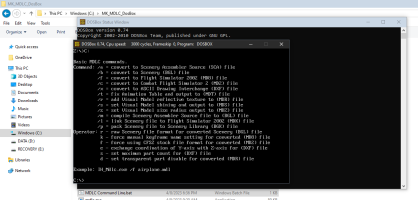
You can run all text based commands via the MDLC Command Line.bat Note DOSBox dose NOT support copy and paste of text so you have to type it out every time.
The linked above DOSMdlc 2.0 also has command line support using DOSBox MDLC Command Line.bat
Last edited:
wolfebee89
SOH-CM-2024
Much thanks for clearing that up and for your efforts @Allen ; makes life rather simpler and much more convenient! Albeit, the key point to remember, is that at the outset, one ought to start by double-clicking the MDLC Command Line.bat file in the MK_MDLC-DOSBox folder and thereafter, going from there!MK_MDLC and MDLC for 64bit systems.zip has the MDLC Command Line.bat for running MDLC in DOSBox. To convert a model to .sca use the command of IH_MDLC.exe /a *YOURMODELNAME*.mdl than hit enter.
You can run all text based commands via the MDLC Command Line.bat Note DOSBox dose NOT support copy and paste of text so you have to type it out every time.
The linked above DOSMdlc 2.0 also has command line support using DOSBox MDLC Command Line.bat
View attachment 202133
The
Anyhow, jolly good show!
cheers!
Last edited: