• There seems to be an uptick in Political comments in recent months. Those of us who are long time members of the site know that Political and Religious content has been banned for years. Nothing has changed. Please leave all political and religious comments out of the forums.

    If you recently joined the forums you were not presented with this restriction in the terms of service. This was due to a conversion error when we went from vBulletin to Xenforo. We have updated our terms of service to reflect these corrections.

    Please note any post refering to a politician will be considered political even if it is intended to be humor. Our experience is these topics have a way of dividing the forums and causing deep resentment among members. It is a poison to the community. We appreciate compliance with the rules.

    The Staff of SOH

  • Please see the most recent updates in the "Where did the .com name go?" thread. Posts number 16 and 17.

    Post 16 Update

    Post 17 Warning

Trying to port Isra's Mirage III to FSX, WIP

Daube

SOH-CM-2025
Hi all,

Those of your who haven't already bought the Skysim Mirage III might know that Isra has been working for several months (years) on a fantastic freeware Mirage III for FS9. The beta version has just been released, so I tried to use it in my FSX.

Of course, I got some problems with the transparent textures and the afterburner effect, very typical from FS9 port-overs, but I'm trying to correct those problems so that the plane displays as good as possible in FSX SP2.

The modelisation of this plane isn't complete yet (thus the BETA version), and not all of the systems are operational, but since they are XML coded, most if not all of the instruments are working quite well in FSX, including the moving map :jump:

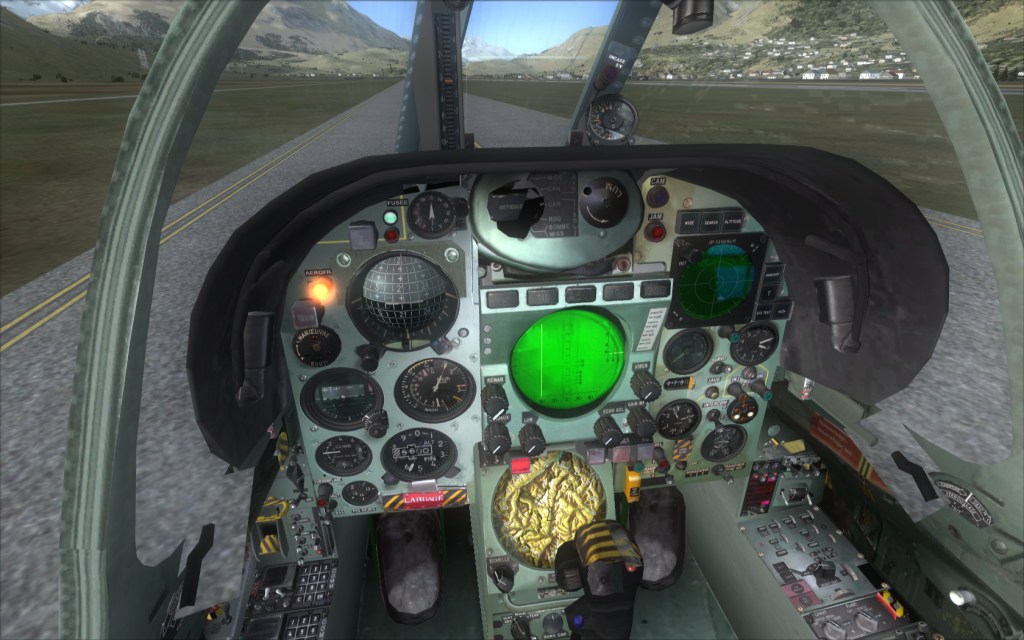
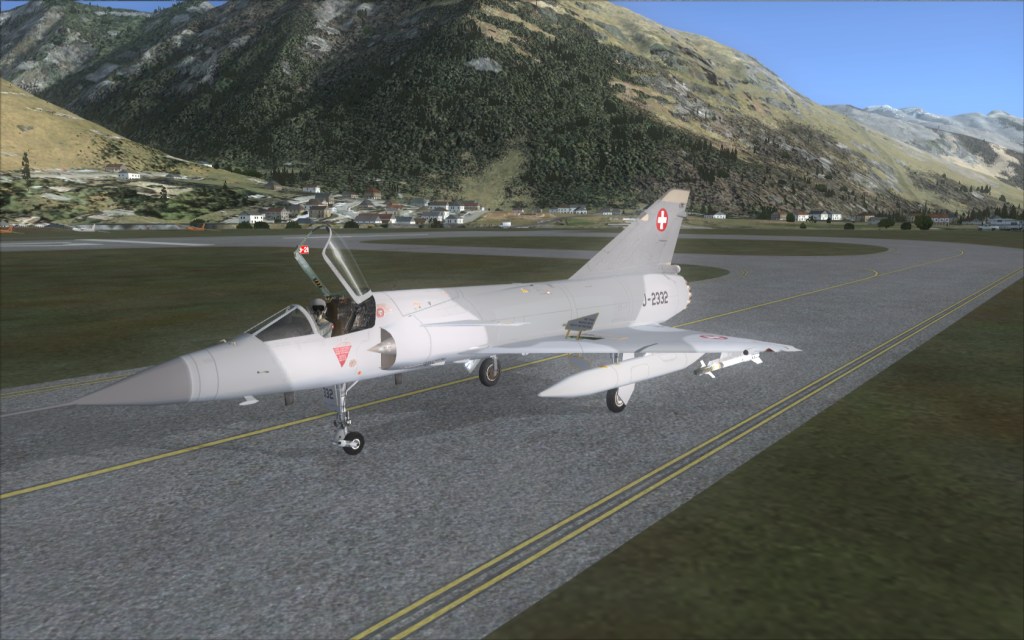
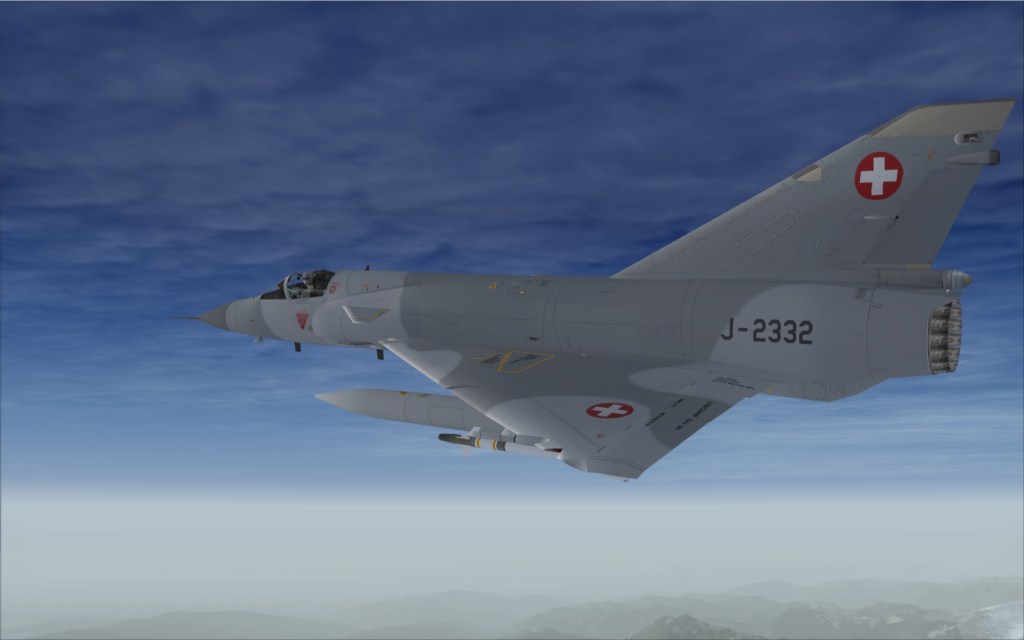
This is how the plane looks like actually in my FSX, after having edited the alpha channels of a few textures:
daube_image1037.jpg


daube_image1038.jpg


daube_image1039.jpg


As you can see in the cockpit shot above, there are some transparency issues that I cannot correct. For example the levers for the parachute and the canopy have a transparent square attached to them for an unknown reason, and their transparency allow me so completely see the ground/scenery through the airplane :/

Also, there is another modelisation problem that cause a reflective square to appear in front/around each gauge or rotative button as soon as a light is activated, like in this shot:

daube_image1036.jpg


Since the plane is still in dveloppment, I hope Isra corrects those problems. The plane flies nicely and the cockpit quality is trully impressive. The impact on the performance is impressive as well but it gets more reasonnable once some gauges are deactivated in the panel.cfg.

Once my modifications are done, and if the above mentionned problems can be solved, then I will provide a complete set of instructions to explain how to convert the plane to FSX-compatible. Else, we'll have to forget about it...
 
Cool!

As for the weird transparency stuff, it looks like they're rectangles for (mouse-) clickspots which got effed up in FSX.

Might be worth taking a closer look at the textures and at *what* exactly gets alpha "channeled" in them...
 
if anything it may come down to the poly's that got selected in Gmax/3ds and using the sdk told that these are click spots. From this code and the fact that something has to be there just behind the texture to click on, and is usually invisible to the FSX eye. This is what is causing the block and can only be adjusted by using the FSX sdk while Compiling the aircraft. Landable platforms from fs9 have the same issues due to the same thing.
 
This is a must have even for those with the Skysim version like me, however I cannot even get this aircraft to load in fsx at all!
 
Hello!
Thanks for your Work!
In the meantime I found out what causes the Problems in FSX and I have at least for the Gauges at the Frontpanel and invisible Clickspots a solution! For the Switches I don't have, exept, moving the Aircraft from FSDS2 into FSDS3.5 and doing all animations new wich would take several months!
For the FPS I also know why they go down so much, I hope to fix them in a Update! In the meantime you can use some Fixes you'll find here: http://www.opus2.ch/miro_patch.htm

Best regards Isra
 
Thanks a lot for your efforts Isra, very appreciated :)

For the switches, from what I saw I understood that they are not animated. Instead there are two switches, one in position ON, and the other one in position OFF, and depending on the swith status one of them goes transparent while the other becomes visible. Problem is that the transparent one makes a "see-though aircraft" issue.

However, there are not so much switches concerned by this problem, which make it not so noticable. So this is really a minor issue, I would say. ;)
(Also, I could always edit the ransparency of the "disabled" switch to make it opaque, with black or green color... kind of camouflage instead of invisibility... that would do the trick, I'll try that :jump: ).
 
The planes compiled with FS9 compiler will not work in FSX if the DirectX10 option if activated.
They only work in DirectX9 mode.
I believe it's not only due to the textures, it's also something in the model... it's complex and I can't remember exactely.

But the FSX users that fly with the DirectX10 option are never using planes in FS9 format anyway, so you don't really need to worry about that :)
 
Isra Mirage III in FSX : how to edit the alpha channels of a few textures?

Hi all,

Those of your who haven't already bought the Skysim Mirage III might know that Isra has been working for several months (years) on a fantastic freeware Mirage III for FS9. The beta version has just been released, so I tried to use it in my FSX. [...] Once my modifications are done, and if the above mentionned problems can be solved, then I will provide a complete set of instructions to explain how to convert the plane to FSX-compatible. Else, we'll have to forget about it...

Hi Daube, I love Isra Mirage III, and since I switched to FSX a few weeks ago, I'd love to be able to port it to FSX, at least have a transparent canopy! How do you "edit the alpha channels of a few textures" as you say? With what software? I have PSP and acces to PS... Is FSrepainter really necessary? Maybe you could explain this or give us the few bmp files you managed to edit.. Thanks for sharing the secret !
 
It's not a secret at all guys.
The Alpha Channel manipulation is the FSX most famous subject for all those who use FS9 planes, since the days SP2 and Acceleration were released.
You have to use a freeware program nammed DXTBMP that let you see the alpha channel of a texture, and export it to an image editor.

The alpha channel defines the transparency of a texture (if the texture is on an object that is supposed to be transparent, of course). The darker, the more transparent. The lighter, the more opaque. In the FS9 days, it was the exact opposite, thus the problems with the FS9 planes in which all the textures have light alpha channels.

EDIT: and despite all of your efforts, you'll never get the cockpit to show properly. As soon as you'll switch the lights on, you'll get those mirror effects. Same with night flying, afterburners or vapor trail...
 
Daube, another trick is to go into the panel.cfg file and scroll to the VC section and change the color in VC _01 from 0,0,0 to 1,1,1. That has worked for me on a few occasions. :salute:
 
Porting FS9 textures to FSX with DtxBmp: more secrets unveiled?

It's not a secret at all guys.
You have to use a freeware program nammed DXTBMP that let you see the alpha channel of a texture, and export it to an image editor.

Thanks Daube!
Ok I got DtxBmp, I'll try it later on the real canopy texture (don't have it here), but right now I can see a "invert alpha" in the alpha menu, which is just what we need, isn't it? But once it's done, how do I save the whole texture? Is it windows 24 bit bitmap? Or an Extended bitmap, with DTX3 maybe? Need help from the oldtimers here again...
Maybe the solution is here:
http://blogs.msdn.com/b/ptaylor/arc...e-propellers-in-fs9-aircraft-for-fsx-sp2.aspx
 
Thanks Daube!
Ok I got DtxBmp, I'll try it later on the real canopy texture (don't have it here), but right now I can see a "invert alpha" in the alpha menu, which is just what we need, isn't it? But once it's done, how do I save the whole texture? Is it windows 24 bit bitmap? Or an Extended bitmap, with DTX3 maybe? Need help from the oldtimers here again...
Maybe the solution is here:
http://blogs.msdn.com/b/ptaylor/arc...e-propellers-in-fs9-aircraft-for-fsx-sp2.aspx

Yes, invert Alpha works most of the times !
To save, I usually choose extended bitmap, then DTX3.
 
Hi
One solution could be to fly with open canopy in VC View hehe..!
Cheers Isra

Hehe, that reminds me of this famous picture of the tomcat flying without canopy :jump:


Daube, another trick is to go into the panel.cfg file and scroll to the VC section and change the color in VC _01 from 0,0,0 to 1,1,1. That has worked for me on a few occasions. :salute:

Ah ? Interesting... I have to check that. Thanks for the info, Falcon :)
 
Isra Mirage III Canopy glass transparent in FSX ! I've made it !

Yes, invert Alpha works most of the times !
To save, I usually choose extended bitmap, then DTX3.

At last I succeded in making the canopy glass transparent in FSX ! Thanks Daube ! The panel.cfg color trick doesn't work here...

This post explain it all:
http://blogs.msdn.com/b/ptaylor/arc...e-propellers-in-fs9-aircraft-for-fsx-sp2.aspx

I changed the alpha channel of these three files:

HUD = window.bmp
Inside glass = innerglassing5.bmp
Outside glass = window_glazing.bmp

Yes the HUD was quite opaque too. Now I'll try to do something about these canopy handles, they are way too much transparent ! But I can't find the proper file names. Isra can you help me here? Thanks ! My german is non existant...

For anybody interested, I can send them the bmp files (Isra you want them for the patch page?) And I've made a 2d panel for wide aspect ratio monitors... Works in FS9 and FSX (Isra I already sent them to you a while ago)

Now I going to fly a bit in the Mirage III over the Swiss Alps, and with the canopy closed... warmer this way...
 
If you can fix this you've made an admirer on me lol! The mirage IIIS has to be the sexiest jet ever made and I fly Swiss Pro X almost exclusively! I wish you the best of luck! :wavey: :salute:
+ please PM me with your current updates vonstroheim!
 
I'm afraid you won't succeed with the open levers.
If I remember the explanations from Isra, the transparent square is not textured, it is meant to be an invisible trigger area, so that the user can manipulate the lever without having to aim too precisely :)
 
Back
Top