
2024 isn't playing nice, Maybe you can help

jmig

SOH-CM-2026
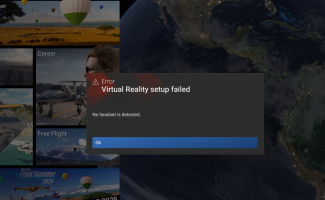
All of a sudden I am getting a error message that says: Virtual Reality Setup Failed - No headset detected. This happens as soon as I start a flight, even before I choose a starting location, I do not have the headset turned on, nor have I asked 2024 to go into VR mode.

I have tried, Repair, Reset, then uninstall and reinstall. Nothing helps. BTW the error box will not allow me to acknowledge, Everything just keeps blinking.

Any thoughts?VR Error Screenshot 2026-07-09 042134.png?
 
I would guess the problem is not really linked to MSFS2024 but most likely to the VR "libraries" (or utilites, or drivers, or call it whatever might be more suitable ;) ).
If I remember correctly, I have faced a similar issue back in MSFS2020. At that time, I just had to take the time to reinstall OpenXR toolkit and such. However, my headset was not from Meta/Occulus, so I'm not sure if my situation really translates here....
 
I would guess the problem is not really linked to MSFS2024 but most likely to the VR "libraries" (or utilites, or drivers, or call it whatever might be more suitable ;) ).
If I remember correctly, I have faced a similar issue back in MSFS2020. At that time, I just had to take the time to reinstall OpenXR toolkit and such. However, my headset was not from Meta/Occulus, so I'm not sure if my situation really translates here....
You may be right. Before doing anything else, I will talk to my new best friend...Google AI.
 
Am I understanding it correctly that your MSFS is complaining about VR even though you haven't switched to VR yet ?
Or is that all happening UPON switching to VR ?
 
Am I understanding it correctly that your MSFS is complaining about VR even though you haven't switched to VR yet ?
Or is that all happening UPON switching to VR ?
As soon as I click "Start", once the sim loads, I get the error. It flashes about once every two-three seconds. I can not get out of it or kill the game, without going to Task Manager. I tried loading the Quest 3 and Virtual Desktop. When I went into VR (LVTRL-TAB) the screen went Black except for the Dev bar on top. According to Google AI you should be able to kill the sim through the Options menu of the Dev bar. Didn't work.

I consulted Google AI and was given some suggestions like switching from OpenXR to SteamVR and deleting the UserCfg.opt file. None of which worked.
 
Ok I don't think switching to SteamVR would be a good idea at all.
You sim is in full screen or windowed mode ? I would suggest you to keep it in windowed mode, it's then very easy to kill it. ALT+ENTER should do the trick. Just ensure the sim has the "focus" (click on it anywhere).
You haven't installed anything related to VR or video drivers recently ?
Since you're using a Quest, could there be any unwanted option in some headset related program in your taskbar (like Occulus tray tools, or any more recent Meta program related to your Quest headset) ?
 
Ok I don't think switching to SteamVR would be a good idea at all.
You sim is in full screen or windowed mode ? I would suggest you to keep it in windowed mode, it's then very easy to kill it. ALT+ENTER should do the trick. Just ensure the sim has the "focus" (click on it anywhere).
You haven't installed anything related to VR or video drivers recently ?
Since you're using a Quest, could there be any unwanted option in some headset related program in your taskbar (like Occulus tray tools, or any more recent Meta program related to your Quest headset) ?
I don't know anything, anymore. I have tried this and that, and then that and this. I have found out that AI can speak from both side of it's virtual mouth. I have two problems and they are probably related, but I don't know anything I did to cause them.

As I recall, I was working on getting both my Moza AY210 feed-back yoke and SinHub, which runs the DOF Reality motion platform to work together with the Cessna-210N by Caranado. I was having a problem where on takeoff I would have to go full right aileron just to keep it from spiraling into the ground. Neither of these programs have anything to do with VR.

Somewhere during this sequence of events I got the VR error dialog box. This error will not go away with ESC, or VR commands. I can't get to MSFS24's settings. So, I decided to start the sim in VR. Well, that is when the black flickering screen began. To exit that I need to either ALT F5 or use Task Manager.

Does anyone know if there is a config or ini file that I can get to? Maybe, I can find a setting that is causing the problems. For the record, I have deleted and reinstalled MSFS24 twice, Virtual Desktop. I have changed several settings in the Windows VR setup, at the suggestion of Google AI. I have also don't a couple other things, but I can't remember them now.
 
I finally found the problem. MSFS24 took it upon itself to change the settings on one of my Leo Bondar I/O cards. I have two 64 connections cards running numerous, buttons, switches, and encoders. One of the cards has a button that is set to toggle VR off and on. For reasons only the MS gods might know, MSFS24 decided to replace the settings on the second card with the ones on card number one. It happened that the setting on the second card which turned VR on and off was a physical toggle switch. So, every time I launched MSFS24 it would try to go to VR, and since the Quest 3 wasn't activated, I would get the error message.

Now, I still have to figure out why the screen goes black when the headset is activated and I select VR.
 
Back
Top