• Please see the most recent updates in the "Where did the .com name go?" thread. Posts number 16 and 17.

    Post 16 Update

    Post 17 Warning old domain name stealing credentials

  • Special Server Maintenance

    Just when you think you have everything running some what better...

    You get a message from the Hosting company. Short story they need to move us to a new server. I have been working with them to plan a good date for all concerned. Here is what we have come up with as a schedule.

    1. November 4th 17:00 -5UTC shut off the forums and start backup proceedures. During this time there will be no access to the forums or the Resource Section.
    2. November 5th Continue with Backups and download same until complete.
    3. November 6th 7:00 turn over server to hosting company to move system to new server
    4. November 7th - 8th restore backups and upgrade forum software.

    If all goes well we should be back online on November 8th.

    To keep you updated we will post updates on AVSIM forums.

    Thank you for your support.

A quick question about Michel Migauds Nieuport 17

huub vink

Administrator
Staff member
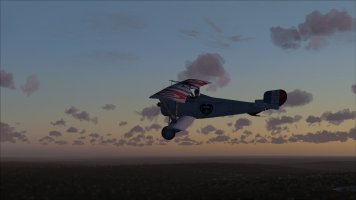
I had never noticed this before, but the package by Michel Migaud has textures for the aircraft flown by Charles Nungesser included. There is also an entry in the aircraft configuration file, so according to the laws of FS2004 it should appear in my aircraft list.
However for a reason I don't understand it doesn't. But when I change Nungesser in the title of the aircraft entry in something shorter, it suddenly appears.

Has anyone who had this aircraft installed noticed this before, and does anyone understand the reason it won't appear?

Thanks for sharing your knowledge....

Huub
 
Hi Huub,

This is what MY aircraft.cfg shows:

[fltsim.3]
title=Nieuport 17 Super Bébé Nungesser
sim=Nieuport_17
model=lewis
panel=
sound=
texture=3
KB_checklists=Nieuport_17_Check
kb_reference=
atc_id=F-ZAMP
ui_manufacturer=Nieuport
ui_type="17 Super Bébé
ui_variation="Nungesser"
description=Nieuport 17\nSPECIFICATIONS \nTop Wing Span: 26 ft 10 in\nTop Wing Chord: 3 ft 11.5 in\nBot Wing Span: 25 ft 4 in\nBot Wing Chord: 2 ft 4.5 in\nWing Gap: 4 ft 1 in\nGross wing area: 158.8 sq ft\nLength: 18 ft 11 in\nHeight: 8 ft 0 in\nEmpty Weight: 825 lbs\nGross Weight: 1233 lbs\nEngine: Le Rhône 9J, 9 cylinder air cooled rotary, \n920 cu. in., 113 hp @ 1200 rpm\nArmament: 1 Vickers .303 machine gun \nFuel: 26 gal
atc_id_color=0x00000000
atc_heavy=0
atc_id_font=Verdana,-11,1,600,0
visual_damage=0

and this is the readme:

TEAM:
=====
Benoit Dubé (Quebec), Flight dynamics
Huub Vink (Holland), technical advices
Christian "Cdab",(France), XML code
Michel Migaud (France), 3D model and texture

INSTALLATION:
=============
Simply unzipp the nieuport 17 folder then drag and drop it in "aircraft" directory of FS9 ACOF

WARNING:
=======
This add on is free and must remain free whatever the support on which it is distributed: DVD, download and others.
You can modify textures with your own way and upload them on the Net without asking authorization but take care to include
in your file this text file as well as the credits to the authors.

This add on is uploaded guaranteed without virus, but it is always careful before to install, to make a research of
possible viruses or malware with your personal antivirus.

Nobody will be able to prevail himself of a possible damage following the installation of this add on.

No person nor no animal was wounded during the design of this aircraft !!!!!!!!!! (LOL)

And in MY FS9 WW1 it shows up normal and flies great.

If it will help you, I can send you MY complete aircraft, so you can install it and see what happens then.

All the best,

Erik.
 
Thanks for your reply Erik.

The entry in my aircraft configuration file is :

[fltsim.3]
title=Nieuport 17 Nungesser
sim=Nieuport_17
model=lewis
panel=
sound=
texture=3
KB_checklists=Nieuport_17_Check
kb_reference=
atc_id=F-ZAMP
ui_manufacturer=Nieuport
ui_type="Nieuport 17"
ui_variation="Nungesser"
description=Nieuport 17\nSPECIFICATIONS \nTop Wing Span: 26 ft 10 in\nTop Wing Chord: 3 ft 11.5 in\nBot Wing Span: 25 ft 4 in\nBot Wing Chord: 2 ft 4.5 in\nWing Gap: 4 ft 1 in\nGross wing area: 158.8 sq ft\nLength: 18 ft 11 in\nHeight: 8 ft 0 in\nEmpty Weight: 825 lbs\nGross Weight: 1233 lbs\nEngine: Le Rhône 9J, 9 cylinder air cooled rotary, \n920 cu. in., 113 hp @ 1200 rpm\nArmament: 1 Vickers .303 machine gun \nFuel: 26 gal
atc_id_color=0x00000000
atc_heavy=0
atc_id_font=Verdana,-11,1,600,0
visual_damage=0

And with this entry, the Nungesser version just refuses to appear. After I had change the line "title=Nieuport 17 Nungesser" into "title=Nieuport 17 Paint3" the version appears normally.

When I replace the complete entry with what you posted above it appears without problems as well.

I have the version from Sim-Outhouse installed.

1793291588793.jpeg
 
I had a similar issue only recently, not with the Nieuport but a different aircraft that I wanted to install a repaint to.
The newly entered repaint did not show up.

My suspicion was that there was a special character in the title line - a special character that is not visible in a standard text editor, or one that is not recognized and displayed by it.

Whatever, after replacing the title entry it worked.


Also, are you sure that there was no duplicate title entry?
As far as I remember when you have duplicate title entries only the first one will show up in the sim.

I usually use the AI Aircraft Editor by Martin Gossmann when installing repaints. I use it for all types of aircraft not only AI
It has some inbuilt functions that checks the entries in the aircraft.cfg for duplicates and other errors.
 
Back
Top