• Please see the most recent updates in the "Where did the .com name go?" thread. Posts number 16 and 17.

    Post 16 Update

    Post 17 Warning old domain name stealing credentials

  • Special Server Maintenance

    Just when you think you have everything running some what better...

    You get a message from the Hosting company. Short story they need to move us to a new server. I have been working with them to plan a good date for all concerned. Here is what we have come up with as a schedule.

    1. November 4th 17:00 -5UTC shut off the forums and start backup proceedures. During this time there will be no access to the forums or the Resource Section.
    2. November 5th Continue with Backups and download same until complete.
    3. November 6th 7:00 turn over server to hosting company to move system to new server
    4. November 7th - 8th restore backups and upgrade forum software.

    If all goes well we should be back online on November 8th.

    To keep you updated we will post updates on AVSIM forums.

    Thank you for your support.

After a very long break (and a new micro desktop), I am back

strykerpsg

SOH-CM-2026
Hi all,

Long time lurker starting back in the FSX days. I bought the full upgraded MSFS2024 when released. Initially disappointed because it was cloud based but saw a few months ago we can now download the entire thing or any parts we desire. So, with my new desktop and a dedicated 4TB NVME, I downloaded all of the US, working on Canada and Caribbean next and finally Asia.

My question is, where is it installing? I see a 7.92 GB (D Drive) install on the partition, but I have downloaded another 65GB and cannot find it on the SSD. My C drive does not appear to have grown, but neither has my D drive. I did select the download versus the cloud on the checked items, including the basic and all upgraded MSFS packages.

Thanks in advance. Looking forward to finding some good military airfields and skins for the C-17. Have a good night all, off to bed in Korea, again.
 
Here ya go:

Steam: C:\Users\[Your Username]\AppData\Roaming\Microsoft Flight Simulator 2024\Packages\
Microsoft Store: C:\Users\[Your Username]\AppData\Local\Packages\Microsoft.Limitless_<Random Characters>\LocalCache\Packages\.

Cheers,
Priller
 
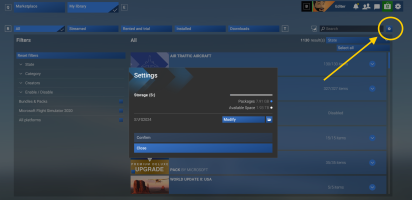
If you go to the "My Library" section under Marketplace, and click the Settings icon there (the lower one, not the system-wide settings; that's some bad UI design there!), you can change the folder where MSFS puts its downloaded files and Community folders. By default it's going to the ridiculously named default folder on your C: drive that Priller pointed out above.

Mine is changed for my S: ("sims") SSD drive. After you change the folder, you should exit MSFS so it can complete the changes, and then reload before changing/adding other stuff.

1758144765850.png
 
If you go to the "My Library" section under Marketplace, and click the Settings icon there (the lower one, not the system-wide settings; that's some bad UI design there!), you can change the folder where MSFS puts its downloaded files and Community folders. By default it's going to the ridiculously named default folder on your C: drive that Priller pointed out above.

Mine is changed for my S: ("sims") SSD drive. After you change the folder, you should exit MSFS so it can complete the changes, and then reload before changing/adding other stuff.

View attachment 172954
Oh! Good to know. Likely a dumb question, but I'm on a noob roll so here goes. After re-assigning the download space, will Steam or the program automatically port the files over? I suspect the answer might be no and if so, can I cut and paste it over?

UPDATE: This worked like a charm! Thank you so much! It automatically transferred all the files to the new partition and spared me buying a bigger SSD. Maybe mods sticky that post???
Welcome back!
Thanks John. It's good to be back.
Here ya go:

Steam: C:\Users\[Your Username]\AppData\Roaming\Microsoft Flight Simulator 2024\Packages\
Microsoft Store: C:\Users\[Your Username]\AppData\Local\Packages\Microsoft.Limitless_<Random Characters>\LocalCache\Packages\.

Cheers,
Priller
Thank you as well Priller. Those pesky files indeed were in there and totally clogging up my OS partition. I am now considering an 8TB upgrade and throw the 4TB into my laptop.
 
Last edited:
Back
Top