
• Please see the most recent updates in the "Where did the .com name go?" thread. Posts number 16 and 17.

    Post 16 Update

    Post 17 Warning old domain name stealing credentials

  • Special Server Maintenance

    Just when you think you have everything running some what better...

    You get a message from the Hosting company. Short story they need to move us to a new server. I have been working with them to plan a good date for all concerned. Here is what we have come up with as a schedule.

    1. November 4th 17:00 -5UTC shut off the forums and start backup proceedures. During this time there will be no access to the forums or the Resource Section.
    2. November 5th Continue with Backups and download same until complete.
    3. November 6th 7:00 turn over server to hosting company to move system to new server
    4. November 7th - 8th restore backups and upgrade forum software.

    If all goes well we should be back online on November 8th.

    To keep you updated we will post updates on AVSIM forums.

    Thank you for your support.

Aircraft Size on Screen

Pierre_NC

Members +
Hello,

I am using Allen's P51B Mustang as AI Aircraft on my FSX. The issue I have with it is its size on screen, see the attached pics below :
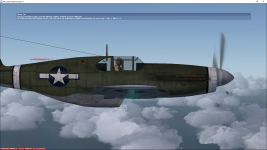
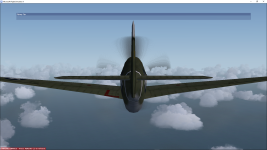
Capture d'écran 2023-06-23 13.31.29.pngCapture d'écran 2023-06-23 13.30.55.png

It's too big. Is there anyway I can fix this so that I can see the entire aircraft on my screen ?

Thank you very much for your kind cooperation and help.

Cordially Yours,
Pierre_NC.
 
I've had this issue with several aircraft in the sim.

Either the viewing distance was too close or too distant.

Here's my original post .... http://www.sim-outhouse.com/sohforums/showthread.php/126835-External-View-Distance?highlight=
The fix is to use the RADltor tool and change the radius figure to suit. You'll probably need to do it several times to get something suitable.

" Look for RADItor on SceneryDesign.org
RADItor is a small tool to adjust the radius (RADI) setting within a FSX MDL file. Aircraft developers sometimes need to adjust this radius to make the aircraft show correctly in the aircraft selection window. "
https://www.scenerydesign.org/raditor/


I hope this helps
 
Hello,
It's too big. Is there anyway I can fix this so that I can see the entire aircraft on my screen ?

The immediate answer is to simply tweak the chase distance, which you do with the CTRL -/= keys. If you want to change the default for that aircraft it probably means adjusting this parameter in some aircraft-specific config file.
 
Hello again,

I"m sorry for being silent those past days but I had my PC upgraded with a new graphics card and i got it back only today.

Thank you sq much to all of you do answering me, the solution was with Allen's MK MDLC_DosBox that worked perfectly and I have now a P51-B Mustang very well sized on my screen.

Again, thank ypu all for your kind coopzeration and help.

Pierre_NC.
 
Glad it worked!

Most the credit should go to Ivan Hsu (MDLC) and Morton (MK_MDLC). I wouldn't let it die and start digging into programs/tools to keep it alive since Win 7.
 
Back
Top