
Aircraft Size on Screen

Pierre_NC

Members +
Hello,

I am using Allen's P51B Mustang as AI Aircraft on my FSX. The issue I have with it is its size on screen, see the attached pics below :
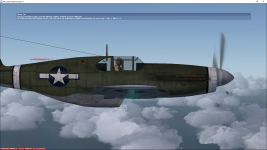
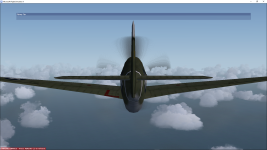
Capture d'écran 2023-06-23 13.31.29.pngCapture d'écran 2023-06-23 13.30.55.png

It's too big. Is there anyway I can fix this so that I can see the entire aircraft on my screen ?

Thank you very much for your kind cooperation and help.

Cordially Yours,
Pierre_NC.
 
I've had this issue with several aircraft in the sim.

Either the viewing distance was too close or too distant.

Here's my original post .... http://www.sim-outhouse.com/sohforums/showthread.php/126835-External-View-Distance?highlight=
The fix is to use the RADltor tool and change the radius figure to suit. You'll probably need to do it several times to get something suitable.

" Look for RADItor on SceneryDesign.org
RADItor is a small tool to adjust the radius (RADI) setting within a FSX MDL file. Aircraft developers sometimes need to adjust this radius to make the aircraft show correctly in the aircraft selection window. "
https://www.scenerydesign.org/raditor/


I hope this helps
 
Hello,
It's too big. Is there anyway I can fix this so that I can see the entire aircraft on my screen ?

The immediate answer is to simply tweak the chase distance, which you do with the CTRL -/= keys. If you want to change the default for that aircraft it probably means adjusting this parameter in some aircraft-specific config file.
 
Hello again,

I"m sorry for being silent those past days but I had my PC upgraded with a new graphics card and i got it back only today.

Thank you sq much to all of you do answering me, the solution was with Allen's MK MDLC_DosBox that worked perfectly and I have now a P51-B Mustang very well sized on my screen.

Again, thank ypu all for your kind coopzeration and help.

Pierre_NC.
 
Glad it worked!

Most the credit should go to Ivan Hsu (MDLC) and Morton (MK_MDLC). I wouldn't let it die and start digging into programs/tools to keep it alive since Win 7.
 
Back
Top