
-
Please see the most recent updates in the "Where did the .com name go?" thread. Posts number 16 and 17.
-
IMPORTANT DOWNLOADING INFORMATION - ALL MEMBERS PLEASE READ
Please see this thread for updates. Update Thread
SOH ADMINISTRATION
You are using an out of date browser. It may not display this or other websites correctly.
You should upgrade or use an alternative browser.
You should upgrade or use an alternative browser.
Alpha Channel Help?
- Thread starter msfossey
- Start date
You need martin Wrights DXT program.
The alphacnannel is basically a greýscale copy of the texture layed behind the coloured texture.
This greyscale contains the opacity information.
Normally all is visible = alphatexture is just white.
- Find the texture with the droptanks on it.
- Make a copy of the texture, paint all white except the droptank area which is painted black.
- Save as XYZ_Alpha.bmp or whatever.
- Load the original texture with DXT program.
- Load the corresponding ALPHA bmp also.
- Now save the main bmp in a format, that includes the alphachannel feature - DXT1 should do it for you.
(DXT3 does work also, but it will not only blend the droptanks out, but every other part of the plane behind)
http://www.mwgfx.co.uk/programs/dxtbmp.htm
http://www.michael-reimer.com/CFS2/CFS2_Tips.html
(I need to update it to the new site of Martin)
The alphacnannel is basically a greýscale copy of the texture layed behind the coloured texture.
This greyscale contains the opacity information.
Normally all is visible = alphatexture is just white.
- Find the texture with the droptanks on it.
- Make a copy of the texture, paint all white except the droptank area which is painted black.
- Save as XYZ_Alpha.bmp or whatever.
- Load the original texture with DXT program.
- Load the corresponding ALPHA bmp also.
- Now save the main bmp in a format, that includes the alphachannel feature - DXT1 should do it for you.
(DXT3 does work also, but it will not only blend the droptanks out, but every other part of the plane behind)
http://www.mwgfx.co.uk/programs/dxtbmp.htm
http://www.michael-reimer.com/CFS2/CFS2_Tips.html
(I need to update it to the new site of Martin)

gaucho_59
Charter Member
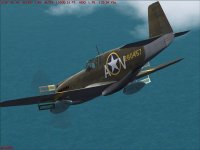
Whose model of the P-51 or Mustang I is this?
It looks like a very nice model... clean airbrakes and camo... which one is it and where
did you get if from? Please tell...
G.
How can I make these drop tanks disappear? Is it through the alpha channel? Is there a tutorial on how to do this?
Thanks for helping,
msfossey
It looks like a very nice model... clean airbrakes and camo... which one is it and where
did you get if from? Please tell...
G.
Bill Kestell
Charter Member
gaucho_59:
Not to intrude, but it's the SU payware Early Mustangs for FS9. And are they a SWEET addition to any hanger!!!
Not to intrude, but it's the SU payware Early Mustangs for FS9. And are they a SWEET addition to any hanger!!!
Jaxon,
Thank you, I will give it try and see what I can do.
gaucho_59
It is the SU payware for FS2004. The package comes with several different models. Most of which convert very nicely. Although I can't seem to get their P-38s to convert. Has anyone else had luck with the P-38's from SU?
msfossey
Thank you, I will give it try and see what I can do.
gaucho_59
It is the SU payware for FS2004. The package comes with several different models. Most of which convert very nicely. Although I can't seem to get their P-38s to convert. Has anyone else had luck with the P-38's from SU?
msfossey