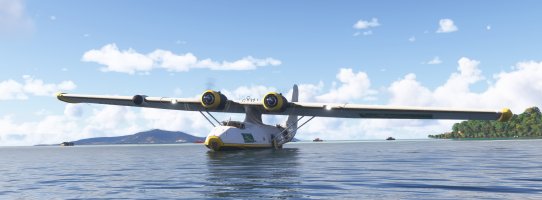
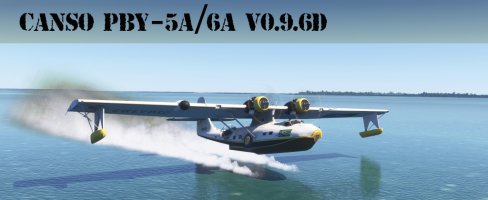
An old project brought up to date: Canso PBY-5 of SAGQ

under manual control, the nose wanders all over the place and I have auto rudder on in my settings

I recommend switching off the auto-rudder, it causes nothing but problems like these both in the air and on the ground. Also, check that your sim settings Flight Model is set to Modern and not Legacy - that Legacy setting causes all the same kind of problems.
 
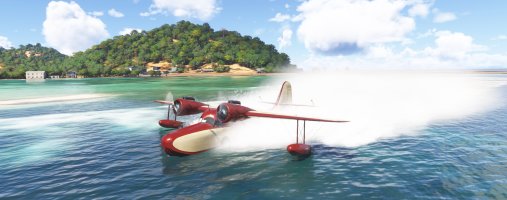
Coming back to the spray issues, I checked again (in 2024), with both the military ànd the Calypso models, and a completely empty community folder, and I have no spray whatsoever, and the wake for the fuselage starts relatively late, and later than the wake for the floats. So if it is a conflict with another aircraft, it must be one of the default aircraft. I also chacked some of the default aircraft and they all have spray, in varying degrees. The goose has lots:
Screenshot (830).jpg
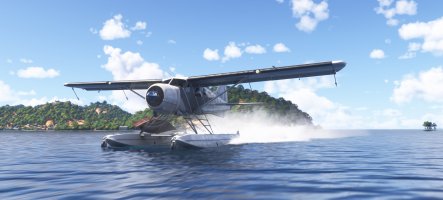
while for instance the Beaver has a lot less, so the amount of spray is variable apparently:
1768028584058.jpeg

But the Catalina has no spray, just a wake, (that actually only starts a while after you touch down, so not immediately):
1768028614480.jpeg

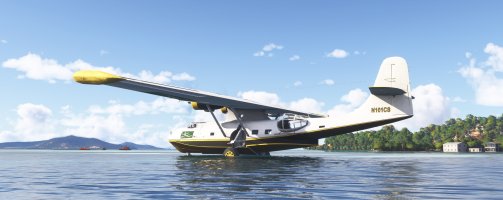
Another strange thing, with the gear extended, it sort of stands on the water:

1768028659916.jpeg

and only sinks into the water when you retract the gear. (BTW, the wheels do turn when moving in the water.) The other models I checked (Beaver, Goose, Albatross) do not do this, they sink immediately.
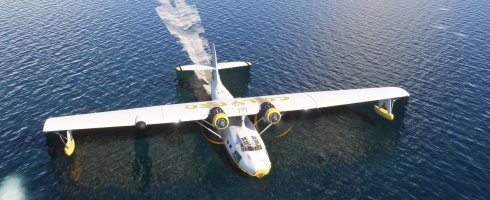
When the floats are not lowered, the aircraft acts as if they are lowered:
1768028770310.jpeg
so it will not touch the water with its wingtips. If you lower the floats, the aircraft will remain in the same position, and I do feel the floats may be a bit deep in the water?
Note this is all in 2024, but I don't remeber any spray in 2020 either. It would be great if it showed spray like the goose!
 
Jankees,

I have read your post and I only retain one point: the fact that the plane exits the water when the landing gear is out.

A) Regarding the lack of effects, I have already replied several times and I even reread the 19 pages of this topic to be able to respond correctly:
- post #77 in August two pics from me with effets under FS20 and FS24 (I have always the two sim on my disk)
- post #162 by Flusimmer (24th Oct.)
- post #163 by Dvj
- post #173 by Hollister56 with FS24 (25th Oct.)
- post #176 by Brian Gladden with FS20 (25th Oct.)
- post #225 by Dvj who has a problem under FS24 and v0.9.3
- post 230 by me under FS20 and v0.9.3
Effects are provided by three sources: default aircraft, Marketplace addons and Community.
I studied how the waves were managed in the Goose de BigRadials, the Microsoft Latécoère and the DHC-2 but I don’t have the Albatross.
Perhaps a survey should be conducted to know who has or does not have the waves and especially if they have FS20, FS24 or both installed.

B) I will try to find a solution but I don't know where is the problem.

C) The third point addressed is in fact a purely physical problem. It is a relatively heavy aircraft with the 2 tanks and engines located closest to the center of gravity. The parasol wing is very wide and plays the role of a balancer like an acrobat walking on a wire: it’s simply physical, the force generated by the weight of the right wing counterbalances perfectly that generated by the left wing.
If I remember well, on version 0.8 the plane was much less stable and in October I received from Tim or Ed a new flight_model.cfg which modified the contact points and particularly those on both sides of the fuselage at the water level, these contact points had been far from the plane and as a result they increased the balance effect and therefore the stability on the water of the plane.

I even searched on the Internet for several videos of the PBY, notably the gatherings on Biscarosse, and we can clearly see that once on the water the plane is very stable, the flotors are practically not used because they graze the surface of the water. In fact, I think they only serve to prevent the wing from touching the surface of the water in case of a bad action by the pilot because in this case, the plane does a spinning wheel and it’s the sure crash.


I didn’t want to release it so quickly but here is my latest working version v0.9.6d:

Canso-PBY-5A_WIP_096d.jpg

The download link:

 
Last edited:
My first look in MSFS 2020

There is spray to be seen, interestingly right beneath the plane.
I'd expect spray further back, and only at touchdown.
This may be indicative?

Microsoft Flight Simulator Screenshot 2026.01.12 - 18.54.32.93.png

... but none from the floats, even when purposely dipping them

Microsoft Flight Simulator Screenshot 2026.01.12 - 19.54.02.99.png

Full rudder at speed produces a 180 pirouette and you end up going backwards!
No idea what happens in the real world, merely an observation

Microsoft Flight Simulator Screenshot 2026.01.12 - 19.54.52.46.png

What a wonderful project: congratulations and many thanks for this gift in the making.
 
Last edited:
@Wing_Z,

While watching videos, I noticed that the blowing of the propellers and the movement of the plane in the air during landing or take-off produces sprays slightly set back from the plane, then these sprays are found at the level of the floating points.

I was able to half recreate this phenomenon but while answering the question, I think I have an idea to perfect it:
- in the test that allows me to trigger these sprays when the plane is 2 ft from the water I will add an offset to move back the display of the spray ... hoping that this does not disturb the standard effect :cool:

For the wakes behind the floats it’s more delicate, I haven’t found the perfect code yet.
In fact, in all the seaplanes that have been published, almost all have fixed floats (Widgeon, Goose, etc.) so not much inspiration on this side. Only the Latécoère 631 has retractable floats.
When I started wearing the PBY it was in 2021 and the SDK didn’t include wingtip floats so I tricked it by using the spoiler combo and creating empties that trigger the effect. Since then I have reported these effects on specific contact points (the SDK has changed) but I stumbled upon other technical issues. I’ll take care of it ...
 
Last edited:
Mario Noriega's Nardi FN-333 Riviera has retractable floats -


This is in MSFS2024, with wakes and spray effects - sorry it's such a poor angle for the spray effect:

1768228286379.jpeg
 
Last edited:
@Tim,
By going through the SDK, I think I’m starting to understand how "retractable wings floats" and their effects in water are managed.

Ref: https://docs.flightsimulator.com/ht...es/Flight_Model/Wheels_And_Contact_Points.htm
If your aircraft model is set up with the animations for retractable floats, then there are a couple of import things that you should know in relation to getting them to work correctly within the simulation.

To start with, you must define a "wheel" contact point as well as the "float" contact points in order for the floats to be evaluated as part of the retract/extend process. This contact point can be placed in a position where it does not interfere with the operation of the aircraft.
In this way, by evaluating the position of a wheel contact point (extended or retracted) paired with a wing float, one can lower or raise the associated wing float and the effect on water seems to be associated with the effect produced by the wheel contact. (something that was already implemented in the simu and through this they managed to get around the problem).

In the Latecoère 631, I can find three wheel contacts (and this aircraft has no wheels but a undercarriage so it's a good tip) but I can’t sure with points corresponding to these coordinates in the float contact points section :

The wheel contact points section (the type is the first parameter so 1) :
point.0 = 1, 19.500694, -0.051002, -7.619506,-1,3,1,0,0.3,1,0.65,5,7,0,0,200,1
point.1 = 1, -17.964924, -11.608418, -4.58901,-1,3,1,0,0.3,1,0.65,5,7,2,0,200,1
point.2 = 1, -17.964924, 11.608418, -4.58901,-1,3,1,0,0.3,1,0.65,5,7,3,0,200,1
and the floats contact points section (the type is the first parameter so 4):
point.3 = 4, 41.068996,0, -2.565992, 1500,0,0.000,0,0.5,1,1,0,0,4,0,0,1
point.4 = 4, -9.339, -43.950001, 2.85,1250,0,0.000,0,0.8,1,1,8,20,4,0,0,1
point.5 = 4, -9.339, 43.950001, 2.85,1250,0,0.000,0,0.8,1,1,8,20,4,0,0,1
point.6 = 4, -25.345634, -0, 0.532,1500,0,0.000,0,0.5,1,1,0,0,4,0,0,1
Point.0 should be the noze fuselage and the wheel contacts points associated with wing floats seems to be the point.1 and point.2 (same Y coordinate but +/- for the X coordinates)
A priori in the second paragraph it should be logically point.4 and point.5 which will be associated with the previous ones.

To compare the different position, here is the station load:
station_load.0 = 170, 21.494406, -2.988606, 9.276581, TT:MENU.PAYLOAD.PILOT,1
station_load.1 = 170, 21.494406, 2.988606, 9.276581, TT:MENU.PAYLOAD.COPILOT,2
...
Pilots location in altitude (in relation to the Center of Gravity) are at the wings level.

1768236660137.png

Tim, if you have the FN333 and can give me the contents of theses two sections, this could give me an indication because in addition the FN-333 has retractable wheels.
 
Last edited:
Here are the wheel contact points:

point.0 = 1, 7.460, 0.00, -4.508, 1000, 0, 0.5, 20, 0.305, 1.236, 0.7, 2.9, 4.5, 0, 101.2, 110 ,1.0 ;nose gear
point.1 = 1, -1.440, -3.08, -4.764, 1200, 1, 0.7, 0, 0.538, 1.293, 0.85, 3.0, 4.6, 2, 101.2, 110 ,2.0 ;left gear
point.2 = 1, -1.440, 3.08, -4.764, 1200, 2, 0.7, 0, 0.538, 1.293, 0.85, 3.1, 4.7, 3, 101.2, 110 ,2.0 ;right gear

The hull float contact points:

point.9 = 4, 7.50, 0.0, -2.50, 1600, 0, 0, 0, 1.00, 2.0, 0.075, 0, 0, 4, 0, 0 ,0.2 ; hull
point.10 = 4, -1.34, 0.0, -3.70, 1600, 0, 0, 0, 1.00, 2.0, 0.075, 0, 0, 7, 0, 0 ,0.2
point.11 = 4, -1.34, 0.0, -3.70, 1600, 0, 0, 0, 1.00, 2.0, 0.075, 0, 0, 8, 0, 0 ,0.2

The wing float contact points:

point.13 = 4, -0.4, -13.15, -1.58, 1000, 0, 0, 0, 1.00, 2.0, 0.075, 2.0, 3.1, 5, 0, 0 ,0.2 ;wing floats
point.14 = 4, -0.4, 13.15, -1.58, 1000, 0, 0, 0, 1.00, 2.0, 0.075, 2.1, 3.0, 6, 0, 0 ,0.2
point.15 = 4, -0.4, -16.96, 2.59, 1000, 0, 0, 0, 1.00, 2.0, 0.075, 0, 0, 5, 0, 0 ,0.2 ;wing floats (retracted)
point.16 = 4, -0.4, 16.96, 2.59, 1000, 0, 0, 0, 1.00, 2.0, 0.075, 0, 0, 6, 0, 0 ,0.2

 
Thanks Tim,
If I understand they don't use the same technic that the one described in the SDK.
Two floats points are defined for each wing float, one for a retracted position and one for full extended; the Z coordinate is lower for the extended wing float (-1.58) and X coordinate has 3.8 ft more what is apparently what one can see on the video.

As float contact points are fixed, with the FN-333, if you land on water with the wing float retracted, you should not see any wake unless you touch the tip of the wing in the water ... Tim, can you make a test ?
This is well in FS or MSFS, it’s that for a technical problem one can have several solutions and there is only the study of comparable aircraft which can make you think of one or the other of the solutions ... but you should be rich as "Rockfeller" to buy all you needs :p

For people who can not see water spray behind the wing floats of the PBY, I think it is because the don't own the Latecoere 631 ... to confirm ...
 
Last edited:
I have nothing to contribute, but I just wanted to say "hats off"🫡 to lagaffe for his tenacity to try and find solutions. Amazing how he keeps going at a "problem" to bring us the best rendition he can:applause::encouragement:
 
When the Rivera's wing floats are retracted, they become the wingtips and they do create a wake when in the water, but NOT when out of the water:

1768244054570.jpeg

The spray effects are .spb files within a VisualEffectsLib folder, but I think the wake effects are MSFS default.
 
Thanks Tim for your test.

In the case of FN-333, declaring 2 points as floats is the simplest method to have an effect but also the more effective.

The method I used in 2023 was to declare a empty ( Spray_Float1 & Spray_Float2 ) in the Exterior 3D model and then associate XML code to show the effect on theses empties when "my" conditions were met.
<!-- Effects due to Floats on Wings's tips -->
<Component ID="FX_SPRAY_FLOAT1" Node="Spray_Float1">
<UseTemplate Name="ASOBO_GT_FX">
<FX_CODE>
(A:SIM ON GROUND, bool)
(A:SURFACE TYPE:6,Enum) 2 == and
(A:GROUND VELOCITY, knot) 10 &gt; and
(L:pBY_WakeFloatRight, Bool) 1 == and
</FX_CODE>
<FX_OFFSET_X>-0.5</FX_OFFSET_X>
<FX_OFFSET_Y>0</FX_OFFSET_Y>
<FX_OFFSET_Z>0</FX_OFFSET_Z>
<FX_ROTATION_OFFSET_H>0</FX_ROTATION_OFFSET_H>
<FX_GUID>{95FD5DF0-5F15-4196-9140-19D51DBFCDAA}</FX_GUID>
</UseTemplate>
</Component>

The advantage is that you have more possibilities to adjust the appearance of the effect (XML code) whereas in the case of point floats, the simulator calls an included library and it is automated. This library is declared in your XML code as :
<Include ModelBehaviorFile="Asobo\Generic\FX.xml"/>
and located in the file: fs-base-aircraft-common\ModelBehaviorDefs\Asobo\Generic\FX.xml

PS: This file use some GUIDs for visual effects and it can be a good reference to use trivial effects in your addon, you need to to search according to the name associated with this visual effect:
<Template Name = "ASOBO_WATER_CP_LANDING_FX">
<DefaultTemplateParameters>
<FX_GUID>{BA223A84-9E83-4A58-B7D7-0C9CBA4E1627}</FX_GUID>
<FX_NAME>LANDING_CP_WATER</FX_NAME>
<FX_CONTACT_POINT_ID>-1</FX_CONTACT_POINT_ID>
<FX_NODE>__NO_NODE__</FX_NODE>
<ENABLE_SURFACE_TYPE_0>RIVER</ENABLE_SURFACE_TYPE_0>
<ENABLE_SURFACE_TYPE_1>WASTE_WATER</ENABLE_SURFACE_TYPE_1>
<ENABLE_SURFACE_TYPE_2>WATER</ENABLE_SURFACE_TYPE_2>
<ENABLE_SURFACE_TYPE_3>POND</ENABLE_SURFACE_TYPE_3>
<ENABLE_SURFACE_TYPE_4>LAKE</ENABLE_SURFACE_TYPE_4>
<ENABLE_SURFACE_TYPE_5>OCEAN</ENABLE_SURFACE_TYPE_5>
<ENABLE_SURFACE_TYPE_6>WATER_FSX</ENABLE_SURFACE_TYPE_6>
</DefaultTemplateParameters>
<Component ID="FX_LANDING_CP_WATER_#FX_NODE#_#FX_CONTACT_POINT_ID#" Node="#FX_NODE#">
<UseTemplate Name="ASOBO_GT_FX">
<FX_CODE>(A:CONTACT POINT WATER DEPTH:#FX_CONTACT_POINT_ID#, Keyframe) 0 &gt; (A:GROUND VELOCITY, knot) 5 &gt; and</FX_CODE>
</UseTemplate>
</Component>
</Template>
Indeed, these graphic effects are included in SPB files which can be located in several places:
- in the fs-base-effects\VisualEffectsLib directory (SPB files)
- under the directory fs-base-effects-legacy which are effects in FSX format, usable via files with FX extension
- in addons added by the user (either in the installation of MSFS or in Community), and depending on the version you bought: Standard, Deluxe or Premium de Luxe you will have more or less aircraft so more at least SPB files.

PS: If you use an effect GUIDS included in a aircraft provided in Deluxe Premium, people using Standard edition could not see theses effects !

When you create an airplane, you have the possibility to call these files via the GUIDs that are associated with each effect contained in these SPB containers (they can be decompiled to access the base files) or to create your own effects, compile them and add them to your plane in a VisualEffectsLib directory.
Nevertheless, the use of an effects editor is not frankly difficult and requires a lot of work.

In 2021 I created some effects for my boats and especially the first effects that were integrated by Henrik/KL791 into GAIST.
1768297665759.png
=> https://www.fsdeveloper.com/forum/direct-messages/wakes.18555/#convMessage-70248

In the last part of the PBY v0.9.6d., if I summarize:
- I declared two float points so the system should manage them natively and make the native effects appear
; Wing Floats (index: 4)
; 0 1 2 3 4 5 6 7 8 9 10 11 12 13 14 15 16
point.12 = 4, -1, -45.3, 1.27, 1500, 0, 0, 0, 0.5, 2.5, 0.7, 10, 11, 5, 0, 0, 1
point.13 = 4, -1, 45.3, 1.27, 1500, 0, 0, 0, 0.5, 2.5, 0.7, 10, 11, 5, 0, 0, 1
and
- I added two empties to display a chosen effect, but I noticed that the GUID for this effect is a GUID included in the Latecoère libraries, since this product is paid, it is not available for everyone.

I will review with the Aircraft Editor the position of the float points which must not be correct and in any case delete one of the two codes because they are redundant
If I want to keep the second solution, the best will be to take back what I had done for Henrik, re-create an SPB library and create new GUIDs that will be used for the wing floats. By the way, I already use in the PBY a VisualEffectsLib for water drop effects for Water Bomber models.
 
Last edited:
Not really complaining but just sharing my most recent experience with the Cat. Took off from Lake Tahoe airport (Yes I know it's high. Stock loadout with full tanks) roll was long and I held it on a bit longer to build some speed. Rotated about 75-80. Started a gentle 3-4 hundred FPM climb at about 90 (As fast as it would seem to go) Cleared the ridge about 300 agl and started a gentle left turn. No more than 15 degree bank and Pow! Left wing stalled with no warning and if FS supported it, I'd have been a fireball... Also the tail was still all over the place. Went someplace lower (Half Moon Bay) Set to modern flight model and turned off auto rudder.... Got it to 100 in a 200 fpm climb and didn't stall in the turn (1/2 tanks the rest out of the box). Turned on the AP and like my previous post, she's had more than one too many at the bar. Nose is wandering all over the place and altitude wanders between 1-200 fpm up and down and 10-15 degrees off heading... Even level at 2,000, just managed to squeak 110 on the asi. Both flights I had the MP and RPM set just out of the yellow arc after initial takeoff.

Still (for me) virtually unflyable.
 
Brian,

I duplicated your flight and can confirm that the used autopilot is not working for altitude and heading. The original Sperry was not intended to steer the aircraft but more to keep it at altitude and heading once properly trimmed and established. BUT I just flew it by hand at cruise, fully trimmed, autolean, 30 inches, 20.5 rpm over the lake, so no thermals and it flies rocksolid, handfree! No issues at all. @lagaffe: I observed that the elevator trimming taps were far from neutral??

Why do you want the fly aircraft like this on autopilot? It seems to me that you want an autopilot in every aircraft even in a Tigermoth? An autopilot should never replace proper handflying to compensate for lacking skills. Ask youself: can you fly an 172 or similar for a longer period (30min) at a chosen altitude (say 3000ft within -/+ 200ft) and heading (-/+ 5 degrees) with proper trimming, without the AP coming to the rescue? If not then first follow the flight lessons and exercise until accurate handflying becomes natural. Then go for an AP. When I fly (sim and real world) I keep scanning the outside and cockpit. Position of the horizon in the cockpit correct and constant? Point on the horizon on the correct heading stays where it should, wind compensation needed? Check IAS, altitude, heading, V/S, engine parameters inside and out again.

Hope this helps,

Paul
 
@PAUL,

Sorry for my 'laborious' English but I’m afraid of misunderstanding your expression : "elevator trimming taps were far from neutral"

If it concerns the value of the elevator trim which is a "bit high" to obtain a horizontal flight, I am still working on it because I am not yet satisfied with it. (point ***)
PS: By the way, when modeling an aircraft, I don’t know if we manage to be happy with the whole thing because as far as I’m concerned, I still see things that don’t suit me.

This afternoon, I took over AirWrench to check certain parameters and I noticed an error on the length of the fuselage: I had entered 63.2 instead of 83.2 ft and this was reflected on the 6 models =>fixed
While doing tests using CRUISE.FLT, I noticed that the alternator was OFF (it lacked the Electrical.0 section) => fixed
On the other hand only the left engine consumed fuel ? (the two engines are ON) I think a valve or a pump isn't ON.

(***) These points have been corrected and I tried to further refine the value of the Center of Gravity to have with half full tanks a "Weight & Balance" that does not require the user to correct with this cursor added by Microsoft and which doesn’t seem to me to match anything ...

1768579850864.png

Currently, the value define after the aircraft initialization is more near of the right value which sould be 22.x% MAC. So after a slight tuning with the Asobo slider, the PBY flight now almost horizontally with a very light trim (only 1% depending on the filling of the tanks).

PS: Publishing this image, I just see that the CowlFlaps are OFF => I have to fixe it as for the Alternator switches.

@brian,
Before Take OFF, do you tune the Empty CG Position ?
 
Last edited:
I flew the 50% fuel and at cruise settings trimmed for level flight. No problem there but the elevator trimming tabs were not level with the elevator but certainly 30 degrees from level. I think @ cruise the elevator and trim tabs should be almost level with the horizontal tail surfaces. So I now am looking for the incidence value that gets the plane level with elevator and trim in perfect alignement. Maybe an idea to switch the autopilot off in the cruise.flt?
 
First, as I am tuning some values which are involded in the "horizontal flight", if you make some modifications, they will be obsolete with the next version v0.9.6e, I need to test theses modifications with the others models: Water-Bomber has also 2 water tanks which change the weight & balance.

Second, as I comment in the flight_model.CFG :
; Setting the htail_incidence so that the aircraft flies level at cruise speed without any required elevator input and zero elevator trim.
Before my fuselage_length modification, the htail_incidence was set at -1.28 to obtain a horizontal flight. From experience, I have noticed that sometimes it is necessary to cheat with the theoretical values to obtain the desired result because due to modeling, the choice of reference axes, etc. using the constructor values does not achieve the expected result: we are in a game and not in reality..

In the Documentation folder, I have pu a "PFB-June-2020-Handbook.pdf" which give a lot of information about PBY-5A.
You can read theses informations in page 33:

1768584990540.png
Third, in AutoPilot section of CRUISE.FLT only the MasterSwitch is TRUE, all the others values are FALSE so I think that the AutoPilot is OFF.

I confirm: I just did another test with my modifications and a take-off after a cold & dark or a CTRL+E and the tank of the right engine is still not used :banghead:
 
Last edited:
I suppose in the end it is all to personal preference. For me rather an aircraft that flies well and feels well then a model that is made by the numbers but behaves wrong.
 
Hello,

The bug about fuel consumption is solved.

In fact during a modification made on the FUELSYSTEM, concerning the supply pressure, the value Pressure:5 would be replaced by Pressure:6 and in the end I left Pressure:65 instead.

So, here are the faulty lines (~ lines 200 ) in each flight_model.cfg file:
Code:
; Electric booster pumps
Pump.1 = Name:pump1#Pressure:6#DestinationLine:line3#Type:Electric#Index:1#TankFuelRequired:tank1
Pump.2 = Name:pump2#Pressure:65#DestinationLine:line4#Type:Electric#Index:2#TankFuelRequired:tank2

an the new lines to take in account:
Code:
; Electric booster pumps
Pump.1 = Name:pump1#Pressure:6#DestinationLine:line3#Type:Electric#Index:1#TankFuelRequired:tank1
Pump.2 = Name:pump2#Pressure:6#DestinationLine:line4#Type:Electric#Index:2#TankFuelRequired:tank2
 
Back
Top