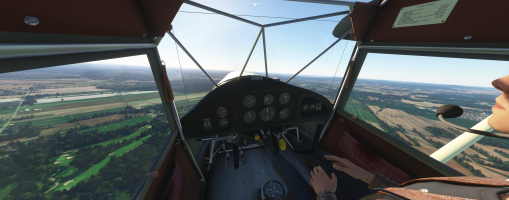
Auster J/1 Airspeed position error

hangarrat101

Members +
Not sure if anyone knows the answer to this: I'm fooling around with the cfg files in Dave Garwood's Auster trying to get it to behave closer to how I think it should. Through most airspeeds the indicated reading seems to correlate pretty well with what it's actually doing, however this shouldn't be the case in reality: The ASI should be pretty much bang on at 100mph, then progressively under-read as you get slower so by 30mph indicated it reads 12mph low. Is there any way of replicating this in the cfg files?
 
in the CFG files, no but I think that it is possible to change the ModelBehavior used.
Generally, the developer use a simple ModelBehavior : min value, max value and a progressive increase in this range.
So it 's also possible to use "Non-Linear ModelBehavior" where you indicate several pairs of values: actual values and values read on the instrument in a sampled manner.
An example used in my addons:

<UseTemplate Name="ASOBO_GT_Helper_Non_Linear_Animation_Code">
<ANIM_NAME>fuel_qty_eng2</ANIM_NAME>
<ANIM_LENGTH>100</ANIM_LENGTH>
<SELECTION>(A:FUELSYSTEM TANK LEVEL:2, Percent)</SELECTION

<MIN_VALUE>0</MIN_VALUE>
<MAX_VALUE>100</MAX_VALUE>

<MIN_DISPLAYABLE>0</MIN_DISPLAYABLE>
<MAX_DISPLAYABLE>100</MAX_DISPLAYABLE>

<ANIM_VALUE_0>0</ANIM_VALUE_0>
<REF_VALUE_0>0</REF_VALUE_0>
<ANIM_VALUE_1>25</ANIM_VALUE_1>
<REF_VALUE_1>25</REF_VALUE_1>
<ANIM_VALUE_2>50</ANIM_VALUE_2>
<REF_VALUE_2>50</REF_VALUE_2>
<ANIM_VALUE_3>75</ANIM_VALUE_3>
<REF_VALUE_3>75</REF_VALUE_3>
<ANIM_VALUE_4>100</ANIM_VALUE_4>
<REF_VALUE_4>100</REF_VALUE_4>

<MAX_POINT_INDEX>5</MAX_POINT_INDEX>
</UseTemplate>
In ths example the real range is 0-100 and the displayable range also 0-100.
Then you indicate 5 couples of value: the real one as the "anim value" and the displayable value "ref value".
Warning: don't forget to indicate the numbers of couples used (5 because you have 0,1,2,3 and 4 couples).
Changing the XML code in the right file by this Template, modificating values in accordance with your needs should resolv your problem.

Hoping that theses some lines of XML can be used :cool:
 
OK, so this is what I inputted into the config file:

<UseTemplate Name="ASOBO_GT_Helper_Non_Linear_Animation_Code">
<ANIM_NAME>[AIRSPEED]</ANIM_NAME>
<ANIM_LENGTH>100</ANIM_LENGTH>
<SELECTION></SELECTION

<MIN_VALUE>0</MIN_VALUE>
<MAX_VALUE>100</MAX_VALUE>

<MIN_DISPLAYABLE>0</MIN_DISPLAYABLE>
<MAX_DISPLAYABLE>100</MAX_DISPLAYABLE>

<ANIM_VALUE_0>36</ANIM_VALUE_0>
<REF_VALUE_0>26</REF_VALUE_0>
<ANIM_VALUE_1>43</ANIM_VALUE_1>
<REF_VALUE_1>35</REF_VALUE_1>
<ANIM_VALUE_2>50</ANIM_VALUE_2>
<REF_VALUE_2>44</REF_VALUE_2>
<ANIM_VALUE_3>57</ANIM_VALUE_3>
<REF_VALUE_3>52</REF_VALUE_3>
<ANIM_VALUE_4>64</ANIM_VALUE_4>
<REF_VALUE_4>60</REF_VALUE_4>
<ANIM_VALUE_5>71</ANIM_VALUE_0>
<REF_VALUE_5>69</REF_VALUE_0>
<ANIM_VALUE_6>79</ANIM_VALUE_1>
<REF_VALUE_6>78</REF_VALUE_1>
<ANIM_VALUE_7>87</ANIM_VALUE_2>
<REF_VALUE_7>87</REF_VALUE_2>
<ANIM_VALUE_8>95</ANIM_VALUE_3>
<REF_VALUE_8>95</REF_VALUE_3>
<ANIM_VALUE_9>102</ANIM_VALUE_4>
<REF_VALUE_9>104</REF_VALUE_4>
<ANIM_VALUE_10>110</ANIM_VALUE_0>
<REF_VALUE_10>113</REF_VALUE_0>
<ANIM_VALUE_11>118</ANIM_VALUE_1>
<REF_VALUE_11>121</REF_VALUE_1>
<ANIM_VALUE_12>124</ANIM_VALUE_2>
<REF_VALUE_12>130</REF_VALUE_2>
<ANIM_VALUE_13>130</ANIM_VALUE_3>
<REF_VALUE_13>139</REF_VALUE_3>


<MAX_POINT_INDEX>14</MAX_POINT_INDEX>
</UseTemplate>

I've tweaked the code you used, however I've clearly got it wrong, as the model is no longer displaying in 2024. Sound effects still work and the aircraft still "flies" but is now completely invisible. Is there something obvious I've done wrong (probably everything.) To say I have no clue what I'm doing would be a gross understatement!
 
This modification should be done in the XML file which manage the interior animations, and precisely the gauges. The old ModelBehavior of this gauge AIRSPEED should be remove or in comments.
The field SELECTION should be declared with the Avars or the Lvars which drive the gauge: in your code, this field is blank !

On FS24 and also FS20 if you change anything in the textures or the XML code you should redone the layout.json at the root of the addon. FS24 don't like modifications if the layout.json isn't is accordance with the code.
...
Well, I have downlooaded from FS.to and .. it's a backport from a FSX addon :mad: which have done very quickly (one again :().
PS: Some "creators" are more interested in the quantity than in the quality of their addons.

So i have made all the modifications and here is the instructions to aply:
The file to modify for example is the AUTOCRAT_OEM\Model\AUTOCRAT_Int.xml
The XML code is a FSX code:
<Animation name="custom_anim_AIRSPEED_INDICATED_37" guid="5cb2cef1-88b7-460a-b25f-156e410517fb" length="200" type="Sim" typeParam2="custom_anim_AIRSPEED_INDICATED_37" typeParam="AutoPlay" />
<PartInfo>
<Name>custom_anim_AIRSPEED_INDICATED_37</Name>
<AnimLength>200</AnimLength>
<Animation>
<Parameter>
<Code>
(A:AIRSPEED INDICATED, mph)
</Code>
</Parameter>
</Animation>
</PartInfo>
This code should be put in comments and replace by this one but in the right place: at the top of this file just after the <Behavior> statement and the 3 Include.
Two others details:
- the animation name is: custom_anim_AIRSPEED_INDICATED_37
- the airspeed animation in on 200 Keyframes so you need to take care adapt the <ANIMATION_LENGHT> statement to this valiue.

Furthermore, it must be framed in a component, like this:

<Component ID="AIRSPEED_GAUGE">

<UseTemplate Name="ASOBO_GT_Helper_Non_Linear_Animation_Code">
<ANIM_NAME>custom_anim_AIRSPEED_INDICATED_37</ANIM_NAME>
<ANIM_LENGTH>200</ANIM_LENGTH>
<SELECTION>(A:AIRSPEED INDICATED, mph)</SELECTION>

<MIN_VALUE>0</MIN_VALUE>
<MAX_VALUE>200</MAX_VALUE>

<MIN_DISPLAYABLE>0</MIN_DISPLAYABLE>
<MAX_DISPLAYABLE>200</MAX_DISPLAYABLE>

<ANIM_VALUE_0>36</ANIM_VALUE_0>
<REF_VALUE_0>26</REF_VALUE_0>
<ANIM_VALUE_1>43</ANIM_VALUE_1>
<REF_VALUE_1>35</REF_VALUE_1>
<ANIM_VALUE_2>50</ANIM_VALUE_2>
<REF_VALUE_2>44</REF_VALUE_2>
<ANIM_VALUE_3>57</ANIM_VALUE_3>
<REF_VALUE_3>52</REF_VALUE_3>
<ANIM_VALUE_4>64</ANIM_VALUE_4>
<REF_VALUE_4>60</REF_VALUE_4>
<ANIM_VALUE_5>71</ANIM_VALUE_5>
<REF_VALUE_5>69</REF_VALUE_5>
<ANIM_VALUE_6>79</ANIM_VALUE_6>
<REF_VALUE_6>78</REF_VALUE_6>
<ANIM_VALUE_7>87</ANIM_VALUE_7>
<REF_VALUE_7>87</REF_VALUE_7>
<ANIM_VALUE_8>95</ANIM_VALUE_8>
<REF_VALUE_8>95</REF_VALUE_8>
<ANIM_VALUE_9>102</ANIM_VALUE_9>
<REF_VALUE_9>104</REF_VALUE_9>
<ANIM_VALUE_10>110</ANIM_VALUE_10>
<REF_VALUE_10>113</REF_VALUE_10>
<ANIM_VALUE_11>118</ANIM_VALUE_11>
<REF_VALUE_11>121</REF_VALUE_11>
<ANIM_VALUE_12>124</ANIM_VALUE_12>
<REF_VALUE_12>130</REF_VALUE_12>
<ANIM_VALUE_13>130</ANIM_VALUE_13>
<REF_VALUE_13>139</REF_VALUE_13>

<MAX_POINT_INDEX>14</MAX_POINT_INDEX>
</UseTemplate>

</Component>
A last information: the end of a statement should be in accordance with the beginning of it so :
<REF_VALUE_9>104</REF_VALUE_0> is not correct and should be replace by <REF_VALUE_9>104</REF_VALUE_9>

1791367421017.png

I have applied all theses modifications and the aircraft run perfectly under FS20.
I have joined all this improvements in the XML file in the following ZIP.

 

Attachments

  • Autocrat_Int.xml.zip
    12.3 KB · Views: 6
Last edited:
Back
Top