
-
Please see the most recent updates in the "Where did the .com name go?" thread. Posts number 16 and 17.
-
Special Server Maintenance
Just when you think you have everything running some what better...
You get a message from the Hosting company. Short story they need to move us to a new server. I have been working with them to plan a good date for all concerned. Here is what we have come up with as a schedule.
- November 4th 17:00 -5UTC shut off the forums and start backup proceedures. During this time there will be no access to the forums or the Resource Section.
- November 5th Continue with Backups and download same until complete.
- November 6th 7:00 turn over server to hosting company to move system to new server
- November 7th - 8th restore backups and upgrade forum software.
If all goes well we should be back online on November 8th.
To keep you updated we will post updates on AVSIM forums.
Thank you for your support.
You are using an out of date browser. It may not display this or other websites correctly.
You should upgrade or use an alternative browser.
You should upgrade or use an alternative browser.
Catalina that Flies in MSFS 2024?
- Thread starter Twice43
- Start date

tiger1962
SOH-CM-2026
Yes, this one by French-VFR - click the small download icon at the bottom the page. The username is pilote, the password is virtuel (french spellings).
Thanks T1962.Yes, this one by French-VFR - click the small download icon at the bottom the page. The username is pilote, the password is virtuel (french spellings).
Currently flying in Florida and it's going nicely, AP works, quite regal as it slowly undulates in the wind.
Thank you la gaffe [sp?]
T43


gray eagle
SOH-CM-2026
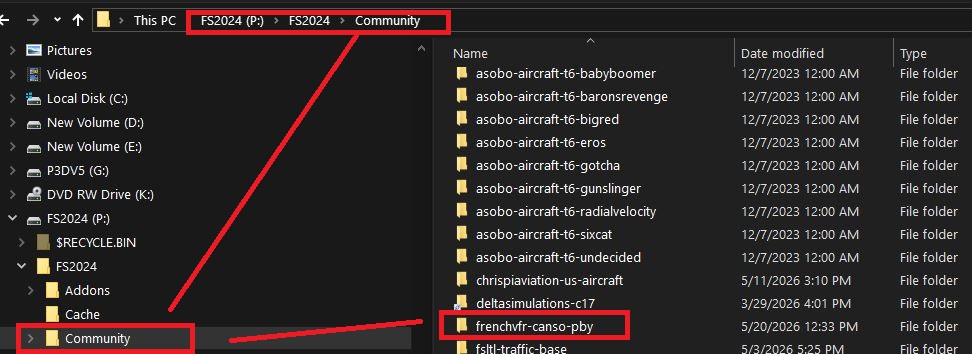
I can't get the preview to show on these cats.

DennyA
SOH-CM-2023
Can't figure out why my screen shots are washed out.
You have HDR turned on, most likely. HDR screenshots are washed out. I believe if you use Microsoft's Game Bar for captures it will save an HDR and non-HDR version. Otherwise, just turn off HDR when doing screen shots.
I can't get the preview to show on these cats.
Try dragging the layout.json onto msfslayoutgenerator.exe -- sometimes that can fix issues with content not showing up in MSFS 2024.
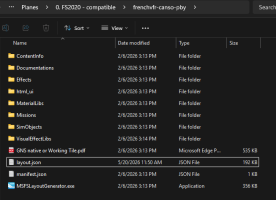
(Aside: After seeing there was already a copy in my Canso folder, I ran Agent Ransack on my MSFS 2020 and 2024 addon manager folders to search for the app. Turns out I had 222 copies of the app! Deleted 221 of them.)
I have 2 Community folders.I can't get the preview to show on these cats.
One like you, that doesn't work, & another attached to the long winded C:\User\name\Appdata\--- Limitless\ --- pathway.
& its a Community folder, not Community24.
Everything in there works, shows up in MSFS 2024 scenario set up in the aircraft choices, including the Lagaffe PBY's. Perhaps look at placing the unzipped PBY download in the long winded pathway Community folder?
T35
gray eagle
SOH-CM-2026
That didn't work either.I have 2 Community folders.
One like you, that doesn't work, & another attached to the long winded C:\User\name\Appdata\--- Limitless\ --- pathway.
& its a Community folder, not Community24.
Everything in there works, shows up in MSFS 2024 scenario set up in the aircraft choices, including the Lagaffe PBY's. Perhaps look at placing the unzipped PBY download in the long winded pathway Community folder?
T35
gray eagle
SOH-CM-2026
I saw this info and made changes as per info and that was a no go.
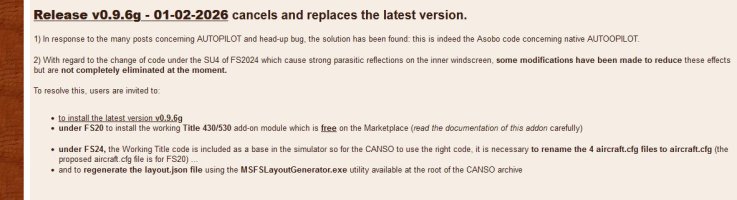
I didn't do any of the above adjustments, I just downloaded the file into MSFS 2024, , unzipped it & changed the destination folder to C\ long & winding road-----\Community. I can confirm the reflections on the inner windscreen, but overall, the aircraft is charming & a delight to fly.
If you need more info on the Community folder location I can provide that.
Good luck.
T35
gray eagle
SOH-CM-2026
I don't have a community folder on my C drive just my P drive. 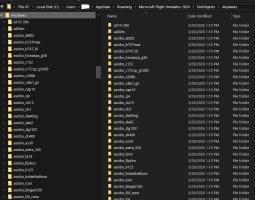

lagaffe
SOH-CM-2026
Sorry, I just saw this post today.
- Regarding layout.json: I rebuild it with each new version that I release, so the one provided is up to date.
- My planes are tested both on FS20 and also on FS24, which is why I proposed panel.20 and panel.24 to address some issues.
PS: Of course, if you rename the panel from panel.20 or panel.24, it will be essential to regenerate the layout.json.
For your information: there is a discussion thread about the Canso PBY in the 2020 section, so don’t hesitate to participate even if it concerns 2024
- Regarding layout.json: I rebuild it with each new version that I release, so the one provided is up to date.
- My planes are tested both on FS20 and also on FS24, which is why I proposed panel.20 and panel.24 to address some issues.
PS: Of course, if you rename the panel from panel.20 or panel.24, it will be essential to regenerate the layout.json.
For your information: there is a discussion thread about the Canso PBY in the 2020 section, so don’t hesitate to participate even if it concerns 2024
Apologies Lagaffe, this should have gone to the gray eagle post.Sorry, I just saw this post today.
- Regarding layout.json: I rebuild it with each new version that I release, so the one provided is up to date.
- My planes are tested both on FS20 and also on FS24, which is why I proposed panel.20 and panel.24 to address some issues.
PS: Of course, if you rename the panel from panel.20 or panel.24, it will be essential to regenerate the layout.json.
For your information: there is a discussion thread about the Canso PBY in the 2020 section, so don’t hesitate to participate even if it concerns 2024
Before I bury myself back in this, [which I am happy to do], a couple of questions-
Are you using a PC?
Did you purchase MSFS 2024 via Steam or the Marketplace [it affects the Community folder pathway]
This is the Community pathway set up by MSFS 2024 if purchased on the MarketPlace. Can you have a look and see if you have this pathway & if anything is in there?
C:\Users\<YourUsername>\AppData\Local\Packages\Microsoft.Limitless_8wekyb3d8bbwe\LocalCache\Packages\Community
This is the Community folder pathway if you purchased via Steam. It looks like from the File Manager image you provided above that you used Steam. Anyway, if you look closely at your path in the image above & what I have written just below, they are not the same. You have \SimObjects\Airplanes after Microsoft Flight Simulator 2024, I have \Packages\Community. Can you find that Community folder as set out in the pathway below. Is there anything in it?
Also, if you can also search and find the FrenchVfr-Canso-PBY folder somewhere, open it up & check it has 8 sub folders. If so, cut the FrenchVfr-Canso-PBY folder & Paste it to the Community folder set out in the pathway below. Fire up MSFS 2024 & search in the aircraft for PBY. [FrenchVfr-Canso-PBY needs to be in a Community folder. If what I have outlined for the C folder doesn't work, try the Steam pathway on the P drive, but I think you should have a Community folder somewhere on the C drive as MSFS 2024 puts it there
C:\Users\<YourUsername>\AppData\Roaming\Microsoft Flight Simulator 2024\Packages\Community
If that doesn't work then I may delete my PBY installation & start from scratch , taking notes along the way to figure this one out.
Good luck
T35
lagaffe
SOH-CM-2026
Yes I am using a PC with MSFS 2020 and MSFS 2024 buyed with Microsoft (not with Steam).
I never installed a Microsoft simulator (FS9 - FSX - P3D - MSFS) in the default hard disk/folder I always used either a dedicated partition (F:\FS20 or F:\FS24) which seems simpler to me (not at the installation level but at the level of problems that could happen later).
This allows in particular to separate :
- the simulator’s core installation (where the executable will be stored and in my example is in S:\FS20\Official\OneStore\ ... )
- from its application data (temporary data and caches, for example) which will always go into your local environment.
This local environment is usually under C:\Users\<YourUsername>\AppData\Local\Packages\Microsoft.FlightSimulator_8wekyb3d8bbwe ...
The path that you indicate is a shorcut create by Microsoft during the installation and indeed I have a directory :
C:\Users\<YourUsername>\AppData\Local\Packages\Microsoft.FlightSimulator_8wekyb3d8bbwe\LocalCache\Packages\Community but is is not used.
PS: If in you explorer you validate the coloring of directories, you can see that under this LocalCache\Packages, files and folders are in green like this (green is for specific files written by Microsft - encrypted) :
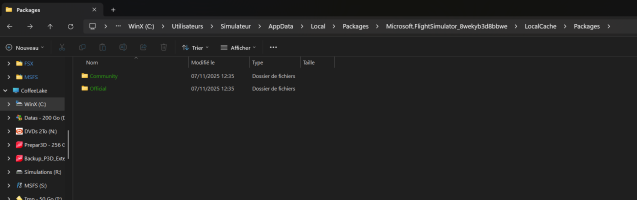
Anything is stored by Microsoft under theses two foldes Community and Official.
Take care also of the difference between Local and Roaming ... (Roaming is for temporary datas).
The right place is indicated in a file UserCfg.opt (you can edit it with Notepad) and which is under this Path:
C:\Users\<YourUsername>\AppData\Local\Packages\Microsoft.FlightSimulator_8wekyb3d8bbwe\LocalCache\UserCfg.opt
At the end of this UserCfg.opt file you can find the location of that you find :
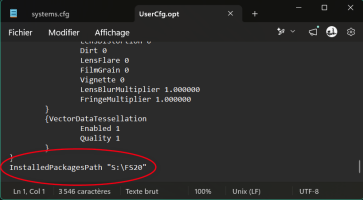
In this screenshot, you can see where my FS20 is installed ...
... and under F:\FS20 you have Official (the datas installed by Microsoft which contains the basic aircraéfts and addons) and the "good" Community is here, where you could copy your addons or create links if you want.
Names of files and folders are in blue because my partition is compressed.
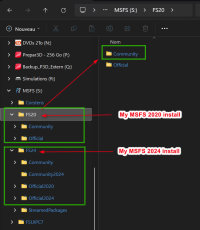
In you case, before removing all you stuff, find the file UserCfg.opt, read the last line and find it in yours disks: it's here that your install go to find yours addons.
If you want to store them in a other folder, change this line with your prefered folder (D:\MSFS2024 for example) create this folder and then install your addons in this directory.
PS: As you ask only of MSFS 24, ome words about my FS24 directory:
- Community2024 is a dedicated folder for only 2024 addons (natives) and
- Community is for FS20 and FS24 addons ...
Now you have all the informations to find the correct folder used currently and the indications to change it if you want.
I never installed a Microsoft simulator (FS9 - FSX - P3D - MSFS) in the default hard disk/folder I always used either a dedicated partition (F:\FS20 or F:\FS24) which seems simpler to me (not at the installation level but at the level of problems that could happen later).
This allows in particular to separate :
- the simulator’s core installation (where the executable will be stored and in my example is in S:\FS20\Official\OneStore\ ... )
- from its application data (temporary data and caches, for example) which will always go into your local environment.
This local environment is usually under C:\Users\<YourUsername>\AppData\Local\Packages\Microsoft.FlightSimulator_8wekyb3d8bbwe ...
The path that you indicate is a shorcut create by Microsoft during the installation and indeed I have a directory :
C:\Users\<YourUsername>\AppData\Local\Packages\Microsoft.FlightSimulator_8wekyb3d8bbwe\LocalCache\Packages\Community but is is not used.
PS: If in you explorer you validate the coloring of directories, you can see that under this LocalCache\Packages, files and folders are in green like this (green is for specific files written by Microsft - encrypted) :
Anything is stored by Microsoft under theses two foldes Community and Official.
Take care also of the difference between Local and Roaming ... (Roaming is for temporary datas).
The right place is indicated in a file UserCfg.opt (you can edit it with Notepad) and which is under this Path:
C:\Users\<YourUsername>\AppData\Local\Packages\Microsoft.FlightSimulator_8wekyb3d8bbwe\LocalCache\UserCfg.opt
At the end of this UserCfg.opt file you can find the location of that you find :
In this screenshot, you can see where my FS20 is installed ...
... and under F:\FS20 you have Official (the datas installed by Microsoft which contains the basic aircraéfts and addons) and the "good" Community is here, where you could copy your addons or create links if you want.
Names of files and folders are in blue because my partition is compressed.
In you case, before removing all you stuff, find the file UserCfg.opt, read the last line and find it in yours disks: it's here that your install go to find yours addons.
If you want to store them in a other folder, change this line with your prefered folder (D:\MSFS2024 for example) create this folder and then install your addons in this directory.
PS: As you ask only of MSFS 24, ome words about my FS24 directory:
- Community2024 is a dedicated folder for only 2024 addons (natives) and
- Community is for FS20 and FS24 addons ...
Now you have all the informations to find the correct folder used currently and the indications to change it if you want.
gray eagle
SOH-CM-2026


gray eagle
SOH-CM-2026
No, I searched both C and P drives and it never showed up.Twice43,
Did you find the file UserCfg.opt in your installation ? Can you post the "Installation Patch" declared in this file ?
gray eagle
SOH-CM-2026
All I did was search in My Library Installed and it showed up there. I had to do some pealing of the onion (so to speak) to eventually find a previewSo, how did you solve it?
T43
of one of the cats and then dig a little deeper to find the livery I was interested int. Apparently, it shows as a FS20 installed addon. I copied the frenchvfr-canso-pby folder to my P:\FS2024\Community folder. Not sure if this is the latest version. Zip file says thisMSFS_frenchvfr-canso-pby5a_WIP_v096g.zip and in my library I see a V0.9.5 hummmmm......

DennyA
SOH-CM-2023
@Twice43 and @lagaffe , just an FYI if folks are looking for their Community folder, there's a much easier way to verify its location. (Your detailed instructions were great, but just keeping it simple for newer users.)
In FS2024, go to Marketplace/My Library and click the second Gear icon next to "Search Full Catalog". That will show (and let you easily change) the folder that contains your Community/Community2024 folders.
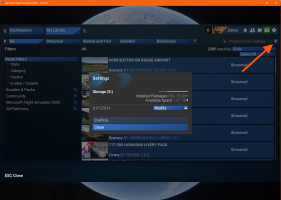
Also, if you're currently using the horrific default C:\Users\<YourUsername>\AppData\Local\Packages\Microsoft.Limitless_8wekyb3d8bbwe\LocalCache\Packages\Community path, changing it here should move your content to whatever human-named folder you decide to use instead.
In FS2024, go to Marketplace/My Library and click the second Gear icon next to "Search Full Catalog". That will show (and let you easily change) the folder that contains your Community/Community2024 folders.
Also, if you're currently using the horrific default C:\Users\<YourUsername>\AppData\Local\Packages\Microsoft.Limitless_8wekyb3d8bbwe\LocalCache\Packages\Community path, changing it here should move your content to whatever human-named folder you decide to use instead.