CFS3 Effects Overhaul WIP

gecko

Charter Member
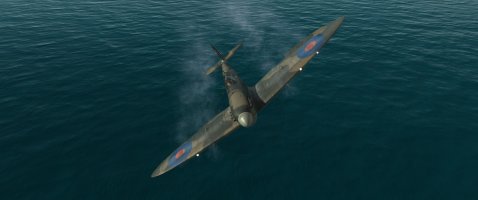
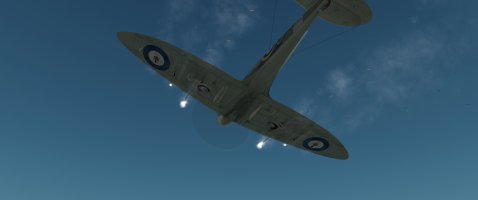
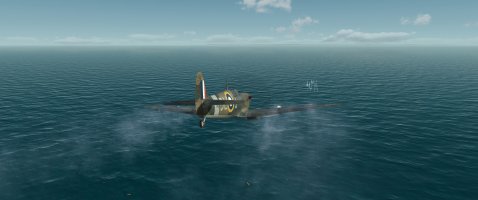
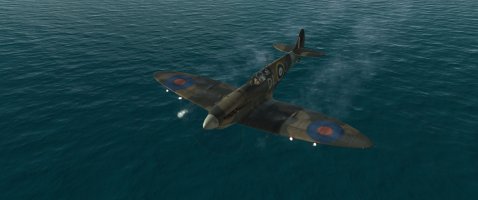
I am continuing work on overhauling CFS3 effects. Here is some of the latest - Muzzle Flashes. I got very tired of the uniform, perfectly synchronized muzzle flashes we have now, both the stock ones and my own past attempts to improve them. After much experimenting, I was able to achieve my goal. Now, every flash, from every shot fired from every gun will be unique every time. They are a hard effect to get right, and in the real world, their appearance can change much more based on lighting than is possible in CFS3. I have tried to go for the best compromise I could, aiming for good visibility, but not overstated. They are quick, punchy, and quite randomized. As such, they are fairly difficult to get a good screenshot of (as you can see, it is near impossible to capture the flashes from all the guns at once), and tend to look different in motion than whatever part of it happens to be in the frame when the screenshot is taken. The smoke and lighting from the flashes has also been redone. Much like the tracers, I have scaled them for every conceivable caliber we might need in CFS3, from rifle caliber to Yamato's main guns. I know there can be quite a variety of flash propagation, even between guns of the same caliber, but I'm not prepared to go that deep, nor would there be enough reference material to do it properly. You will, however, be able to get a sense of the relative sizes of the guns you are firing.
Shot07-17-26-06-51-13.jpg
Shot07-17-26-06-46-41.jpgShot07-17-26-06-46-08.jpg
Shot07-17-26-07-10-35.jpg

This is only the beginning. I intend to replace every effect, and design lots of new ones where needed, and replace every single effect texture. Many of them have never been updated since CFS3 was released nearly a quarter-century ago, and are a pixelated mess. No longer!

Watch this space for more.
 
The new effects look good in the screenies, can you make a little vid?
The smoke looks less dense and more realistic in colour, it was always a bit beige.
(y)(y)
 
Yeah, the only good way to do it will be to fully integrate it into a standalone install - which is the end goal I'm working towards - this being only one step in that path of many. Because I'd really be selling CFS3's capabilities short to limit myself to a one-to-one replacement of existing effects, there will be a ton of new stuff, which will not only have to be added to the effects.xml, but also referenced in the various object xdps in order to actually be seen - hence the standalone install. Muzzle flashes are a prime example, since most CFS3 aircraft do not explicitly reference them and use a default effect, but a custom one can be added. However, I will certainly make them all available independently for others to integrate into their own sims.
 
Last edited:
Yeah, the only good way to do it will be to fully integrate it into a standalone install - which is the end goal I'm working towards - this being only one step in that path of many. Because I'd really be selling CFS3's capabilities short to limit myself to a one-to-one replacement of existing effects, there will be a ton of new stuff, which will not only have to be added to the effects.xml, but also referenced in the various object xdps in order to actually be seen - hence the standalone install. However, I will certainly make them available independently for others to integrate into their own sims.
Will you be looking at weather, including high altitude winds, haze, etc.?
 
I have taken weather as far as I think CFS3 can handle, (possibly a bit farther, due to FPS limitations) in the latest shaders. I do plan a regional weather generator to be part of it, but I haven't created it yet.
 
This really seems true to life! Excellent job! :icon29:

I found it a bit hard to tell from your first video but is the 'muzzle sound' also 'randomized'?
Meaning that six .50s firing simultaneously probably do not sound like one big .50 as they do now in the game but should sound like 6 separate machine guns (see the P-40 video your posted in another thread). I don't mean that there should be different muzzle sounds that should be randomized like the muzzle flashe textures but that the sounds from each gun should not play at the exact same moment but with a slighty different timing - if you understand what I'm saying.
I seem to recall that there was a way to implement that (through the aircraft's .xpd?) but I might be mistaken and have forgotten how-to anyway.
Asking for a friend who is working on an aircraft with 8x .50s :chuncky:
 
Yes, quite possible, though I haven't done it with the .50cal yet. I have done it with the 8 .303s on Spitfire Mk.IIA and Mk.VA, so you can see exactly how I did it. I used four different, slightly varied sound files, and assigned them to different pairs of guns in the gun xdps - outer pair, inner pair, etc. More than four seemed to push the limit of what CFS3 could handle without causing the sounds to stutter, and once you have four different ones going, you really can't tell that it's only four and not eight anyway. Having each pair split between the two wings ensured that if one gun got damaged, it wouldn't kill the sound of the one on the other side, but if more guns keep getting damaged, you will hear the a change in the gunfire sound as they drop off line. The sounds need to be almost the same. I believe I took mine all from the same burst, but used Audacity to rearrange the order of the shots. It gives a consistent, full sound, without the weird metallic effect you get when you trigger more than one instance of the same sound at the same time. IMO even though each sound represents a pair, the sound should still be of a single gun firing. That way, if you get down to just one operational gun, it doesn't sound like two. With only the one sound playing, it would be too obvious. But when they are all playing, you don't notice.
 
Back
Top