• Please see the most recent updates in the "Where did the .com name go?" thread. Posts number 16 and 17.

    Post 16 Update

    Post 17 Warning old domain name stealing credentials

  • Special Server Maintenance

    Just when you think you have everything running some what better...

    You get a message from the Hosting company. Short story they need to move us to a new server. I have been working with them to plan a good date for all concerned. Here is what we have come up with as a schedule.

    1. November 4th 17:00 -5UTC shut off the forums and start backup proceedures. During this time there will be no access to the forums or the Resource Section.
    2. November 5th Continue with Backups and download same until complete.
    3. November 6th 7:00 turn over server to hosting company to move system to new server
    4. November 7th - 8th restore backups and upgrade forum software.

    If all goes well we should be back online on November 8th.

    To keep you updated we will post updates on AVSIM forums.

    Thank you for your support.

Changing ATC airline?

Killbilly

SOH-CM-2026
So, as I'm adding liveries, I've found that sometimes I can't change what the ATC calls me. For example, in the C-130, ATC calls me "Air Force 774." I would like it to call me "Flight N85AX." In MSFS2020, I could just change the "atc_airline" and "atc_flight_number" lines in the aircraft.cfg for the livery. In MSFS2024, I've tried adding those lines under "[FLTSIM]" in the livery.cfg (where the "atc_id" line is; but it doesn't work.
Anyone understand the new livery.cfg file well enough to help me figure out how to change what ATC calls me?
 
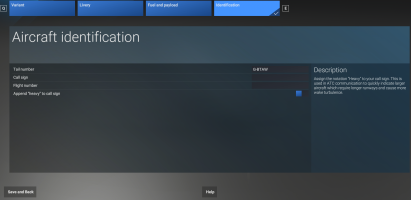
In MSFS2024, ATC callsigns etc. are entered into the Aircraft Identification menu. Select your aircraft, then click Configure on the bottom left of the screen, then click the Identification menu heading:

1761484980326.png

Don't forget to click Save and Back when you've made your changes!
Note that ALL aircraft will inherit these these callsign details in the sim, and that the Call sign and Flight number override the Tail number.
Therefore, if you enter a Call sign and Flight number which you then want to remove, delete each one completely and then type a single space in it's place.
 
Back
Top