• Please see the most recent updates in the "Where did the .com name go?" thread. Posts number 16 and 17.

    Post 16 Update

    Post 17 Warning old domain name stealing credentials

  • Special Server Maintenance

    Just when you think you have everything running some what better...

    You get a message from the Hosting company. Short story they need to move us to a new server. I have been working with them to plan a good date for all concerned. Here is what we have come up with as a schedule.

    1. November 4th 17:00 -5UTC shut off the forums and start backup proceedures. During this time there will be no access to the forums or the Resource Section.
    2. November 5th Continue with Backups and download same until complete.
    3. November 6th 7:00 turn over server to hosting company to move system to new server
    4. November 7th - 8th restore backups and upgrade forum software.

    If all goes well we should be back online on November 8th.

    To keep you updated we will post updates on AVSIM forums.

    Thank you for your support.

Compass Deviation

@ FAC257,

Just to get back to your question it has taken me a a long time to find or do anything in MSFS 2024!

This "controls problem" has been very frustrating for me.

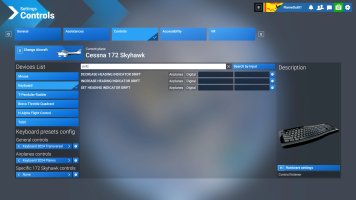
I did find this in the controls section. It appears to have no key assignment. Screenshot (68)_2.jpg

- Don
 
Don,

Thank You!

I tried every search word could think of trying to find that control. "Drift" never crossed my mind.

I just assigned it a few minutes ago during my current flight. I'll see if it works while I'm up.

Added:
It works if I switch the controls options to 2020. That command doesn't work under 2024 options.


Forest
 
Last edited:
I remember that all the way back to FSX and P3D there were two keyboard commands that I always used:

1. B = for barometric pressure

2. D = for heading deviation

If we now go to our control's section / keyboard assignment and use the "search by input" feature; tapping on the B key or the D key will show a bunch of assignments and conflicts that have B or D single or multiple combinations!

Why couldn't they leave well enough alone! Very frustrating :mad:

And my Tobii head tracking is not working well.

- Don
 
Yep. Those are the same two keys w/commands I used in 2020 also. I tried to assign the D key for drift under the 2024 command mess. When I did that, I also deleted the commands that were also associated with the single D press. Which did not work. What it did do though is somehow affect the "End" key command I had set for switching back and forth between the cockpit and exterior. Each time I hit the End key; the aircraft would go into a hard right bank. Oddly, that's what one of the default commands are for the D key, before I changed anything. So, I went back into the Controls and did a search on the "End" input, which showed nothing else assigned to that command.

I couldn't figure out anything to make the End = Right Bank to go away, so I gave up and switched to the 2020 command section.

Why they went to so much trouble to make something that use to be a tried and true no brainer into something so convoluted is beyond me.


Forest
 
To your statement of assigning a toggle keystroke between the interior and exterior views = this function in MSFS 2024 is the, <----- Backspace key (I only found this function last night).

I'm not coping well with these "command changes" at all. I think I'm gonna have to get some counseling! :mad:

Now on the other hand, my aim is to move forward into MSFS 2024 (if the vast majority of my MSFS 2020 airport sceneries) will work in MSFS 2024. I think I have over 200 payware & freeware airport sceneries.

Dang sure need counseling just for that!

I'll place this into my mind as a new "Discovery" on things.

- Don
 
I have to agree 100% with both you guys. The control changes don't make ANY sense, and I am also having troubles setting up they way it was. Supposedly we can use the 2020 default keyboard, but it does not work for me. Also, I rarely use the keyboard, I have (had) most of the basic actions required for simple GA aircraft on my HOTAS (X-56.) And no, I haven't been able to program the "D" and "B" keys to my stick. They did work in 2020. The default settings for them are completely different, and don't seem at all intuitive. I was able to put some of them back, but now I have totally random button presses going on, even when I am not sitting in front of my screen. And they are TOTALLY different from the ones I was fighting in 2020.

My Tobii is not working well either. Constant drift to the right, very little vertical movement, and other problems. I disconnected mine after a couple days. The changelog for the latest update says they "fixed the CTD when adjusting the Tobii in the settings." I haven't reconnected it to check-see if it works.
 
Back
Top