Creating an airfield

Ian Astill

Charter Member 2012
Hi again,

Anyway, I'm from the Isle of Man and there was quite a bit of activity on the Island during WW2. I have the add on that has the airfield in the south of the Island (RAF Ronaldsway, or from 1944 HMS Urley (Urley is Manx for Eagle))

However, there were two other airfields in the north of the island, named Jurby and Andreas. Anyhoo, My main aim is to create a few missions exploring some of the stories from these airfields.

So, is there a good tutorial knocking around on creating my own airfield?
 
Ok, so I got FSSC and I've had a mess around with it with the aim of creating RAF Jurby

So far it's worked pretty well. I have the basic layout of the Airfield sorted (Runways and Taxi ways) and in the right location. However I do have a slight problem.........

Bolloxed.jpg


Obviously not what I really want. The annoying thing is that when flying....

Notasbolloxed.jpg


It looks fine


Shall have a hunt through those links and see if I can solve the problem!!! Thanks guys


EDIT!!!: It appears that I missed a pretty large area out of the tutorial. Seems to be working a lot better now that I've actually read about it

If at first you don't succeed. Try doing it the way you were told
 
Yes, it takes a bit of trial and error. Don't forget to flatten your area with FSSC and use Maskrider's tutorial to exture and MB Layouts/gsl to add objects. FSSC ig good for the runway type, lines and lights as well as placing "fuel boxes".
 
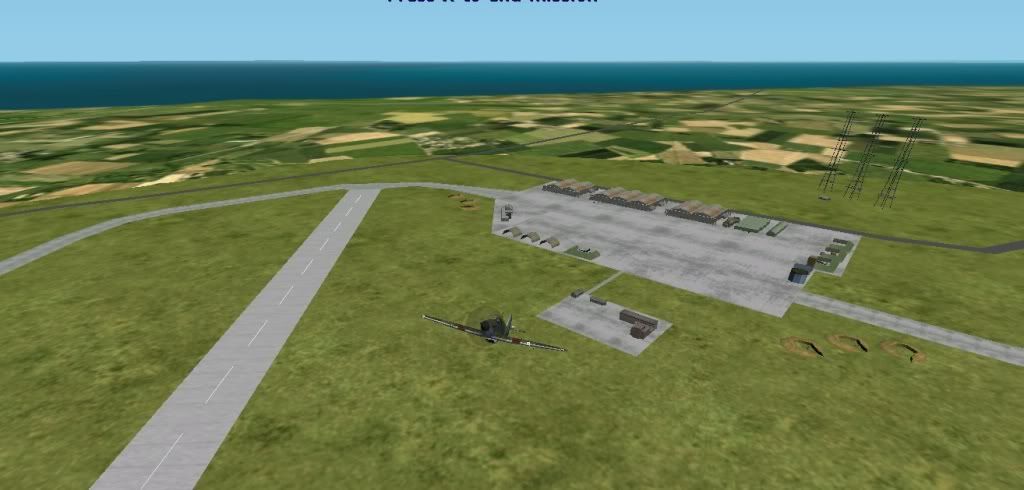
Have taken your advice and I now have a very basic airfield that works!

RafJurby.jpg


I've stuck in a few objects to bring it to life a bit. Will be an ongoing project though, hopefully with that tutorial I can make it blend in a bit better and give it the finer details

Not really aiming for 100% accuracy (pretty much impossible as very little info exists about the airfield itself and the site today has a prison built on top of it!) but I'll try and make it at least believable

Thanks guys, any more suggestions would be very welcome
 
Hiya Ian,

Here is a link to the first tutorial I ever used to add a very basic base with FSSC.

John "m4ilm4n" Applegate's How to Add A Base to CFS2

Not that you need it. Judging from the screenies it looks like you have it pretty well down

Chris
 
Yes, it takes a bit of trial and error. Don't forget to flatten your area with FSSC and use Maskrider's tutorial to exture and MB Layouts/gsl to add objects. FSSC ig good for the runway type, lines and lights as well as placing "fuel boxes".

Hi there, not quite sure what you mean by ''MB Layouts/GSL''?

I know that 'gsl' has something to do with buildings being destroyable, and I noticed that the buildings I have temporarily added to this airfield are non-destroyable.

Is there another program for adding destroyable objects??

And MaskRider, your tutorials are extremely helpful (May have to wait till I have a few days off before attempting the blended airfield one though) ! Thank you
 
Hi there, not quite sure what you mean by ''MB Layouts/GSL''?

I know that 'gsl' has something to do with buildings being destroyable, and I noticed that the buildings I have temporarily added to this airfield are non-destroyable.

Is there another program for adding destroyable objects??

And MaskRider, your tutorials are extremely helpful (May have to wait till I have a few days off before attempting the blended airfield one though) ! Thank you

Yes:
Once you have the airbase built and textured/blended without buildings, add it to your airbases.dat file and open the base in Mission Builder. Next, place objects - hangars, revetments etc. on it , position and orient them as you like and then create a mission builder layout (see Cody Coyote's Mission Builder Handbook). Use Martin Wrights GSL tools (you'll have to go to his site and ask him for it) to convert your layout and create a GSL/gob for the layout. http://fly.to/mwgfx/ Follow Martin's instructions and load it into your CFS2 GSL file and voila... you'll have an airbase with destroyable objects.
 
Ok, I have pretty much finalised the runways and taxiways etc.

JurbyBeta.png


They are mainly based on this plan here Except a few of the roads shown which were added after ww2 :

510921Jurby3.jpg


Emailed Martin Wright about getting his Gsl Edit

Only problem now is, When I try to start up Mission builder, It comes up with ''Failed to initialise the database, files corrupted'' (paraphrased)

What can I do to fix it? Didn't want to do a fresh install in case it wipes all of my add ons!
 
Another quick update
Flypast.jpg


So I got Mission Builder working. Not entirely sure how but If it's working then I don't want to know

Have added most of the structure that I want so just waiting on turning this mission file into a layout and then I can sort out the gsl file
 
You'll find that by doing a layout and gsl, you will be able to get about 300+ objects and trees for the same framerate cost as 150 using the FSSC placed objects and they'll be destroyable. Don't use ships or AA guns in the layout - the ships won't be sinkable and the guns won't fire.

Lookin good! :salute:
 
Another update

JurbyAirfield1.jpg


All done!!

May tweak it a bit (The roads have lights at night, aswell as there being a blackout I sincerely doubt there were many vehicles moving around there in WW2) and I'll remove the AA guns (thanks for the heads up)

Thanks for all your help guys, I know it's not the flashiest airfield ever made but It's my first time delving into this world and it's been very addictive!!

Next step, I'll be making a mission or two revolving around some of the exploits of the squadrons based on the IOM (There was one Blitz victim on the IOM during WW2. A Dornier jettisoned its load trying to escape from a hurricane and blew up a frog!) . I'll be trying to make Andreas Airfield which is right next door to this one and I'll also be making a target range which was just on the coast next to this airfield

(as always, I welcome any comments about improvements. I'm very new to this and willing to learn)
 
Hi Ian,

Brilliant effort!

Have you installed Dick "Rhumbaflappy" Ludowise's terrain mesh and Sander de Cocq's Europe package? These addons really transform the look of the ETO - the hilly landscape of the Isle of Man will look great. Keep up the good work.

Kevin
 
Thanks Kdriver. I have looked at installing them but I just want to get a bit more confident with that kind of stuff before I start such a major project!

Started on Andreas today (It's nice having a bit of time off!). only a couple of miles to the north east of Jurby, completely different as it was designed during the war rather than before it. All of the buildings are dispersed to try and prevent collateral damage in the case of a raid. Again not 100% accurate as there are very few documents about it

AndreasAirfield.jpg
 
Hi all,

Was just wondering if anybody would be willing to test out Jurby Airfield??

What would I need to send? Is it just the contents of the RAF Jurby folder in SCENEDB folder, the gsl file and the Airbase.dat entry?

Would help me out and you guys could suggest any improvements. If you PM me your email address then I can send it all to you

Cheers

Ian
 
I think this is pretty impressive first effort. Keep going and each new airfield will look better and better.

I would suggest you try working with MaskRider's Blended Airfields Tutorial techniques and have some fun creating a blended ground texture around your airfield. It's not that hard and I think you will like how it enhances the realistic look of your airport. :jump:
 
Ian,

I'll shoot you an E-mail so that you can send it to me. I'll get a few RAF planes up there and populate the base with some misfits and drunks and see what comes up.
 
Back
Top