Data paths question

jmig

SOH-CM-2026
I have four different Wingwin devices; throttles, joystick, F-16 ICP,& F-18 PTO2. Wingwin provides software called SimAppPro that allows downloadable switch configuration and settings, provided by both Wingwin and others.

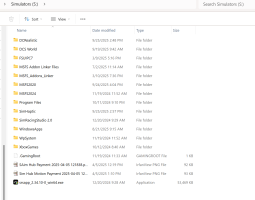
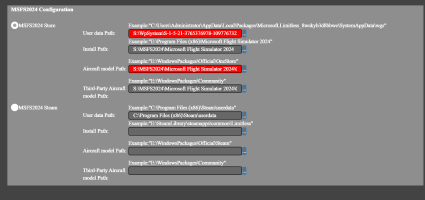
The software needs different paths to DCS, P3D, MSFS, etc. I have 2024 installed on a drive reserved for simulators. I tried using their suggested locations but I am not having success with the User Data Path or the Aircraft Model Path. Can anyone help me? I have attached screen shots of the MS 2024 configuration screen and my S drive. The two in RED are the ones I can't seem to point the app to.

Thanks
John
 

Attachments

  • Wingwin Config Panel.png
    Wingwin Config Panel.png
    116.2 KB · Views: 5
  • S Drive.png
    S Drive.png
    122.2 KB · Views: 5
User data is going to your AppData folder for the sim. Under C:\users (might be a hidden folder), look for the folder that's based on your microsoft account login name (such as jmig, edite, etc.).

So in my case, it's:
C:\users\Edite\AppData\Local\Packages\Microsoft.Limitless_8wekyb3d8bbwe

The second folder will be different on your system, depending on your login name. AppData is definitely a hidden folder by default, BTW.

Aircraft Model Path is wherever your main MSFS 2024 files are installed. I don't know the default, because I moved the installation folder from the default, but go to the Folder containing your Community folder and you'll find the OneStore packages in Official2020 and Official2024. Though I actually wonder if you should point it to the "StreamedPackages" folder, since my OneStore folders only contain 2024 stuff I've manually downloaded.

In my case it's S:\FS2024\Official2024\OneStore but I moved MSFS2024's downloads from the default folder to s:\FS2024.

Hope this helps!

(Also, if you figure out the Winwing software, be proud. I tried to set up my Orion 2 setup for DCS and it was so confusing I haven't played DCS since. :) )
 
...Hope this helps!

(Also, if you figure out the Winwing software, be proud. I tried to set up my Orion 2 setup for DCS and it was so confusing I haven't played DCS since. :) )
Thanks Denny. As for DCS, I just downloaded an aircraft profile and ran it. Voila, all the switches were populated for their functions. Now, if mighty Microsoft would do that for their little flight sim game. However considering that their own population system doesn't work half the time, I figure I will be doing the assignments manually for a long time.
 
Back
Top