
• Please see the most recent updates in the "Where did the .com name go?" thread. Posts number 16 and 17.

    Post 16 Update

    Post 17 Warning old domain name stealing credentials

  • Special Server Maintenance

    Just when you think you have everything running some what better...

    You get a message from the Hosting company. Short story they need to move us to a new server. I have been working with them to plan a good date for all concerned. Here is what we have come up with as a schedule.

    1. November 4th 17:00 -5UTC shut off the forums and start backup proceedures. During this time there will be no access to the forums or the Resource Section.
    2. November 5th Continue with Backups and download same until complete.
    3. November 6th 7:00 turn over server to hosting company to move system to new server
    4. November 7th - 8th restore backups and upgrade forum software.

    If all goes well we should be back online on November 8th.

    To keep you updated we will post updates on AVSIM forums.

    Thank you for your support.

F4U-1D Texture Repainting Question

TARPSBird

Moderator
Staff member
I want to repaint the A2A F4U-1D to reflect the NAS Glenview paint job on Warbird Heritage Foundation's FG-1D. Each texture consists of two .dds files: one in color and one grey-scale which I assume is a specular (?) file (see attached). My question is, how do you get the grey-scale file to match the color file after you've repainted the color file? If there's a tutorial somewhere pls point me in the right direction.
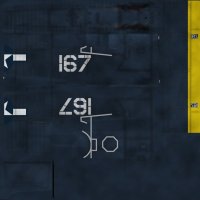
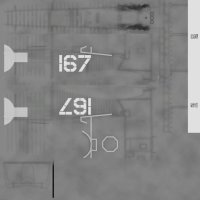
Bitmap_1.jpgBitmap_2.jpg
 
TARPS, your paint program should be able to convert the full color texture to a “grayscale” texture. Both photoshop and paint shop pro have texture conversion apps.
 
Last edited:
Duckie, thanks for the response. OK, I can convert the color texture to grayscale. I have PSP 7 and also PSP X7 to open the .psd textures in paint kits. My next question is what does the grayscale texture control on the plane? If I make it darker or lighter, what happens?
 
TARPS, I am certainly not one to explain how a specular map works. That said, simply put and as I understand it, the lighter the specular the “tighter” the reflection. Polished chrome with a pinpoint reflection would have a very light or white specular. Old, weathered and worn rubber tires that hardly reflect any light at all would have a very dark specular. There are an almost infinite number of variations based on needs of the repainter. Check out this link for a fairly good explanation of basic specular mapping. http://wedesignvirtual.com/what-does-a-specular-map-do/#:~:text=Specular maps are used to,(or on the texel).
 
Back
Top