
F4U-1D Texture Repainting Question

TARPSBird

Moderator
Staff member
I want to repaint the A2A F4U-1D to reflect the NAS Glenview paint job on Warbird Heritage Foundation's FG-1D. Each texture consists of two .dds files: one in color and one grey-scale which I assume is a specular (?) file (see attached). My question is, how do you get the grey-scale file to match the color file after you've repainted the color file? If there's a tutorial somewhere pls point me in the right direction.
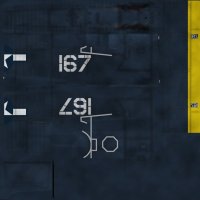
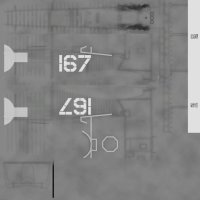
Bitmap_1.jpgBitmap_2.jpg
 
TARPS, your paint program should be able to convert the full color texture to a “grayscale” texture. Both photoshop and paint shop pro have texture conversion apps.
 
Last edited:
Duckie, thanks for the response. OK, I can convert the color texture to grayscale. I have PSP 7 and also PSP X7 to open the .psd textures in paint kits. My next question is what does the grayscale texture control on the plane? If I make it darker or lighter, what happens?
 
TARPS, I am certainly not one to explain how a specular map works. That said, simply put and as I understand it, the lighter the specular the “tighter” the reflection. Polished chrome with a pinpoint reflection would have a very light or white specular. Old, weathered and worn rubber tires that hardly reflect any light at all would have a very dark specular. There are an almost infinite number of variations based on needs of the repainter. Check out this link for a fairly good explanation of basic specular mapping. http://wedesignvirtual.com/what-does-a-specular-map-do/#:~:text=Specular maps are used to,(or on the texel).
 
Back
Top