Flight Replicas DH89 Dragon Rapide released

Donation drives

SOH Bandwidth Drive 2026 <---

Click the title for drive details.
Goal
$3,500.00
Donated
$3,780.00
This donation drive ends in
@Javis
@jankees
and everyone else who has the model

I am in contact with Mike at Flight Replicas support, with a list of bugs which he can't replicate at his end. I've tried turning off all add-ons using Add On Linker, and I've installed the Rapide ( as opposed to just streaming it ), but with no luck. It might be a streaming issue that will resolve itself in a couple of days ( I've had that before), but in the meantime, do any of you have the following issues with the Rapide in MSFS2024 ?

1. There are no click spots for using the autopilot
2. The passenger visibility switch doesn't animate, or have any effect on the passenger visibility.
3. The pilot visibility click spot at the top of the panel is not there.
4. The cabin light switch works, but does not animate.

Paul, the only issue I share is the cabin light switch not animating. Do you run a non-standard resolution or use texture upscaling? A while back when I set to 1920x1080 and scaled up to 2560x1440 I found some clickspots had moved and, for example, the dev mode menus become unusable with the mouse.
 
Paul, the only issue I share is the cabin light switch not animating. Do you run a non-standard resolution or use texture upscaling? A while back when I set to 1920x1080 and scaled up to 2560x1440 I found some clickspots had moved and, for example, the dev mode menus become unusable with the mouse.

Thanks - that's something I hadn't considered. I'll check NCP etc, but I think I'm running at standard 1440p ( 2K ).

EDIT: @SpaceWeevil I've looked into it, just be certain - standard resolution and no upscaling, so that possibility can be eliminated. Still no autopilot.
 
Last edited:
I bought it on Steam for FS2020, and it's the first Flight Replica aircraft I cannot get to work in FS2024. My earlier purchases showed up just fine, but this one, although it shows up in my profile, will not allow me to get rid of the "disabled" statement. I also tried addons linker, and even a manual install, but to no avail. Seems it is stuck in FS2020 for me so far. Have you folks bought it within FS2024, or did any of you buy it in FS2020 and then get it working in FS2024?
 
I bought it on Steam for FS2020, and it's the first Flight Replica aircraft I cannot get to work in FS2024. My earlier purchases showed up just fine, but this one, although it shows up in my profile, will not allow me to get rid of the "disabled" statement. I also tried addons linker, and even a manual install, but to no avail. Seems it is stuck in FS2020 for me so far. Have you folks bought it within FS2024, or did any of you buy it in FS2020 and then get it working in FS2024?

I bought it in the Marketplace for MSFS2024. I'm now contemplating re-installing the sim to see if that sorts the Autopilot problem out.
 
Bought in the Marketplace also. I don't use 2020 anymore (ever since 2024 arrived) so it works fine in 2024 but for the few switches. AP works fine too. Only thing i wasn't that happy about is that 'streaming' seems to be the only option.
 
I bought it again for 2020, and there all switches seem to work. I got this paintscheme working in 2020, not yet in 24..

FYI, when you buy an FS2020 aircraft in any sim, you are supposed to get an entitlement to the plane in the other version automatically. However, this typically takes 24-48 hours to show up in the other sim, it's not instant. So if you bought it in 2024, it should have shown up as available to download in your Content Manager in 2020 a day or two later. (It also happens with some FS2024 aircraft, if they are free upgrades or MS-published planes.)

Unless you just want Mike and Jorg to have more money, I'd suggest going to the MS Zendesk support site and opening a ticket -- they should refund you for the extra purchase.

Only thing i wasn't that happy about is that 'streaming' seems to be the only option.

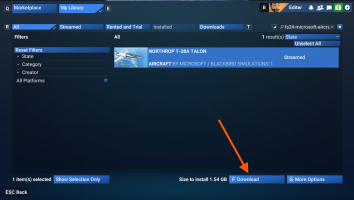
Streaming is the default on purchase in 2024, but if you want to download it locally, just go to Marketplace, choose My Library, search for the plane, and then click Download. You can download any plane/airport/scenery area.

1769548547374.png

After the download completes, you then have to click Install:
1769548904583.png

...which is dumb UX because why would you download and not install?
 
Last edited:
Turns out the 2020 paints work just fine, so no conversion needed I think.
For aircraft that are not 2024-native, 2020-repaints will work in MSFS 2024 just fine. If the aircraft is 2024-native, then conversion of 2020-repaints is necessary since 2024-native aircraft only use the KTX2-format. Lovely repaints and screenshots, BTW(y).
 
Back
Top