
Flight Replicas P-40N

I just bought a Flight Replicas P-40N for MSFS on the Marketplace.

Before buying it, I watched this video:


And I read the manual for this plane.


I was happy to have both the historical and the Airshow versions.

But my historical version also has an autopilot.
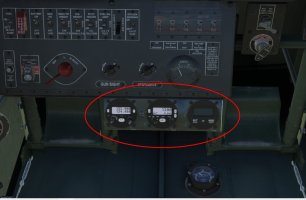
ScreenHunter_06 Apr. 08 00.18.jpg

It's not shown in the video or the manual.

How can I hide it to fly historically?
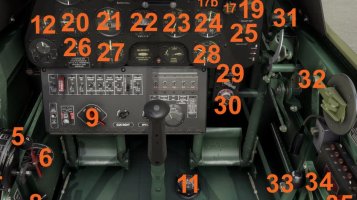
ScreenHunter_07 Apr. 08 00.18.jpg

I understand that the Airshow version can have radios and navigation.

But they shouldn't be available in the historical version.

How can I disable it to get the same version as in the manual and videos?

Best regards
 
I've looked through the manual (link in the post above). I think I've watched every video on YouTube, and it doesn't have the bottom panel with the three gauges, and the autopilot still doesn't work.

When I bought it, I thought I was getting a historically accurate model, which is exactly what I wanted, as I'm not interested in a display model.

I also have a Big Radials P-40B and an IniBuilds P-40F, but this Flight Replicas P-40N, from what I've seen in videos, is the best in terms of being as faithful to the original as possible.

But that extra panel with gauges? I really don't like it. I think that even if they added it in new updates, there should be an option to disable it so I can fly without it. After all, it's a historical model, not a display model.

I have a question: does anyone else have this panel? Is there a way to disable it?

Best regards,

PS. I contacted Flight Replicas technical support, but haven't received a response yet.
 
And the matter was resolved. I found their Facebook page and read:

"An update for the Curtis P-40N has been released. The update includes significantly improved aerodynamics, a full (though discreet) radio suite, and a two-axis autopilot for all models."

It's a shame they simply couldn't hide this "discreet little gem" :(
like the wheel chocks, for example.

Anyway, the plane is great, although the vintage autopilot is annoying.

Most importantly: they could write about it in the magazine or on their official website and change the screens in the store.
 
I imagine 96.73% of us can just ignore that tiny panel at the bottom and enjoy the experience. The lack of G forces, smell, control feedback, freezing temperatures, and potential death all also distract from realism, but we somehow manage. :)
 
I just wish they'd fix the VR pilot view point, it reverts with every update, a simple fix but a pain none the less. with the stock camera coordinates in VR pilot view it has you sitting on the nose just behind the exhausts. All that is required is a copy paste from VC pilot XYZ coordinates to VR pilot view XYZ & it fixes it. I notified them of it early on after it's release but it's still there!
 
FR seem to be very underrated in MSFS, I find all of the aircraft I have of theirs to be very good especially the matte finishes on the paints, also the 3D modelling is very clean, I have their Spitfires too & find them to be great representations.
 
I'm also happy because the plane is really cool and a joy to fly. I have many of their planes and they're great. But technically, it's not a problem to create a click point that hides this panel (like hiding the wedges or the pilot).

If the developers also plan to add new avionics when updating other Seafire and Spitfire planes, it would be nice to give the user the option to disable them, especially since it's not a major technical issue.

Best regards.
 
I love all of Mike's aircraft, some of the best looking aircraft around. Great to paint too. A few pics to show the beauty of this model:


Very nice paintings - I already have a few of them :)

Yes, Flight Replicas has very nice repaint files because the sides are in one piece.
I'm not a professional painter,
but I've done repaints, mainly for X-Plane, and that includes most of the Polish paint jobs (close to my heart) that weren't available.
Sometimes, however, I get the urge to paint the F4U-1 Corsair.

You can find my repaints here:


Best regards.
 
Back
Top