-
Please see the most recent updates in the "Where did the .com name go?" thread. Posts number 16 and 17.
-
Special Server Maintenance
Just when you think you have everything running some what better...
You get a message from the Hosting company. Short story they need to move us to a new server. I have been working with them to plan a good date for all concerned. Here is what we have come up with as a schedule.
- November 4th 17:00 -5UTC shut off the forums and start backup proceedures. During this time there will be no access to the forums or the Resource Section.
- November 5th Continue with Backups and download same until complete.
- November 6th 7:00 turn over server to hosting company to move system to new server
- November 7th - 8th restore backups and upgrade forum software.
If all goes well we should be back online on November 8th.
To keep you updated we will post updates on AVSIM forums.
Thank you for your support.
You are using an out of date browser. It may not display this or other websites correctly.
You should upgrade or use an alternative browser.
You should upgrade or use an alternative browser.
FSX Only Grumman Mallard G-73AT v1.0
- Thread starter stovall
- Start date


nigel richards
Charter Member

nigel richards
Charter Member
Thanks, Nigel !One uploading shortly !
Joe
PS: you and Milton are 'da bomb' !
Awe thanks Joe - just trying to keep our flying buddies happy.

Looking forward to seeing your creations.


The FSX Only Mallard v1.2 has just been uploaded. This corrects minor issues with the model, panel, sounds, and aircraft.cfg. It also uses DDS/DXT5 textures and a common texture folder to improve load times. Although we do not support P3D and the typical P3D version issues are present with this aircraft, it does correct the load problem with P3D 2.n according to beta tests.
http://www.sim-outhouse.com/sohforums/local_links.php?catid=34&linkid=21699
http://www.sim-outhouse.com/sohforums/local_links.php?catid=34&linkid=21699
Attachments



I am having trouble understanding how to install. When I download the referenced file it opens up into a folder with a lot of files, but I can't find the MallardTPX1.2 file.
It seems I am getting the wrong file.
Any help would be appreciated.
Thanks,
Tom
Tom,
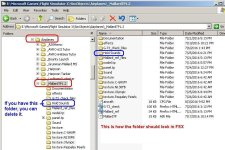
See attached. Do you not see this folder?
Attachments
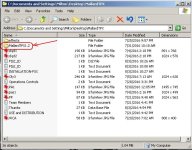
Tom,
See attached. Do you not see this folder?
Hi Milton,
No when I download the file it appears to be opening to the expanded file.
Tom
Hi Milton,
No when I download the file it appears to be opening to the expanded file.
Tom
Tom,
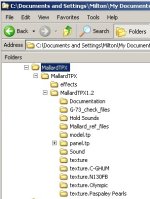
When you unzip the downloaded file, you will see a MallardTPX folder.
When you open that folder, your will see another MallardTPX folder.
Open that and you will see the folder I posted above.
The MallardTPX1.2 folder is the one you copy to FSX/Airplanes folder.
EDIT: See attached Folder View
Follow the simple installation instructions.
Attachments
Last edited:
Tom,
When you unzip the downloaded file, you will see a MallardTPX folder.
When you open that folder, your will see another MallardTPX folder.
Open that and you will see the folder I posted above.
The MallardTPX1.2 folder is the one you copy to FSX/Airplanes folder.
EDIT: See attached Folder View
Follow the simple installation instructions.
When I download the listed file it opens 726 files none of which is a MallardTPX folder.
Sorry, but I am at a loss as to what is happening.
Tom
The FSX Only Mallard v1.2 has just been uploaded. This corrects minor issues with the model, panel, sounds, and aircraft.cfg. It also uses DDS/DXT5 textures and a common texture folder to improve load times. Although we do not support P3D and the typical P3D version issues are present with this aircraft, it does correct the load problem with P3D 2.n according to beta tests.
http://www.sim-outhouse.com/sohforums/local_links.php?catid=34&linkid=21699
Sorry if I'm getting confused, but when I download and install this aircraft (MallardTPX.zip), I find only a single tp.mdl in the model.tp folder. Does the lack of an interior model indicate that this is the port-over version as I thought FSX native aircraft have a external and an internal mdl file? Just wondering if I got the right version.
Tks
Gerard
Tom,
See attached. Do you not see this folder?
Milton,
I found the problem. I was downloading from your thread that listed the new release and provided a download.
As soon as I downloaded directly from the Warbirds library it installed correctly.
Thanks for your help.
Tom
Sorry if I'm getting confused, but when I download and install this aircraft (MallardTPX.zip), I find only a single tp.mdl in the model.tp folder. Does the lack of an interior model indicate that this is the port-over version as I thought FSX native aircraft have a external and an internal mdl file? Just wondering if I got the right version.
Tks
Gerard
Gerard,
Sorry for the confusion. That was simply a Model replacement folder for the v.1.2 release to correct the "leak" in the model.
I posted it so someone could test the fix. I will correct the v1.2 version in place and provide a separate model folder fix.
If you downloaded and installed the latest version, that Model folder may be used to replace the model in the latest release.
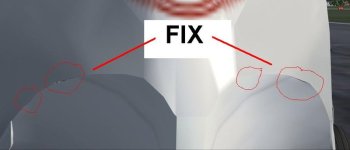
I have uploaded the official Model Folder FIX for the Mallard Turboprop. It applies to the latest v1.2 releases, FSX and FS9.
If you downloaded V.1.2 before now, this FIX applies to you.
http://www.sim-outhouse.com/sohforums/local_links.php?catid=8&linkid=21707
I have also updated the original v1.2 release archives to incorporate the fix so if you have downloaded after this post, the FIX is already applied in your download.
The FIX corrects a Model see-thru leak you may notice if you zoom in closely from the front.
See attached.
If you downloaded V.1.2 before now, this FIX applies to you.
http://www.sim-outhouse.com/sohforums/local_links.php?catid=8&linkid=21707
I have also updated the original v1.2 release archives to incorporate the fix so if you have downloaded after this post, the FIX is already applied in your download.
The FIX corrects a Model see-thru leak you may notice if you zoom in closely from the front.
See attached.
Attachments