-
Please see the most recent updates in the "Where did the .com name go?" thread. Posts number 16 and 17.
-
Special Server Maintenance
Just when you think you have everything running some what better...
You get a message from the Hosting company. Short story they need to move us to a new server. I have been working with them to plan a good date for all concerned. Here is what we have come up with as a schedule.
- November 4th 17:00 -5UTC shut off the forums and start backup proceedures. During this time there will be no access to the forums or the Resource Section.
- November 5th Continue with Backups and download same until complete.
- November 6th 7:00 turn over server to hosting company to move system to new server
- November 7th - 8th restore backups and upgrade forum software.
If all goes well we should be back online on November 8th.
To keep you updated we will post updates on AVSIM forums.
Thank you for your support.
You are using an out of date browser. It may not display this or other websites correctly.
You should upgrade or use an alternative browser.
You should upgrade or use an alternative browser.
FSX Screenshots Here!!
- Thread starter Walter
- Start date


aardvark62
Charter Member
aardvark62
Charter Member


CrazyCanuck
Members +
Leaving Nantucket...


Mario Donadon
Members +
Arado 234


bazzar
Charter Member 2018
The new video card has really juiced up my machine. Graphics are something else!

Ahhh the hours I've spent in front of that one...


ZsoltB
Charter Member
Arado 234
This is P3D?
ZsoltB
Charter Member
Arado 234
This is FSX?
aardvark62
Charter Member
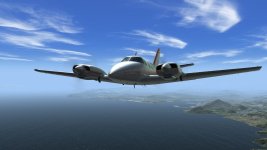

Griffon 100M at (newly released) EDGT Bottenhorn
Cheers, A.
Hi Aardvark,
Great shot here . . .
I recently downloaded the Griffon, but am having problems with the windscreen and windows being opaque in FSX/DX10 (Steve's Fixer). I've tried changing the Alpha layer to nearly black for the file that looks to be the windscreen/glass, but still no visibility. Did you have any issues with this? Do you remember where you DL'ed the package?
Thanks in advance for any suggestions.

Regards,
Michael
padburgess
Charter Member
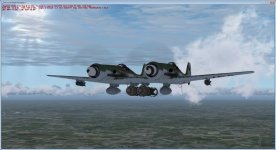
Mario Donadon
Members +
[QUOTE = zsoltquack; 1144508] Isso é FSX? [/QUOTE]
FSX,but I managed to make it work on P3D v3
FSX,but I managed to make it work on P3D v3
aardvark62
Charter Member
Hi Aardvark,
Great shot here . . .
I recently downloaded the Griffon, but am having problems with the windscreen and windows being opaque in FSX/DX10 (Steve's Fixer). I've tried changing the Alpha layer to nearly black for the file that looks to be the windscreen/glass, but still no visibility. Did you have any issues with this? Do you remember where you DL'ed the package?
Thanks in advance for any suggestions.
Regards,
Michael
Hello Michael.
Can't remember where I downloaded from, but I did have to adjust the alpha in the windows_t.bmp to a dark grey.
I could send you the file I altered, but it sounds like you've already tried this - it worked for me but I don't use DX10, so I'm afraid I'm out of suggestions there.
A.
Mario Donadon
Members +
[QUOTE = padburgess; 1144644] Algo que eu coloquei em conjunto para descansar do trabalho do cockpit.

Atenciosamente
Paulo [/QUOTE]
I liked it a lot, where do I think to download ??
Atenciosamente
Paulo [/QUOTE]
I liked it a lot, where do I think to download ??

ian elliot
SOH-CM-2026
Always like the concept of the Zerstörer, two good engine's and a well designed fuselage, the idea should be a winner, though history tells us it was'nt. Still. it went on to have a successful career in other role's, not envisaged by the original designer. Untill a payware developer has a crack at the 110, im happy flying the old Groundcrew warhorse ported to FSX
padburgess
Charter Member
Mario
I'm sorry but this one is for my private use only. I do not own the base model and have borrowed parts that are not my original work. I have added original parts to create the twin but they are only about 30% of the final product.
I am working on some more usable transformations but they are a ways off yet. The first one will hopefully use the cockpit (see thread on playing with 3d model) I am building at the moment. Funnily enough, one of my passions is to do a cockpit for the Ground Crew Bf110. Maybe later this year if I can get things to go my way.
Paul
I'm sorry but this one is for my private use only. I do not own the base model and have borrowed parts that are not my original work. I have added original parts to create the twin but they are only about 30% of the final product.
I am working on some more usable transformations but they are a ways off yet. The first one will hopefully use the cockpit (see thread on playing with 3d model) I am building at the moment. Funnily enough, one of my passions is to do a cockpit for the Ground Crew Bf110. Maybe later this year if I can get things to go my way.
Paul
Thanks for the quick reply, Aardvark. After learning of your success, I tried again. This time, I modified both the Alpha layer (to near back) and the primary layer image (to pure white). I didn't know the the primary layer could have such a significant effect on transparency, but making that change with the one for the Alpha layer did the trick. The Griffon has a clear windscreen again. I appreciate you highlighting this freebie and the nudge to get it working. Best regards, MichaelHello Michael. Can't remember where I downloaded from, but I did have to adjust the alpha in the windows_t.bmp to a dark grey. I could send you the file I altered, but it sounds like you've already tried this - it worked for me but I don't use DX10, so I'm afraid I'm out of suggestions there. A.