• There seems to be an uptick in Political comments in recent months. Those of us who are long time members of the site know that Political and Religious content has been banned for years. Nothing has changed. Please leave all political and religious comments out of the forums.

    If you recently joined the forums you were not presented with this restriction in the terms of service. This was due to a conversion error when we went from vBulletin to Xenforo. We have updated our terms of service to reflect these corrections.

    Please note any post refering to a politician will be considered political even if it is intended to be humor. Our experience is these topics have a way of dividing the forums and causing deep resentment among members. It is a poison to the community. We appreciate compliance with the rules.

    The Staff of SOH

  • Server side Maintenance is done. We still have an update to the forum software to run but that one will have to wait for a better time.

GAS Uploads for FSX work in FS9

Mick

SOH-CM-2025
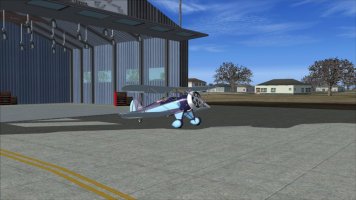
First, a big thanks to the guys at Golden Age Simulations for sharing those great files. You've seen them on the downloads list, posted as FSX planes.

Well, they are for FSX, but the Waco F package works in FS9 if you take the trouble to convert the textures, and I'll bet some of the others do to. One of these days I'll get the time to try the Boeing 40 and the Douglas Dolphin. I don't need a Dolphin since David and I did one several years ago but I'd like to see if the Catalina Island scenery can be made to work in FS9.

Converting the textures is simple, if a bit tedious. You have to load each one in DXTbmp, flip them vertically, then save them in a format that FS9 can see. (I like 32-bit for external and very detailed bits, the others can be saved in a DXT format like DXT-3.) They don't have to be resized.

If you like old fabric-covered biplanes you'll love these WACOs. None of them duplicate any freeware releases that I know of. The package includes the Waco 10, ASO, GXE, IIF. QCF and RNF.

I haven't tried any of the ones built for the more advanced sims like P3D or FSXSE.
 
I too grabbed a copy of the Waco F after I saw that it was said to work in FS9. Sadly, the installer only creates files in an FSX directory structure with .DDS texture files instead of .BMPs. From Mick’s post, I assume that I can make these aircraft work happily in FS9 if I change the directory structure to a typical FS9 one and follow Mick’s instructions for converting the texture files. I am not sure, however, whether the .AIR file and the aircraft.cfg file would need any revisions to make them fully FS9 compatible.

Could someone please advise whether these two files would work in FS9 as created by the original installer ? ? ?
 
I too grabbed a copy of the Waco F after I saw that it was said to work in FS9. Sadly, the installer only creates files in an FSX directory structure with .DDS texture files instead of .BMPs. From Mick’s post, I assume that I can make these aircraft work happily in FS9 if I change the directory structure to a typical FS9 one and follow Mick’s instructions for converting the texture files. I am not sure, however, whether the .AIR file and the aircraft.cfg file would need any revisions to make them fully FS9 compatible.

Could someone please advise whether these two files would work in FS9 as created by the original installer ? ? ?
No, the original installer is set up for FSX. So yes, you have to put the pieces in the standard FS9 places and convert the textures.

I don't know how "well" the Wacos fly in FS9 but they do fly. I tried one and found nothing amiss. I don't know enough about the real Wacos to say whether the models fly like the real ones, but the one I tried flew nicely.
 
dolphin has a separate interior model; theres a utility on flightsim that will convert dds to bmp in a batch

ttfn

Pete
 
I just used the provided .exe files and the aircraft popped out in the normal manner. Then I converted the textures. Birds fly great. My thanks to GAS for being so generous to the community.

normb
 
I tried one of the others and it seems that planes initially built for FSX don't work in FS9. So apparently it's just the Wacos that we can use

Still, that's a very nice flock of Wacos!
 
I tried with GAS Super Stearman, but finally there were incompabilities with mdl files.

Bernard
 
A model compiled as FSX native can never work in FS9 but a FS9 model can be fine in FSX but may need some texture corrections for glass and prop transparency. The biggest issue would be with any custom FSX animations as FS9 used a different method for animating parts.
 
The easiest way to tell what sim the model was compiled for is to open the 'XXX.MDL' file in a text reader like 'Notepad++' (it is better for this than the default 'Notepad' but that works too).

On the first line you should see blocks of info similar to the lines below and the info in that block tells you what sim it was compiled for:

FS2004 (FS9): MDL8MDLH - The '8' indicates that it is a FS2004 model.

FSX: MDLXMDLH - The 'X' indicates that it is a FSX model.

P3D v4.5: PV44MDLH - The '44' indicates that it is a P3D v4.4+ model.

Hope that helps.
 
The easiest way to tell what sim the model was compiled for is to open the 'XXX.MDL' file in a text reader like 'Notepad++' (it is better for this than the default 'Notepad' but that works too).

On the first line you should see blocks of info similar to the lines below and the info in that block tells you what sim it was compiled for:

FS2004 (FS9): MDL8MDLH - The '8' indicates that it is a FS2004 model.

FSX: MDLXMDLH - The 'X' indicates that it is a FSX model.

P3D v4.5: PV44MDLH - The '44' indicates that it is a P3D v4.4+ model.

Hope that helps.

Interesting. I never knew that!

Thanks! :ernaehrung004:
 
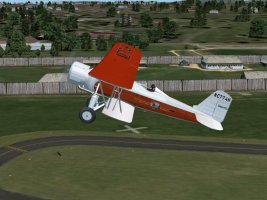
Waco1.jpg

I used FSRepaint to convert the textures with *no* issues. This Waco is defiantly sitting at Ankeny in FS2004. :cool:
Just flip the textures and save as DXT3. My only problem is the gauge faces. I think I missed a "glass" texture?
That's an easy fix if it isn't the gauges themselves. Either rename another glass texture and drop it in the folder or run it thru FSR one more time.
If you DO use FSR, work on only one texture at a time and let FSR do its thing.

Meanwhile, D'OH! I was reading this post and thought "Yeah, dummy, there's a VC. FSR lets you use a VC view.."
So, everything is now converted to FS9 BMPs. :wiggle:

I've attached the converted texture folder for the WACO QCF-2 (as pictured). There are some extra DDS textures, but they aren't used.
Meanwhile2, did anyone else notice that the external textures need to get flipped while the VC textures don't? :unsure:
 

Attachments

  • FS9 conv WACO QCF-2.zip
    2.3 MB · Views: 8
Last edited:
I used FSRepaint to convert the textures with *no* issues.
Did you know there is a freeware tool that will batch convert an entire folder of textures from one format to another rather than doing it individually? I was amazed when I discovered it earlier this year considering it's been around for years! I only discovered it by accident and it's made by the same guy who made the well known DXTBmp conversion tool. All his tools can be found at this link: https://www.mwgfx.co.uk/

There has been an updated version of the batch tool released called ConvImX which has more options and is better suited to converting to or from FSX and P3D DDS files. This one can be found at: https://www.softpedia.com/get/Multimedia/Graphic/Image-Convertors/ConvImX.shtml

There is no manual but it is very easy to use. I have attached a PDF tutorial I just wrote to help anyone out who wants to use the 'ConvImx' application.

Good luck! (y)
 

Attachments

  • ConvImx_Tutorial.pdf
    650.1 KB · Views: 10
But there is/was a WACO F Package (that includes a QCF-2) for FS2004 already.

Also. for FS2004. Stearmans, Pitcairns, Travel Air's & a whole bunch of WACO's..
Basically all the P3D & FSX GAS aircraft were available for FS2004.

Hopefully, we can get them into our library?
 
I have searched the archives and have found 10 FS2004 models that I am happy to provide, However an admin will have to create a Golden Age Simulations subdirectory here (https://sim-outhouse.org/sohforums/resources/categories/fs-2004-aircraft.71/) in the Resources location for me to place them. The models available are Boeing Stearman, Boeing 40, New Standard D25, Lockheed 12A, Stinson Jr, Pitcairn Autogiro, Stearman Model 4 Speedmail, Stinson Model A Trimotor, Travelair 6000, Taylor J-2 Cub. If I find more the list will be updated
 
Thanks for the great F2 texture conversion. The chrome on yours looks brighter than one I did for myself.

GAS made some great airplanes. I have some of the FS9 planes and fly them regularly. Their BW Birds and the Taylor/Piper J-2 are my favorites.
For my 40-knot brain the J-2 is a jewel.

I have FSX but stay with FS2004 because of its stability and flexibility. I can drop in most CFS2 birds if I want to. Or load the older FS stuff for a look see.

normb
 
In my archive of FS2004 stuff I also found the old Kinner Sportwing for 2004 that GAS released as freeware back in 2005. It should already be up on Sim-Outhouse.
 
Back
Top