

gsnde
Members +
Hi everyone,
I’m happy to share GMax Reviver 1.0, a small tool for a known Gmax crash on Windows 10 and 11. You can find it in the download sections at MAIW and The Owl’s Nest.
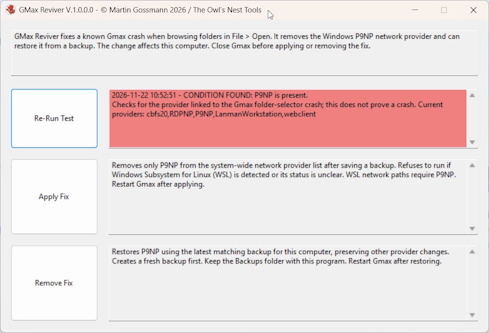
If Gmax crashes when you browse folders through File > Open, the P9NP network provider entry may be the cause. GMax Reviver checks for that entry when it starts. You can repeat the check with Re-Run Test.
To try the fix, close Gmax and click Apply Fix. The tool checks for Windows Subsystem for Linux (WSL) and only proceeds if those checks complete successfully and find no WSL installation. It backs up the registry setting before making the change. You can restore the entry later with Remove Fix.
GMax Reviver is provided as is, without warranty. Use it at your own risk. To the extent permitted by law, I assume no liability for damage or loss resulting from its use.
If you give it a try, I’d be interested to hear whether File > Open works again on your system.
Martin
I’m happy to share GMax Reviver 1.0, a small tool for a known Gmax crash on Windows 10 and 11. You can find it in the download sections at MAIW and The Owl’s Nest.
If Gmax crashes when you browse folders through File > Open, the P9NP network provider entry may be the cause. GMax Reviver checks for that entry when it starts. You can repeat the check with Re-Run Test.
To try the fix, close Gmax and click Apply Fix. The tool checks for Windows Subsystem for Linux (WSL) and only proceeds if those checks complete successfully and find no WSL installation. It backs up the registry setting before making the change. You can restore the entry later with Remove Fix.
GMax Reviver is provided as is, without warranty. Use it at your own risk. To the extent permitted by law, I assume no liability for damage or loss resulting from its use.
If you give it a try, I’d be interested to hear whether File > Open works again on your system.
Martin