How to take screenshots ?

sixstrings5859

Charter Member
Just got back into CFS2 and would like to know how to take screenshots and where to find them. Any help ? got back into it a few years ago but my memory fails me. Heavy into CFS3 and love the PTO and the addons so much in CFS2 ,i just had to give it a chance again. Don't mind the grafics so much ,as i'm a old timer . i began back in '98 with combat flight sims and been at it since the days of Falcon. Still into Falcon BMS and a diehard for WW II sims. Thanks for any help. Regards, Scott
 
UT is right, multigrab is easy to use. I use the paid program FRAPS too (for screenshots and videos) but MG is free, as far s I know.
 
Totally lost. What do they mean by clipboard after i select print screen ? Don't know where the screenshot goes. Have multigrab and photo shop. Please help.
 
From the readme

"
Install :-

Just put the program anywhere you want. Create a shortcut in
the usual ways if you want an easy way to run it. Create or
locate a suitable folder for storing the Grabs in then run
the program and use the Folder browser to tell it where this
folder is.

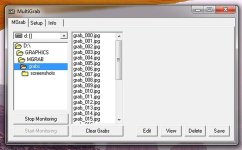
The screenshot goes to the folder you created/navigated to when you first installed MGrab? Maybe pics will help...

Here's my set up:
MGrab__home_tab.jpg

I created a sub-folder of "Grabs" called "screenshots" which is where I save my pics after I've edited/ resized etc. in PaintShopPro.

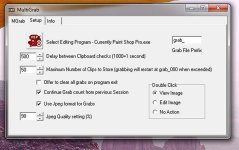
My SetUp Tab looks like this:

MGrab_setup_tab.jpg


Hope this makes it a little clearer.
 
Thanks a bunch. Got it figured out now. Thanks for all the help. Now that i got it fired up,let the good times roll ! Regards,Scott
 
Back
Top