
-
Please see the most recent updates in the "Where did the .com name go?" thread. Posts number 16 and 17.
-
Special Server Maintenance
Just when you think you have everything running some what better...
You get a message from the Hosting company. Short story they need to move us to a new server. I have been working with them to plan a good date for all concerned. Here is what we have come up with as a schedule.
- November 4th 17:00 -5UTC shut off the forums and start backup proceedures. During this time there will be no access to the forums or the Resource Section.
- November 5th Continue with Backups and download same until complete.
- November 6th 7:00 turn over server to hosting company to move system to new server
- November 7th - 8th restore backups and upgrade forum software.
If all goes well we should be back online on November 8th.
To keep you updated we will post updates on AVSIM forums.
Thank you for your support.
You are using an out of date browser. It may not display this or other websites correctly.
You should upgrade or use an alternative browser.
You should upgrade or use an alternative browser.
HU: MSPG RAF Valley scenery beta v0.1
- Thread starter hschuit
- Start date


It's quite simple to get it to work with ORBX FTX WALES:
go to ...
[your path here]\Lockheed Martin\Prepar3Dv3\ORBX\FTX_EU\FTX_EU_WLS_05_SCENERY\scenery
... and rename these three files:
ADE_FTX_WLS_EGOV.BGL.off
ADE_FTX_WLS_EGOV_CVX.bgl.off
FTX_WLS_EGOV_objects.bgl.off
Then - make sure your Valley scenery is set higher up the scenery list than all the ORBX entries.
I'll post some screenshots shortly!
Adam.
OK - here goes:
It's really hard to do justice to this scenery in screenshots as the airfield is rather spread out. There's lots of nice details dotted around - and lots to enjoy!
I can't see any obvious "gotchas" - but I do appear to be missing certain objects (when compared to other pics posted earlier).


Here's the palette problem. The ground detail seems to match really well - just the tone/colour doesn't match the ORBX WALES tiles colouring. It doesn't actaually look this bad in the sim!


I should add, that it's a GREAT piece of work!!!
go to ...
[your path here]\Lockheed Martin\Prepar3Dv3\ORBX\FTX_EU\FTX_EU_WLS_05_SCENERY\scenery
... and rename these three files:
ADE_FTX_WLS_EGOV.BGL.off
ADE_FTX_WLS_EGOV_CVX.bgl.off
FTX_WLS_EGOV_objects.bgl.off
Then - make sure your Valley scenery is set higher up the scenery list than all the ORBX entries.
I'll post some screenshots shortly!
Adam.
OK - here goes:
It's really hard to do justice to this scenery in screenshots as the airfield is rather spread out. There's lots of nice details dotted around - and lots to enjoy!
I can't see any obvious "gotchas" - but I do appear to be missing certain objects (when compared to other pics posted earlier).
Here's the palette problem. The ground detail seems to match really well - just the tone/colour doesn't match the ORBX WALES tiles colouring. It doesn't actaually look this bad in the sim!
I should add, that it's a GREAT piece of work!!!
Last edited:

falcon409
SOH-CM-2026
I have to say that it's hit or miss as to whether this will make it into the thread or not. The site is constantly going off because of the downloads for the new C-47. If it does, my suggestion (and this is not a slap at the artist who did the scenery at all) would be to eliminate the areas outside the base (dirt mostly anyway), add a "blend" mask to transition from the photoreal to the Orbx textures and darken the photoreal slightly to better match. I hope this isn't taken as anything other than just a suggestion. . .the scenery still stands as an excellent addon of an Air Base that has a great history. Nicely done!
lowlevelRAF.
Members +
Just to advise, the new screen is not released yet, those are scenery shots of the previous BETA build. New build has all the rest of the buildings, ground equipment etc  ! I will post here when its out!
Matt
! I will post here when its out!Matt
lowlevelRAF.
Members +
The tile has been cut as it is due to the spotting location on the beach by the base, plus the landing light models etc, it would have looked strange with the tile just covering the approach lights. We did test with the tile chopped more, but decided to go with its current form.
Sadly, we only use FSX, as don't own P3D at this time. The tile looks okay colour wise in FSX from our testing and BETA version.
Sadly, we only use FSX, as don't own P3D at this time. The tile looks okay colour wise in FSX from our testing and BETA version.
lowlevelRAF.
Members +
RAF Valley RELEASED!
As the title suggests, our new RAF Valley Scenery has been released on our site!
http://www.mspgsimulations.com/raf-valley-fsx.html
Please download from there!
We have worked hard on this for a while now, hope you enjoy it!
*Note, there is no night lighting in this release, this will come in a future update
Matt!
As the title suggests, our new RAF Valley Scenery has been released on our site!
http://www.mspgsimulations.com/raf-valley-fsx.html
Please download from there!
We have worked hard on this for a while now, hope you enjoy it!
*Note, there is no night lighting in this release, this will come in a future update
Matt!
Yay! Many thanks, MAtt! Looking forward to installing it.RAF Valley RELEASED!
We have worked hard on this for a while now, hope you enjoy it!
As to the P3D palette thing - it doesn't detract from the scenery *that* much. The improved airfield outweighs that by far!
Adam.


dhazelgrove
Charter Member


The MAIW 'UK Hawks Pt. 1' traffic drops straight in. Both 4 Sqn (T2) and 208 Sqn (T1/A) have allocated parking spots. Shame about 19 Sqn, though, but it works well enough.
Dave
dhazelgrove
Charter Member
dhazelgrove
Charter Member
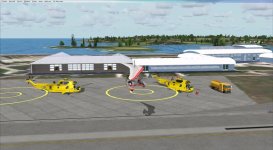
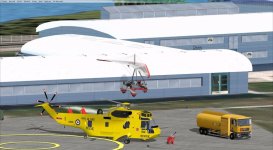
I've been trying to get the 22 Squadron Sea Kings to appear in this, and to this end I installed the MAIW Sea King model and traffic files from their package. No show.
I then looked at the flight plans and found that the Sea Kings are using "E1OV" rather than the expected "EGOV".
If you have/had the ACG FSX version of RAF Valley, you will find this in the scenery subdirectory.
Just move it into the MSPG RAF Valley scenery subdirectory and you'll have Sea Kings.
Dave
Last edited:
dhazelgrove
Charter Member

A few small tweaks to reposition slightly, and.....
Dave