
-
Please see the most recent updates in the "Where did the .com name go?" thread. Posts number 16 and 17.
-
Special Server Maintenance
Just when you think you have everything running some what better...
You get a message from the Hosting company. Short story they need to move us to a new server. I have been working with them to plan a good date for all concerned. Here is what we have come up with as a schedule.
- November 4th 17:00 -5UTC shut off the forums and start backup proceedures. During this time there will be no access to the forums or the Resource Section.
- November 5th Continue with Backups and download same until complete.
- November 6th 7:00 turn over server to hosting company to move system to new server
- November 7th - 8th restore backups and upgrade forum software.
If all goes well we should be back online on November 8th.
To keep you updated Tom Clayton has offered to post updates on AVSIM forums.
Thank you for your support.
You are using an out of date browser. It may not display this or other websites correctly.
You should upgrade or use an alternative browser.
You should upgrade or use an alternative browser.
Is plane from FS2004 working in FSX?
- Thread starter Hitori131
- Start date

MrZippy
SOH-CM-2026
No joke! I flew many FS2004 aircraft without any modifications done to them! Only some need any kind of modifications to make them work!I saw someone told me that the planes mod in FS2004 also work in FSX is it real? or just a joke?

Many will work fine, some will work with issues. Common problems can be either no glass or black/white glass (an easy fix if you know how to edit texture files) or prop blur textures disappear behind clouds, trees, buildings etc. which can be fixed by replacing the prop textures with a set from a FSX native aircraft.
Many native FS2004 aircraft have already been converted to native FSX so that you don't get these types of issues.
Many native FS2004 aircraft have already been converted to native FSX so that you don't get these types of issues.

Hitori131
Members +
Oh thanks you that's make sense when I saw the same plane from FSX in FS2004Many will work fine, some will work with issues. Common problems can be either no glass or black/white glass (an easy fix if you know how to edit texture files) or prop blur textures disappear behind clouds, trees, buildings etc. which can be fixed by replacing the prop textures with a set from a FSX native aircraft.
Many native FS2004 aircraft have already been converted to native FSX so that you don't get these types of issues.
If you see the term 'port over' on an FSX aircraft it means that it was originally a FS2004 aircraft that has been made to work in FSX (bad glass/prop textures have already been changed etc.) but the model itself is still a FS2004 model.
If you see the term 'FSX native' this generally means that a FS2004 aircraft has been processed through a program like 'Model Converter X' and has been made fully compliant with the FSX way of doing things. It can also refer to an aircraft that was made exclusively for FSX originally.
If you see the term 'FSX native' this generally means that a FS2004 aircraft has been processed through a program like 'Model Converter X' and has been made fully compliant with the FSX way of doing things. It can also refer to an aircraft that was made exclusively for FSX originally.

wolfebee89
SOH-CM-2024
@Hitori131 adding to remarks by @Tako_Kichi one can generally tell a port-over from a native FSX model by having a quick look at the model folder of the relevant file: native FSX aircraft have the distinct interior and exterior model mdl files, while the port-overs typically have the older 'unified' single mdl model file, common to FS2004; another marker is evident in the texture folder of the aircraft release: native FSX typically feature dds textures while the older FS2004 port-overs generally have bitmapsIf you see the term 'port over' on an FSX aircraft it means that it was originally a FS2004 aircraft that has been made to work in FSX (bad glass/prop textures have already been changed etc.) but the model itself is still a FS2004 model.
If you see the term 'FSX native' this generally means that a FS2004 aircraft has been processed through a program like 'Model Converter X' and has been made fully compliant with the FSX way of doing things. It can also refer to an aircraft that was made exclusively for FSX originally.
cheers!

virago83
Members +
Late to this thread but as a long time FS9 vs FSX-SE addict, I can confirm that most FS9 aircraft work great in FSX. I have several FS9 Carenado paywares along with many FS9 freeware kites which I use quite often under FSX. Also good sport is aliasing one aircraft to another, especially when playing FSEconomy, such as I have done since 2014. Often one wants to fly a particular airframe but has none available in their flightsim library, ex. A Cessna 207 on amphibious floats. I take my FS9 (or FSX) older Carenado C206 which includes float versions, tweak the .cfg file and FSEconomy will recognize it as a C207.

vonstroheim
SOH-CM-2026
Well, FS9 aircrafts in FSX (especially with DX10) is mostly a hit and miss affair. The thing is, just try it! If there is some issue, the community here can help!
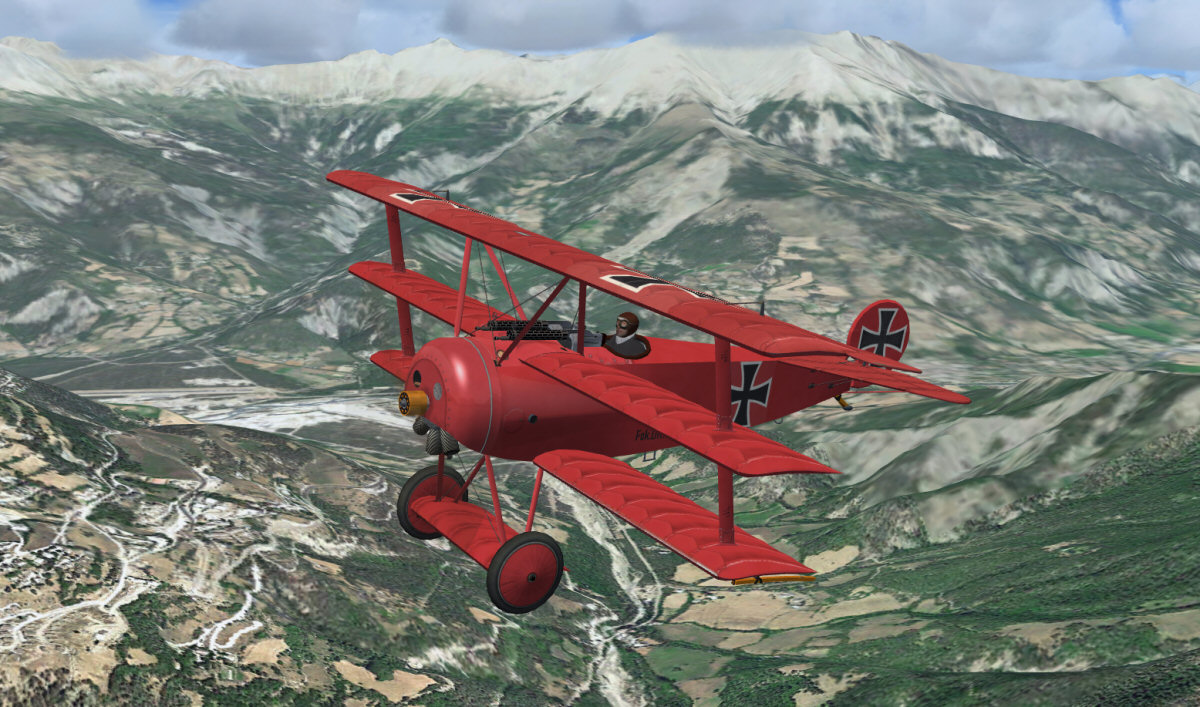
I was very surprised by Martin, Gary & Huub's Fokker Dr.I, there is almost no problem with my FSX DX10 setup, and it's a fun aircraft, with rotating piston engine (you have to see it to understand the concept). Just some weird transparency issue with machine guns. I fixed it by removing alpha channel from one texture (bmp attached to this post).
I was very surprised by Martin, Gary & Huub's Fokker Dr.I, there is almost no problem with my FSX DX10 setup, and it's a fun aircraft, with rotating piston engine (you have to see it to understand the concept). Just some weird transparency issue with machine guns. I fixed it by removing alpha channel from one texture (bmp attached to this post).