
-
Please see the most recent updates in the "Where did the .com name go?" thread. Posts number 16 and 17.
You are using an out of date browser. It may not display this or other websites correctly.
You should upgrade or use an alternative browser.
You should upgrade or use an alternative browser.
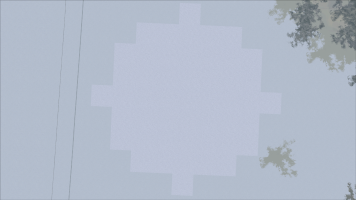
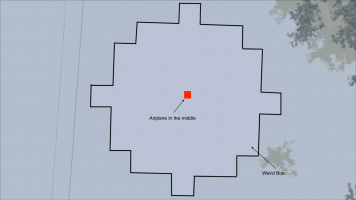
Lined Box around my Aircraft - what is it?
- Thread starter Airbasil
- Start date

Luis Hernandez
Members +
Remember these lines in fs9.cfg?
TERRAIN_DEFAULT_RADIUS=
TERRAIN_EXTENDED_RADIUS=
This is the physical representation of that: levels of detail of textures shown. That's the top-down view, zoomed out, right?
TERRAIN_DEFAULT_RADIUS=
TERRAIN_EXTENDED_RADIUS=
This is the physical representation of that: levels of detail of textures shown. That's the top-down view, zoomed out, right?

Airbasil
Members +
Yes..That's the top-down view, zoomed out, right?
Luis Hernandez
Members +
Sadly, you can't. In fact, you'd want this box to be as big as possible, so that the blurry ground textures are far far away. I don't know if you have ever read Jobia's document about FS9 ground textures.
Airbasil
Members +
You'd want this box to be as big as possible, so that the blurry ground textures are far far away?
Exactly...
Infact, Sadly, you can't.
Okey, and why not? what's the issue there to expand it?
I've now tried to set the extended terrain to 100.000000... allthough that did nothing... same box remains though...
I don't know if you have ever read Jobia's document about FS9 ground textures.
I indeed haven't.. what's the exact resumée of this document? - can you tell me? Thanks...

wolfebee89
SOH-CM-2024
I indeed haven't.. what's the exact resumée of this document? - can you tell me? Thanks...
can also recommend from https://web.archive.org/web/20181116214537/http://jobia.de/
FS2004 Landclasspatch der LandclassHauptsteuerdatei
FS2004 Landclasspatch der Textursteuerdateien
Last edited:
Luis Hernandez
Members +
Sadly, you can't.
I guess I didn't write it well: you can't get rid of that box, but you'll want it to be as big as possible within FS9 limitations (which now are more strict than the hardware available now).Okey, and why not? what's the issue there to expand it?
My German is almost non existent (barely level 30 in Duolingo after a 1143-day streak). But what I could translate back then using Babelfish (there wasn't Google Translate yet), it was something about ground textures and how to set them up in FS9.cfg. I had to read the conclusions from others in forums like Avsim and Flightsim (I'm new here, remember). I guess it won't be an issue for you, though.I indeed haven't.. what's the exact resumée of this document? - can you tell me? Thanks...