

-
Please see the most recent updates in the "Where did the .com name go?" thread. Posts number 16 and 17.
-
IMPORTANT DOWNLOADING INFORMATION - ALL MEMBERS PLEASE READ
Please see this thread for updates. Update Thread
SOH ADMINISTRATION
You are using an out of date browser. It may not display this or other websites correctly.
You should upgrade or use an alternative browser.
You should upgrade or use an alternative browser.
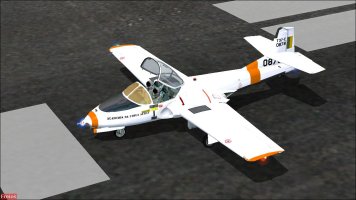
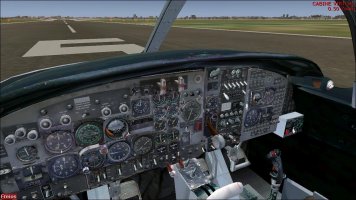
Looking for an old payware T-37 Dragonfly
- Thread starter anels9
- Start date

MrZippy
SOH-CM-2026
Can't find the Skyunlimited payware Dragonfly only the freeware version
 flyawaysimulation.com
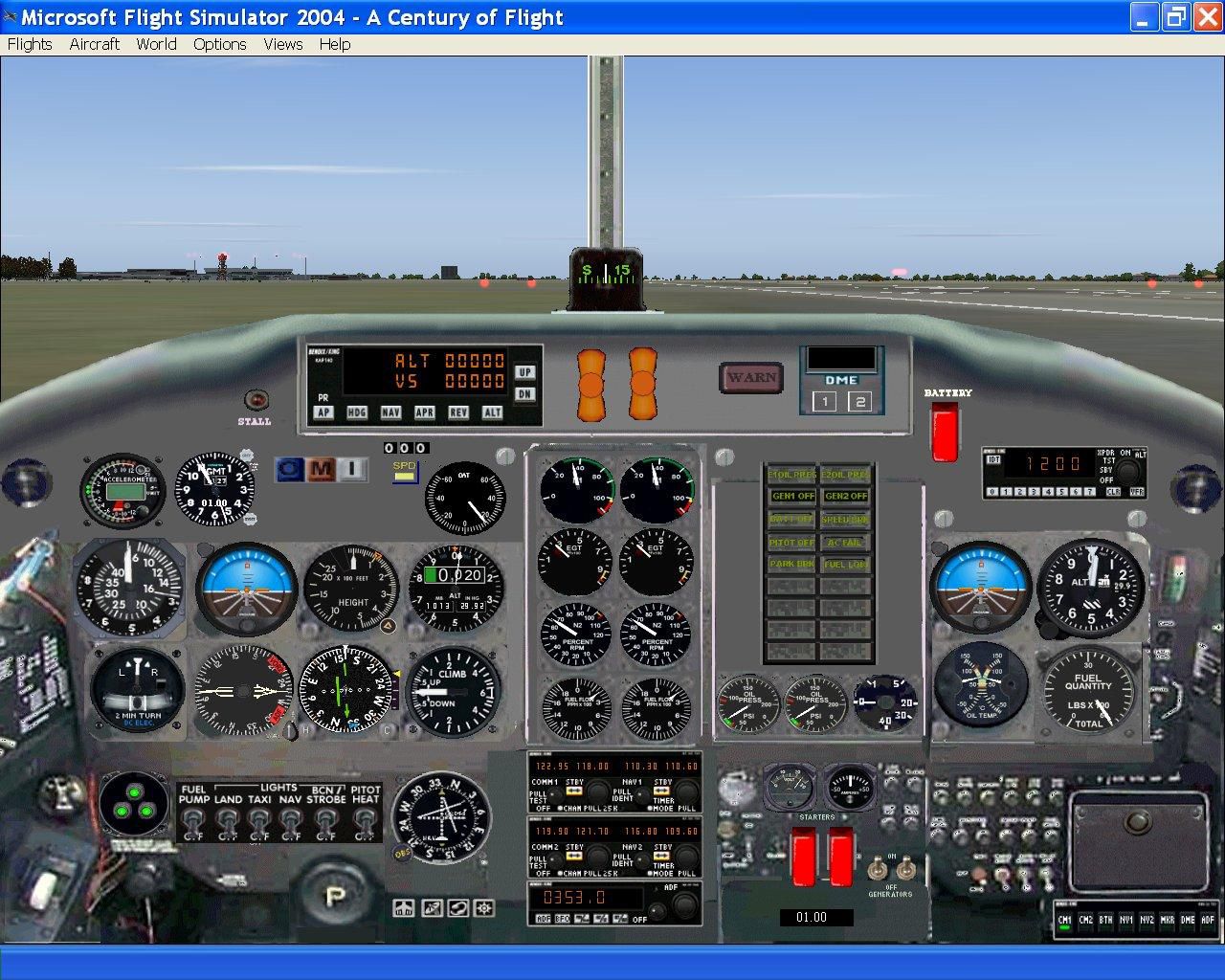
FS2004 Cessna T-37 Dragonfly
FS2004 Cessna T-37 Dragonfly. The model has been created with Abacus FSDS_v3. It features reflective metallic skin and very detailed moving parts, such as all flight controls, steerable nose wheel, spinning wheels, animated canopy, rotating pilot's head on rudder command, lighted engines exhaust...

wolfebee89
SOH-CM-2024
gents, I believe what @anels9 is referring to is the famous T-37 Tweet by microSimulator https://web.archive.org/web/20110904042449/http://www.t37sim.com/
AVSIM review https://web.archive.org/web/20170105085843/http://www.avsim.com/pages/0407/T37/T37.htm
Unfortunately, while the exe download link to purchase via the Flight1 wrapper system is still available via the wayback machine https://web.archive.org/web/20080827161744fw_/http://www.t37sim.com/purchasing.htm , do note that even if the vendor was still listed on Flight1, and thereby permitting said purchase via the Flight1 wrapper, Flight1 has, of late, regrettably disabled all new purchases with the Flight1 wrapper https://www.flight1.com/view.asp?page=legacy
AVSIM review https://web.archive.org/web/20170105085843/http://www.avsim.com/pages/0407/T37/T37.htm
Unfortunately, while the exe download link to purchase via the Flight1 wrapper system is still available via the wayback machine https://web.archive.org/web/20080827161744fw_/http://www.t37sim.com/purchasing.htm , do note that even if the vendor was still listed on Flight1, and thereby permitting said purchase via the Flight1 wrapper, Flight1 has, of late, regrettably disabled all new purchases with the Flight1 wrapper https://www.flight1.com/view.asp?page=legacy

AndyG43
SOH-CM-2023
Well I downloaded the installer, from the link provided by wolfebee, but it is not possible to reinstall it as it uses the key activation (as opposed to reactivating via the account) that Flight1 no longer supports. I've got 5-6 products like this, aircraft that have not been reproduced in any other form, very very frustrating. 
wolfebee89
SOH-CM-2024
perhaps get in touch with flight1, as they "may be able to offer limited assistance, however that old version of the wrapper is not supported" https://www.flight1.com/kb/kb.asp?id=1Well I downloaded the installer, from the link provided by wolfebee, but it is not possible to reinstall it as it uses the key activation (as opposed to reactivating via the account) that Flight1 no longer supports. I've got 5-6 products like this, aircraft that have not been reproduced in any other form, very very frustrating.
and also here https://www.flight1.com/view.asp?page=wrapper --> per the support site, if said key is not linked to your Flight1 account, then to get the pertinent access, you would have to provide Flight1 "with any previous email addresses, order numbers, and street address you may have used" at the time of purchase

You have the installer and are/were a legit customer. Try extracting the contents with universal extractor.Well I downloaded the installer, from the link provided by wolfebee, but it is not possible to reinstall it as it uses the key activation (as opposed to reactivating via the account) that Flight1 no longer supports. I've got 5-6 products like this, aircraft that have not been reproduced in any other form, very very frustrating.
AndyG43
SOH-CM-2023
Thanks for the suggestion, sadly it didn't work (unknown file type).You have the installer and are/were a legit customer. Try extracting the contents with universal extractor.
wolfebee89
SOH-CM-2024
You have the installer and are/were a legit customer. Try extracting the contents with universal extractor.
Gents, please do note that the flight1 wrapped installer in said wrapper not only includes the relevant setup files, but is and has been for the longest while, also Flight1's primary digital payment/-processing platform and software license validation solution with the relevant payment method details (for any re-installs), and as such, any attempts to bypass the flight1 wrapper is wholly illegal and a major no-no, if not, also a cause for law enforcement actionThanks for the suggestion, sadly it didn't work (unknown file type).
per https://www.flight1.com/view.asp?page=service it clearly states under the heading Key Files "Important: Flight1 has officially ended support for product keys. If you have a very old product where account reinstall is not available, then please make sure you have an account then contact Flight1."
Last edited:
You could try with the Flight1 Agent: https://www.flight1.com/view.asp?page=legacyThanks for the suggestion, sadly it didn't work (unknown file type).
I might add that preventing a legit buyer to reinstall things that were legally bought is theft.Gents, please do note that the flight1 wrapped installer in said wrapper not only includes the relevant setup files, but is and has been for the longest while, also Flight1's primary digital payment platform and software license validation solution with the relevant payment method details (for any re-installs), and as such, any attempts to bypass the flight1 wrapper is wholly illegal and a major no-no; if not also a cause for law enforcement action
per https://www.flight1.com/view.asp?page=service it clearly states under the heading Key Files "Important: Flight1 has officially ended support for product keys. If you have a very old product where account reinstall is not available, then please make sure you have an account then contact Flight1."
wolfebee89
SOH-CM-2024
only wish the developers and publishers would see it that way...I might add that preventing a legit buyer to reinstall things that were legally bought is theft.
AndyG43
SOH-CM-2023
I get that there can be many reasons why things are withdrawn, there is more than one Alphasim product I 'lost' because developers fell out with Phil (who, personally, I've always found helpful), and I'm understanding and supportive of IPR. I just wish more could follow the examples of the GAS guys, Thomas Nillson et al.only wish the developers and publishers would see it that way...
But too many just hide behind the "we've moved on from ..... ", my recent posts about the Aerosoft SH-60 being an example*; Flight1 are probably the worst offender in this.
* Although Christian did make suggestions no concrete solution could be offered.
anels9
Charter Member
Guys i was able to find an installer on some dodgey site. Admin, please edit this post if needed
the download said V2 but when i ran the installer it said 1.04 and one of the pages in the manual says 1.02. So i dont know which version it really is.
Everything seems to be there, paints, panels etc.. Ive taken the liberty of just uploading it into a rar. As i said the site i got it was iffy and it might show as a virus for someone else.

the download said V2 but when i ran the installer it said 1.04 and one of the pages in the manual says 1.02. So i dont know which version it really is.
Everything seems to be there, paints, panels etc.. Ive taken the liberty of just uploading it into a rar. As i said the site i got it was iffy and it might show as a virus for someone else.
Microsimulator T-37 FS2004
MediaFire is a simple to use free service that lets you put all your photos, documents, music, and video in a single place so you can access them anywhere and share them everywhere.
www.mediafire.com

Sbob
SOH-CM-2026
Ohhhhh boy, I remember this thing. 
I was trying to find a good Tweet for FS2002 and I don't remember if I bought it or if the iffy downloads were already out there.
The MDL looks great but the "procedural stuff" makes the VRS Superbug look tame.
It might be worth while to play around with the .air file and swapping out all of the gauges. Just to get it running.
Expect a lot of this:

The engines like to explode.
There is that dodgy Simsound.dll file that Vista, Win10 (and I'm guessing Win11) won't touch with a 10 foot pole.
I managed to get it in the air by loading another twin engine fighter, getting it running, then taking off before I switched back to the Tweet.
You'll get a minute or two of hope before an engine detonates and it goes as cold as a Cod.
There's actually a rather sordid history of this plane, as I recall. Lots of pitchforks were out at FS.com.
I'm still not sure if was just too advanced for its own FS good or it just never worked.
I'm pretty sure it didn't last as payware for very long.
I scanned everything with Defender and it passed as OK.
Play around with it, but expect to get frustrated.
I'd still love to fly the Tweet, so I'm going to try wrenching on it.
So, the download is safe once you get past all the PDF readers and "download downloads".
Just be careful and make SURE you get the Microsimulator T-37 FS2004.zip file.
IMPORTANT!
DO NOT use the Install proggy in the zip file. There is a VERY convoluted procedure to get this thing running in its stock form.
Just install the aircraft files as you normally would.
DO NOT install the "Sound.DLL" you'll find in the zip. This is the same DLL that got a bunch of grief when M$ did one of its first Security Updates. If you install it, you probably won't be able to start FS.
Open the Sound folder and you'll find two DAT files. Trash can them. As I recall, they work with that DLL file Windows will refuse to run.
Open the Panel folder and you'll find a single gauge file and a CAB file/folder. Trash the single gauge, it ends with "C9". Keeping this gauge will result in you having to repeatedly hit an "OK" button while Windows/FS complains about not being able to find a gauge file.
If you've made it this far without deleting the zip file, dig around in the DOCUMENTS folder.
Like I said, there is a very convoluted process to getting this thing running in its stock form.
Lots of shades of VRS, you're supposed to click a separate icon to start a T-37 version of FS after you jump thru a bunch of other hoops then save a start up flight. I mean, for Pete's sake already..
If anyone wants work together to try and make this thing a normal FS aircraft, I'm going to give it a shot. Maybe some of us team up or start a separate thread? I think there's some potential and a reason to give it a chance. I'm hoping there isn't stuff coded in the MDL files and I don't think there is, yet. I haven't dived into the .air file. Maybe fixing it won't be that tough?
I was trying to find a good Tweet for FS2002 and I don't remember if I bought it or if the iffy downloads were already out there.
The MDL looks great but the "procedural stuff" makes the VRS Superbug look tame.
It might be worth while to play around with the .air file and swapping out all of the gauges. Just to get it running.
Expect a lot of this:
The engines like to explode.
There is that dodgy Simsound.dll file that Vista, Win10 (and I'm guessing Win11) won't touch with a 10 foot pole.
I managed to get it in the air by loading another twin engine fighter, getting it running, then taking off before I switched back to the Tweet.
You'll get a minute or two of hope before an engine detonates and it goes as cold as a Cod.
There's actually a rather sordid history of this plane, as I recall. Lots of pitchforks were out at FS.com.
I'm still not sure if was just too advanced for its own FS good or it just never worked.
I'm pretty sure it didn't last as payware for very long.
I scanned everything with Defender and it passed as OK.
Play around with it, but expect to get frustrated.
I'd still love to fly the Tweet, so I'm going to try wrenching on it.
So, the download is safe once you get past all the PDF readers and "download downloads".
Just be careful and make SURE you get the Microsimulator T-37 FS2004.zip file.
IMPORTANT!
DO NOT use the Install proggy in the zip file. There is a VERY convoluted procedure to get this thing running in its stock form.
Just install the aircraft files as you normally would.
DO NOT install the "Sound.DLL" you'll find in the zip. This is the same DLL that got a bunch of grief when M$ did one of its first Security Updates. If you install it, you probably won't be able to start FS.
Open the Sound folder and you'll find two DAT files. Trash can them. As I recall, they work with that DLL file Windows will refuse to run.
Open the Panel folder and you'll find a single gauge file and a CAB file/folder. Trash the single gauge, it ends with "C9". Keeping this gauge will result in you having to repeatedly hit an "OK" button while Windows/FS complains about not being able to find a gauge file.
If you've made it this far without deleting the zip file, dig around in the DOCUMENTS folder.
Like I said, there is a very convoluted process to getting this thing running in its stock form.
Lots of shades of VRS, you're supposed to click a separate icon to start a T-37 version of FS after you jump thru a bunch of other hoops then save a start up flight. I mean, for Pete's sake already..
If anyone wants work together to try and make this thing a normal FS aircraft, I'm going to give it a shot. Maybe some of us team up or start a separate thread? I think there's some potential and a reason to give it a chance. I'm hoping there isn't stuff coded in the MDL files and I don't think there is, yet. I haven't dived into the .air file. Maybe fixing it won't be that tough?
Last edited:

ScottishMike1
Members +
I found the best solution was to fit the panel from the freeware T37 of D'Attomo & Quai into the payware, it seemed to work well (although I have not done extensive testing; one take-off and landing ).
Pics below:
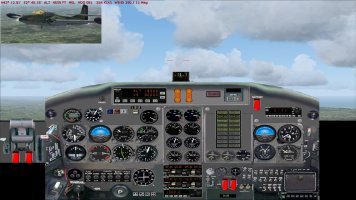
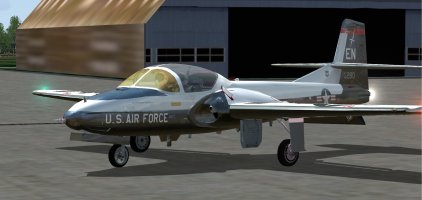

I had no problem with the sim9sound.dll (using windows 10). I found the handling a little mushy, but never having flown the real thing it's difficult to comment.
Pics below:
I had no problem with the sim9sound.dll (using windows 10). I found the handling a little mushy, but never having flown the real thing it's difficult to comment.
Last edited:
Sbob
SOH-CM-2026
I just tried pasting the panel from the FSD T-38 into one of the aircraft (the T-38 has a strange start up) but no joy. I also found some odd values in the "500" section of the .air file and tried trashing them.
Like I said, I think it has potential.
So, you're saying those DLL and DAT files are fine in Win10? Are you doing "the full Monte" in terms of the actual install instructions or just installing the plane as you would normally?