• There seems to be an uptick in Political comments in recent months. Those of us who are long time members of the site know that Political and Religious content has been banned for years. Nothing has changed. Please leave all political and religious comments out of the forums.

    If you recently joined the forums you were not presented with this restriction in the terms of service. This was due to a conversion error when we went from vBulletin to Xenforo. We have updated our terms of service to reflect these corrections.

    Please note any post refering to a politician will be considered political even if it is intended to be humor. Our experience is these topics have a way of dividing the forums and causing deep resentment among members. It is a poison to the community. We appreciate compliance with the rules.

    The Staff of SOH

  • Server side Maintenance is done. We still have an update to the forum software to run but that one will have to wait for a better time.

New GA Twin Possibilities

Tom Clayton

Administrator
Staff member
I noticed that the Carenado C90 King Air is on sale for $10 (US) on the marketplace, but I've had mixed results from their stuff, especially with the C408 backport. So I'm looking for either input from someone that already has the C90 or suggestions for other (semi-)modern GA twins.
 
I spent two years washing, waxing and detailing 4 C-90's for the charter outfit I used to work for. They all had the Blackhawk Speed stacks and double ventral fins installed. I have a bit of a love hate relationship with the airframe. (Ask me how I know where every rivet is on that airplane....) It's one of the real aircraft I know how to start. I had the FSX/P3d version of the C-90 so Perhaps I'll pick it up. As a personal real airplane, unless you fly it virtually every day, it's a bit of a handful for a single GA pilot. It's pretty complex for single pilot operation. We flew ours part 135 with two crew. We had a customer that had a C-90 we did maintenance on who was a Jeweler. After it scaring the crap out of him several times, he put it up for sale and bought a CJ1. His insurance required him to have a copilot until he got 200 hours in the CJ. Ours were were impeccably maintained but could throw you a curveball. Had two different birds have a co pilot windshield failure. About 8 months apart. Had another one that burned out the A/C blower fan motor (under the co pilot's seat) and fill the cabin with smoke. Luckily they were just taxiing out at Teterboro. Also had one of my co workers loose one off the tow bar on the only hill on the airport. (No brake rider) The resulting crunch cost $175,000 to fix the airplane (In house with our own mechs) and 30 grand to replace the hangar door it hit. In 2005 dollars. :rolleyes:
 
If you want a King Air, better stick with the one from BlackSquare, unless you really want a '90...
I have the Black Square Steam version, but I've become discouraged by it. I keep the failures turned off - I just want to fly and relax. But I still get warning lights pop on that won't reset, even using the weather radar interface. It happens once out of every three-four flights.

I also have the Turbine Duke (love that thing!) and the Baron Pro set - both from BS. I also have the Chancellor and 310R. I love turboprops most, so most of my flights recently have been in the Steam Caravan and the Duke.

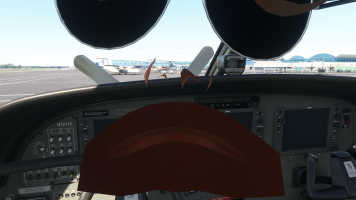
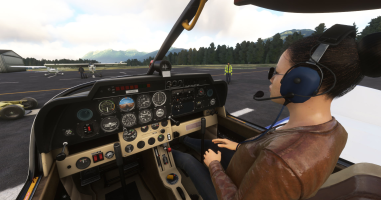
It's less than a burger and fries at the clown house, so I might as well take a chance on the C90. I just wish Carenado would update their 2020 stuff to make the copilot visible inside the cockpit.
 
Well, I'm glad I did a little more digging first. The C90 uses Collins glass with one of those cursed FMS pads in the center console - something you can't see from any of the PR shots in the Marketplace.
 
Concerning the visible copilot in the cockpit, you should be able to do it by yourself, provided the aircraft was NOT bought from the marketplace.
Unfortunately, the only Carenado plane I'm interested in is the Staggerwing, but contrary to other Carenado planes, that one is ONLY sold through the marketplace, which makes it impossible for me to edit the file to add a visible copilot :/
 
Last time I tried any kind of cfg edit, I ended up staring at the back of my own sunglasses. There wasn't a way to have only the copilot without the pilot too. This is why I have the invisible avatar pack from the .to site. It lets me make the exterior view match the interior when I need to.

I decided to pick up the B55 from MS/Carenado. I think it's another backport, but I'm not sure. The panel is nice, and a tablet lets you swap the GPS and show/hide a more modern AH/HSI setup. There's still no interior copilot, but at least the tablet lets me turn that off in the exterior view.
 
Well, I did the modification for all of the MSFS standard edition planes in my hangar (other edition planes are encrypted), and all of the freewares that required it, and some of the paywares I have too. The technique is rather simple: edit the LOD0 file to add the section about "PILOT_1" that can be found in the LOD1 file. All of this can be done using Notepad or Notepad++ (which has a nice identation function to make the file more readable).
There are some youtube videos that explain how to do it, it's pretty handy and it takes me 1 minute per aircraft more or less.
If you tried it and ended up seeing your own pilot position avatar, then it's probably that you have added something else than the PILOT_1. Not sure about the main pilot name... maybe PILOT_0 ? No idea, but PILOT_1 is your target :)
 
Which LOD files are you talking about. The only ones I see are *.bin and *.gltf, neither of which have a pilot section of any kind.
 
Let me take an example with the default DR400, which is located in the "Official" folder.
The plane's folder name is "asobo-aircraft-dr400".
I navigate to the sub-folder "model" of that aircraft.
In there, there are several files. I'm only looking at the files with extension ".gltf", and especially the ones that mention "cockpit" (or "interior" for some other planes).
So I can see the files "DR400_cockpit_LYCOMING_LOD00.gltf" (LOD0) and "DR400_cockpit_LYCOMING_LOD01.gltf" (LOD1).

What I want to do from now on, is the following:
- edit the LOD1 file in Notepad++
- if you have installed the JSON extension within Notepad++, trigger the "format JSON" menu.
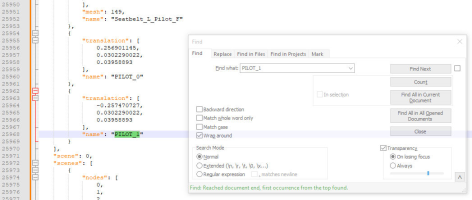
- use the search function to find "PILOT_1".
- you should find something like this:
1764366115353.png
- copy that "translation" section from the "{" to the "}" (lines 25.962 to 25969 in this case). We're going to paste them in the LOD0 file.
- edit the LOD0 file in Notepad++. Use the JSON formatting just like the LOD1 file.
- scroll down until you find the end of the section that lists a lot of "translation" items, and just before it lists the "nodes" as simple numbers. That's the place.
- see in the screenshot below, you want to do two things from this point:
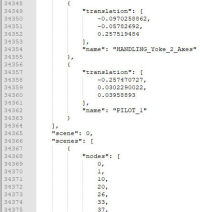
1- paste the "translation" section you had copied from the LOD1 file at the end of the list of translations
2- add one number to the list of "nodes" which is right below.
- it should look like that for the translations (I have already pasted it in that screenshot):
1764366454251.png

Then in the list of nodes, I have added the last number, like next in line (I have added "216" in this case):
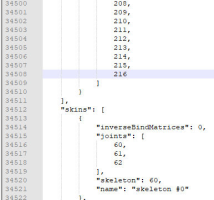
1764366576523.png
Just mind the commas (",") !
 
Just Pilot_1 - I was careful to get everything, including the comma. I did get the copilot, I just didn't have her in this screenshot.
 
Tom, in the cameras.cfg you can move your eyepoint a few inches forward to get in front of the pilot's head. At the top of the cameras.cfg is a line like this example:

[VIEWS]
eyepoint = -7.587841,-0.832531,0.72103 ; (feet) longitudinal, lateral, vertical distance from reference datum

To move your eyepoint 6" forward in the above example, change eyepoint = -7.587841 to eyepoint = -7.087841.
 
I'm good with the way things are right now. More than half the planes I fly right now do have copilot visibility - it's just a few that don't.
 
I just gave it a try right now with the default Caravan, which I had not modified before (because I use only the one from BlackSquare....), and ended up having the same issue as you !!
But for example the DR400 works just right, as you can see below.
I wonder if it's perhaps an issue with another addon that interferes ?
Just out of curiousity, which other aircraft gave you that issue ?
1764525800438.png
 
I just ran the mod on the stock TBM and that was a success! I already fly that one quite a bit despite being alone in the cabin. I have a feeling that's going to change now.

Edit: The Caravan was my first attempt. I'm guessing the issue there is just model-specific.
 
It might be a bit of a stretch to consider it a GA twin, but the Flysimware Lear 35 is superb. Unfortunately, it does not have a visible copilot. I've tried manually adding one numerous times and never had any luck. If anyone can figure that one out, you'd be a hero to many....as it's an oft-requested feature of FSW's discord.
 
Back
Top