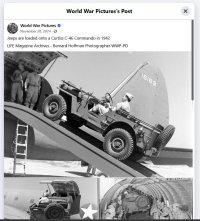
No Jeep inside Curtis Commando

gray eagle

SOH-CM-2026
I thought that the Jeep that shows outside and next to the plane would also be visible inside the cargo hold of the C-46 Curtis Commando.
I see that one has to configure the load before flight so that what you see here will show - but no Jeep.
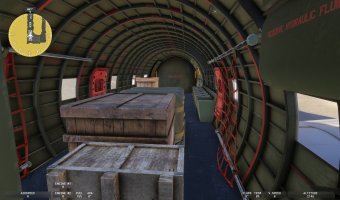
Cargo.jpg
 
@gray eagle,
For the jeep to appear in the cargo area of the C46, there are two possibilities:
- animate the jeep so that it "climbs" into the cargo area and trigger this movement by using the event of closing the doors, for example,
- create a second occurrence of the jeep placed in the cargo area and make it appear (while also making the first one disappear) when the doors close.

If you want to upgrade the addon, the second solution is the one I would choose because it is technically feasible without modifying the sources.
You will need to find the model of a jeep, place it in the right place relative to the point (0,0,0) and define it via an attachment to the existing 3D model, then add a few lines of XML code to manage its display.
 
@gray eagle,
For the jeep to appear in the cargo area of the C46, there are two possibilities:
- animate the jeep so that it "climbs" into the cargo area and trigger this movement by using the event of closing the doors, for example,
- create a second occurrence of the jeep placed in the cargo area and make it appear (while also making the first one disappear) when the doors close.

If you want to upgrade the addon, the second solution is the one I would choose because it is technically feasible without modifying the sources.
You will need to find the model of a jeep, place it in the right place relative to the point (0,0,0) and define it via an attachment to the existing 3D model, then add a few lines of XML code to manage its display.
I really appreciate your suggestions, but your suggestions are too technical for me to comprehend. In other words, your suggestions are over my head but thank you any way. :)
 
I can't see any way to specify loading the jeep as cargo. I don't know whether it was loadable before - if it was, maybe it just got dropped in the Inibuilds/WT redevelopment.
 
I can't see any way to specify loading the jeep as cargo. I don't know whether it was loadable before - if it was, maybe it just got dropped in the Inibuilds/WT redevelopment.
The idea of the Jeep in my view was perhaps just eye candy appearing as an available ride and maybe not as cargo. I know diddler's C-54 Skymaster uses the jeep as both cargo and off loaded on tarmac. I can make load adjustments for the C-46 but even with max cargo, no Jeep
will appear as loaded cargo.
 
Last edited:
I am away from the sim now and can't check it, but I seem to remember that the jeep showed up on the ground with the "military" version and not the "modern" version. However, I'm old and could be hallucinating that. Just a thought.
 
I am away from the sim now and can't check it, but I seem to remember that the jeep showed up on the ground with the "military" version and not the "modern" version. However, I'm old and could be hallucinating that. Just a thought.
True, it shows on the ground outside of the C-46 military liveries.
 
Have you guys tried flipping the SECURE AIRCRAFT switch above the co-pilot. That should toggle the Jeep between inside and out.

I just tried it, and it seems the animation has become wonky. When the aircraft first loads the Jeep is visible inside the aircraft. Flipping the switch moves it outside. But flipping the switch again, the Jeep disappears outside but doesn't show up inside. Something has change from the way it used to work. Even the door animation and sound seem out of sync sometimes.

Forest
 
Last edited:
Have you guys tried flipping the SECURE AIRCRAFT switch above the co-pilot. That should toggle the Jeep between inside and out.

I just tried it, and it seems the animation has become wonky. When the aircraft first loads the Jeep is visible inside the aircraft. Flipping the switch moves it outside. But flipping the switch again, the Jeep disappears outside but doesn't show up inside. Something has change from the way it used to work. Even the door animation and sound seem out of sync sometimes.

Forest

No luck with that. Still just crates and boxes, even at above-maximum take-off weight with 100% cargo. Not that it bothers me much - I'm happy with boxes.
 
Have you guys tried flipping the SECURE AIRCRAFT switch above the co-pilot. That should toggle the Jeep between inside and out.

I just tried it, and it seems the animation has become wonky. When the aircraft first loads the Jeep is visible inside the aircraft. Flipping the switch moves it outside. But flipping the switch again, the Jeep disappears outside but doesn't show up inside. Something has change from the way it used to work. Even the door animation and sound seem out of sync sometimes.

Forest
I did that (flip the switch) if memory serves, I thought I saw it in the cargo bay but now when I flip the switch, I hear the sound of the rear door opening and the jeep is outside next to the plane.
 
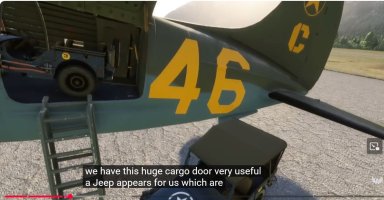
I found a Youtube video that was demo of the C-46 and I managed to take a screen shot showing the Jeep loaded in the cargo bay.
I recently added chaseplane and wonder if that has any thing to do with the no show Jeep inside. I do know that Chaseplane will cripple
the walk around avatars.
Capture.JPG
 
I think this out of sync door sound and erratic Jeep appearance issue started with one of the MSFS updates over maybe this last year. The C-46 is an aircraft I've been flying for a long time, and I've never seen it do this until I looked after seeing this thread.


Forest
 
I think this out of sync door sound and erratic Jeep appearance issue started with one of the MSFS updates over maybe this last year. The C-46 is an aircraft I've been flying for a long time, and I've never seen it do this until I looked after seeing this thread.


Forest
So are you having this issue as well? Maybe last MSFS2024 update cause this. I tried uninstalling/ reinstalling and still the issue remains.
I contacted INI files about this and they pointed me to MSFS 2024 forum and the issue is just hangin' there to dry.
 
Last edited:
Back
Top