
-
Please see the most recent updates in the "Where did the .com name go?" thread. Posts number 16 and 17.
-
IMPORTANT DOWNLOADING INFORMATION - ALL MEMBERS PLEASE READ
Please see this thread for updates. Update Thread
SOH ADMINISTRATION
You are using an out of date browser. It may not display this or other websites correctly.
You should upgrade or use an alternative browser.
You should upgrade or use an alternative browser.
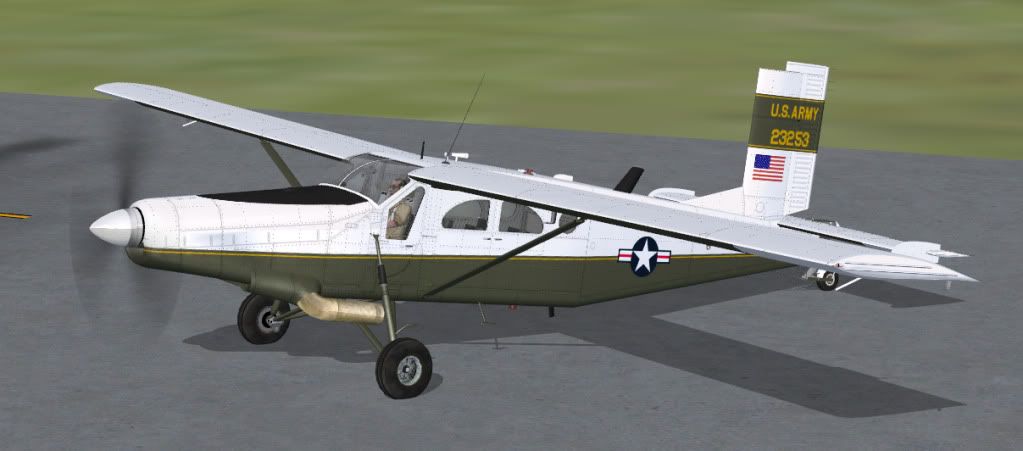
Piglet's Porter...
- Thread starter DaveKDEN
- Start date
Yet an other masterpiece Tim, thank you :salute: After your pc-7 this is yet an other perfect slow-mover for flying over my beloved Switzerland X scenery.
And here it is (just started it, still some work to do). Although the Swiss Porter is slightly different it will do perfectly.
View attachment 17479
Swiss Air Force repaint
And Tim.....AN MASTERPIECE !!!!!
And here it is (just started it, still some work to do). Although the Swiss Porter is slightly different it will do perfectly.
View attachment 17479
Gregory Paul
Charter Member

falcon409
SOH-CM-2026
Ah, yet another Vin Masterpiece. . .nice job Vin.:salute:. . . . . . .And here it is (just started it, still some work to do). Although the Swiss Porter is slightly different it will do perfectly.
View attachment 17479
Anyone have a tutorial or check sheet on the proper use of the engine controls on this one. Like what setting for the throttle, pitch and mixture controls for idle, takeoff cruise and landing, and the proper start up procedure?
I have pistons down pat but am baffled by the turbines.
Dave
I have pistons down pat but am baffled by the turbines.
Dave

I was working on one but Tony is well ahead of me on that so I will let him finish it off.Tim did the most of it (wonderfully, we all agree) but
now guys, is up to you, master repainters, to get on with "amazing" repaints .......
Italo

I started this one today.....
View attachment 17508
...F-GKIA
That's a very rough screen grab, the real thing looks much better ...honest! Still playing with getting all the curves right and then I have to match it on top, bottom and the other side. Will be a few more days yet before she's ready.

Yes FSX doesnt do turboprops well. Make sure the brakes are on, MAke sure that prop pitch is at minimum, shift F1 i think or on Tims plane pull the knob out, ( this usully stops the plane from running away on start up, but dosnt always work, dont know why ) battery on, nav,beacon on, start engine, as soon as the engine catches , turn the start to off. This is when things can go awry with turboprops, Tims seems to spool up for too long but at least it dosnt run away, which most of the others i have will do even with the brakes on.Usually then you use the throttle to set power and prop pitch for RPM but this one i am not sure, adjusting pitch causes the plane to lurch ( fsx issue i think ), but doesnt change RPM, seems to effect the power settng, although if you pull the knob out far enough it will cause the plan to lose power. Still all in all a nice plane to fly. By the way Tim, minor problm, once i land , switching the radio switch to off , doesnt turn the radios off.
Forgot to mention, turboprops have a little spooling tim. so adjusting throttle or prop pitch will take time for engine to do anything, so you have to think ahead.
Forgot to mention, turboprops have a little spooling tim. so adjusting throttle or prop pitch will take time for engine to do anything, so you have to think ahead.
Is anyone else having a problem getting all of the files for the Porter
It says it is downloading 12.1 meg-missing complete .cfg file and the cab file as well
Any ideas-tried twice
Rick
Rick, did you scroll down in the aircraft.cfg file? There's a huge blank space between the repaint entries and the rest of it for some reason. And the cab file is separate from the aircraft folder in the zip.

Paul K
SOH-CM-2026
Tim, you're finest moment since the Kingfisher, in my opinion. For someone who's getting a bit weary of the fast military jet releases, a good STOL cargo carrier like this is very welcome indeed.
Just been trying it under full flap, IAS around 60 knots, and she holds at 1600 ft. like a kite on a string. Perfect for setting up an approach into the kind of rough airstrips you find in PNW ( and Cambodia cough cough ) etc.
An essential acquisition for anyone who is looking to create an air freight operation with Air Hauler.
Have a beer. No, have several.
Just been trying it under full flap, IAS around 60 knots, and she holds at 1600 ft. like a kite on a string. Perfect for setting up an approach into the kind of rough airstrips you find in PNW ( and Cambodia cough cough ) etc.
An essential acquisition for anyone who is looking to create an air freight operation with Air Hauler.
Have a beer. No, have several.
Gregory Paul
Charter Member
A little OT
I have few questions.
What is the texture file spec? What does it do?
How do you make a bump texture file?
Thanks for your help. I have not really played with painting in FSX or FS9 for a long time now (about two years or so).
I have few questions.
What is the texture file spec? What does it do?
How do you make a bump texture file?
Thanks for your help. I have not really played with painting in FSX or FS9 for a long time now (about two years or so).


papab
Charter Member
Rick, did you scroll down in the aircraft.cfg file? There's a huge blank space between the repaint entries and the rest of it for some reason. And the cab file is separate from the aircraft folder in the zip.
Thanks Bill,I will give it a whirl....
Rick

doublecool
Charter Member
Is there a way to put the GPS from the PC-7 on her dash
Um silly question but I can't seem to get it going, tried starting as per mjrhealth's post and it sounds like the turbine is turning (indicating about 10% RPM) but no ignition (and yes the ignition switch is on lol!) Ctrl+E doesn't seem to want to start it either and if I start with another A/C running and swap to the Porter it runs down to a stop..
The spec map controls the reflected light and the colour of the reflections. The alpha channel in the spec map controls the size of the reflections from pinpoint to flood.I have few questions.
What is the texture file spec? What does it do?
Making a bump map is quite complex until you get the hang of it. Try a Google seach for bump mapping tutorials for FSX as there are a couple on the net.How do you make a bump texture file?
Bear in mind that you can only use spec maps and bump maps if the designer originally included them in the model's materials settings. You cannot add them later to an aircraft that does not have them originally.

warchild
Charter Member
Um silly question but I can't seem to get it going, tried starting as per mjrhealth's post and it sounds like the turbine is turning (indicating about 10% RPM) but no ignition (and yes the ignition switch is on lol!) Ctrl+E doesn't seem to want to start it either and if I start with another A/C running and swap to the Porter it runs down to a stop..
I'm geting ready to fly it for the first time right now, so i aint no expert, but chrck and make sure of the battery and magneto switches if they are modeled..also make sure the fuel is turned on and youve switched to a full tank..