Scenery Editor / Builder

Peter Lagan

Members +
Anyone know of a Scenery builder / Editor which will work with FSX Steam I have tried four different ones non of which work with the current Steam edition They all need a Tools folder in the SDK folder which is no longer in the latest version
 
I have the FSX Acceleration SDK and the P3D v1.4 and v3 SDKs installed for FSX models (including Steam) and I have the P3D v4.5 SDK installed for my P3D models.

NONE of the above seem to have a 'Tools' folder anywhere in their respective file structure.

Where is this 'Tools' folder supposed to live?

I used ADE to build FSX airports/scenery files in the past and I know the creator is no longer active but the files are still available on FSDeveloper: https://www.fsdeveloper.com/wiki/index.php/ADE
 
Thanks
I have the FSX Acceleration SDK and the P3D v1.4 and v3 SDKs installed for FSX models (including Steam) and I have the P3D v4.5 SDK installed for my P3D models.

NONE of the above seem to have a 'Tools' folder anywhere in their respective file structure.

Where is this 'Tools' folder supposed to live?

I used ADE to build FSX airports/scenery files in the past and I know the creator is no longer active but the files are still available on FSDeveloper: https://www.fsdeveloper.com/wiki/index.php/ADE
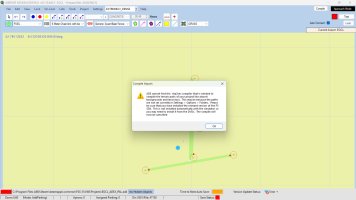
I am using ADE to build with when I go to Compile I see this message . Now I think this is supposed to live in the SDK folder in FSX in a subfolder called "Tools" Which is not there .
 

Attachments

  • Screenshot .jpg
    Screenshot .jpg
    215.9 KB · Views: 4
I dont have stream, just the regular disk version of both 9 and X, but i just create my own tools folder and SDK folder and set the path in my scenery tools properties, ADE, Sbuilder, Instant scenery ect. My SDK's and tools folder are in C/ along with my various installs
 
I just did a search for 'shp2vec.exe' and I found an instance of the file in each of my installed SDKs as follows:

FSX Accel SDK (good for boxed and Steam FSX): C:\FSX Tools\FSX Accel SDK\SDK\Environment Kit\Terrain SDK

P3D v1.4 SDK (good for boxed and Steam FSX and P3D up to v1.5): C:\FSX Tools\P3D_V1.4_SDK\Environment Kit\Terrain SDK

P3D v3 SDK (good for boxed and Steam FSX and P3D up to v3): C:\FSX Tools\P3D_V3_SDK\Environment SDK

P3D v4.5 SDK (good for 64-bit P3D v4.5): C:\P3D_Tools\P3D_4.5_SDK\World\Terrain

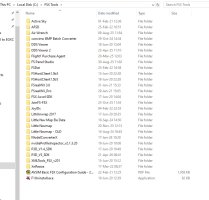
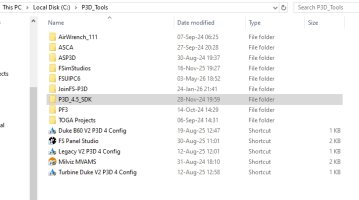
I did create both the 'FSX Tools' and the 'P3D Tools' folders on the root of my C: drive and ALL of my simulator tool apps live in those folders like this:

2026-05-05 08_25_10-FSX Tools.jpg
2026-05-05 08_24_29-P3D_Tools.jpg

I don't currently have ADE installed on this current PC as I have not made any sceneries in years but if I did I would install it into the 'FSX Tools' folder.

It seems like your install of ADE does not know where to find the 'shp2vec.exe' file so if I were you I would go into the ADE 'Settings>Options>Folders' section and make sure the address listed in there matches the file location for the 'shp2vec.exe' on your specific PC which could be something like: C: YOUR LOCATION INFO\FSX Accel SDK\SDK\Environment Kit\Terrain SDK

Hopefully the above info will get you up and running.
 
Back
Top