• Please see the most recent updates in the "Where did the .com name go?" thread. Posts number 16 and 17.

    Post 16 Update

    Post 17 Warning old domain name stealing credentials

  • Special Server Maintenance

    Just when you think you have everything running some what better...

    You get a message from the Hosting company. Short story they need to move us to a new server. I have been working with them to plan a good date for all concerned. Here is what we have come up with as a schedule.

    1. November 4th 17:00 -5UTC shut off the forums and start backup proceedures. During this time there will be no access to the forums or the Resource Section.
    2. November 5th Continue with Backups and download same until complete.
    3. November 6th 7:00 turn over server to hosting company to move system to new server
    4. November 7th - 8th restore backups and upgrade forum software.

    If all goes well we should be back online on November 8th.

    To keep you updated Tom Clayton has offered to post updates on AVSIM forums.

    Thank you for your support.

Scenery Editor / Builder

Peter Lagan

Members +
Anyone know of a Scenery builder / Editor which will work with FSX Steam I have tried four different ones non of which work with the current Steam edition They all need a Tools folder in the SDK folder which is no longer in the latest version
 
I have the FSX Acceleration SDK and the P3D v1.4 and v3 SDKs installed for FSX models (including Steam) and I have the P3D v4.5 SDK installed for my P3D models.

NONE of the above seem to have a 'Tools' folder anywhere in their respective file structure.

Where is this 'Tools' folder supposed to live?

I used ADE to build FSX airports/scenery files in the past and I know the creator is no longer active but the files are still available on FSDeveloper: https://www.fsdeveloper.com/wiki/index.php/ADE
 
Thanks
I have the FSX Acceleration SDK and the P3D v1.4 and v3 SDKs installed for FSX models (including Steam) and I have the P3D v4.5 SDK installed for my P3D models.

NONE of the above seem to have a 'Tools' folder anywhere in their respective file structure.

Where is this 'Tools' folder supposed to live?

I used ADE to build FSX airports/scenery files in the past and I know the creator is no longer active but the files are still available on FSDeveloper: https://www.fsdeveloper.com/wiki/index.php/ADE
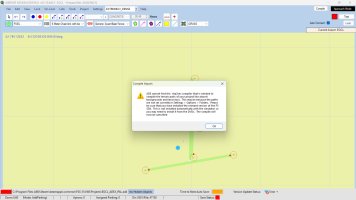
I am using ADE to build with when I go to Compile I see this message . Now I think this is supposed to live in the SDK folder in FSX in a subfolder called "Tools" Which is not there .
 

Attachments

  • Screenshot .jpg
    Screenshot .jpg
    215.9 KB · Views: 8
I dont have stream, just the regular disk version of both 9 and X, but i just create my own tools folder and SDK folder and set the path in my scenery tools properties, ADE, Sbuilder, Instant scenery ect. My SDK's and tools folder are in C/ along with my various installs
 
I just did a search for 'shp2vec.exe' and I found an instance of the file in each of my installed SDKs as follows:

FSX Accel SDK (good for boxed and Steam FSX): C:\FSX Tools\FSX Accel SDK\SDK\Environment Kit\Terrain SDK

P3D v1.4 SDK (good for boxed and Steam FSX and P3D up to v1.5): C:\FSX Tools\P3D_V1.4_SDK\Environment Kit\Terrain SDK

P3D v3 SDK (good for boxed and Steam FSX and P3D up to v3): C:\FSX Tools\P3D_V3_SDK\Environment SDK

P3D v4.5 SDK (good for 64-bit P3D v4.5): C:\P3D_Tools\P3D_4.5_SDK\World\Terrain

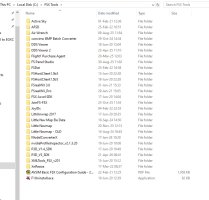
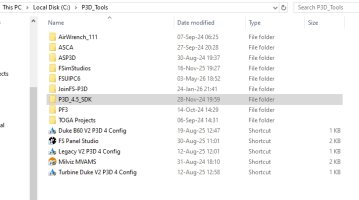
I did create both the 'FSX Tools' and the 'P3D Tools' folders on the root of my C: drive and ALL of my simulator tool apps live in those folders like this:

2026-05-05 08_25_10-FSX Tools.jpg
2026-05-05 08_24_29-P3D_Tools.jpg

I don't currently have ADE installed on this current PC as I have not made any sceneries in years but if I did I would install it into the 'FSX Tools' folder.

It seems like your install of ADE does not know where to find the 'shp2vec.exe' file so if I were you I would go into the ADE 'Settings>Options>Folders' section and make sure the address listed in there matches the file location for the 'shp2vec.exe' on your specific PC which could be something like: C: YOUR LOCATION INFO\FSX Accel SDK\SDK\Environment Kit\Terrain SDK

Hopefully the above info will get you up and running.
 
Back
Top