Thanks for the effort(s) both.
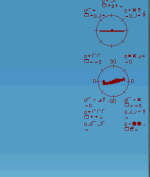
The image that you got for the HUD is somehow artifactually distorted. On my screen the sky is seamlessly blended. I should add that I fly FXS with very complex Orbx scenery and proprietary aircraft (A2A) at highest graphics/detail settings and everything works beautifully using this machine.
CFS2 - and I have about six separate versions, one for each WWII theater - is loaded into the Microsoft Program Files (86) address. (All six versions have the same HUD problem, BTW, and they have a variety of Settings selections. So in my mind the problem lies in some hand-shaking code failure between the program and some hardware/Win software - although I certainly could be wrong)
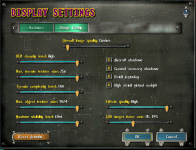
The Hardware setting identifies the card correctly and is set for 1080x1920 (32) although as I said I've used a variety of displays. I'm not at the desktop and will have to look regarding Enable Hardware Acceleration box and Resolution choices on the CFS2 Settings Hardware page...I don't recall seeing those boxes, but will review. Where are they displayed? I don't see them on the attached Display Settings screen.
Here's another interesting problem that has arisen on a different machine at a vacation house: Older machine, but not ancient; running Win 10. Since converting to Win 10, all CFS2 programs (same set I have at the main house) crash with that old message "Windows has encountered an unexpected problem and must close. Sorry for...yada, yada. These versions of CFS2 ran perfectly on Win 7, before I switched. (and the above HUD problem was not and is not present). Actually I just copied them (before I switched to Win10) and transferred them to my faster machine intact and expected they would run in similar fashion. They don't crash, but the HUD problem occurred as I mentioned above.
Shessi: Everything else is readable and displays perfectly. But that material is probably hard-coded and fixed. The HUD repaints constantly to be congruent with changing flight conditions and so its code must reside somewhere else in the program and be dependent upon the video card updating the display in real time.
Now, certainly one can fly the programs without the HUD, but it's annoying to not understand the source of the problem and be able to correct it. Am sure you understand.
Again, I appreciate the investment of time and help.
Archive1



 ...
...
