
-
Please see the most recent updates in the "Where did the .com name go?" thread. Posts number 16 and 17.
-
IMPORTANT DOWNLOADING INFORMATION - ALL MEMBERS PLEASE READ
Please see this thread for updates. Update Thread
SOH ADMINISTRATION
You are using an out of date browser. It may not display this or other websites correctly.
You should upgrade or use an alternative browser.
You should upgrade or use an alternative browser.
Someone to model a building for me
- Thread starter OleBoy
- Start date


I think it's safe to return to my regularly scheduled project
That looks great!
Thanks Rob. I respect, and thank you for that. As you know, I'm a picky ole ***.
I fancy myself a pretty creative person with 25 years as a commercial artist for several Advertising Agencies, but even in Sketchup I can't get past making a box, let alone anything that complex. That's amazing stuff, especially since you just advertised for someone to do it for you.
I've got the drive, and the ability to do many things. Mainly, I lack patience. I'm a, "I want it now" type. People think I'm a real prxxk because of it most of the time. If I had the patience to really get to learn modeling for FSX, I know I would do very well. I have Gmax, and FSDS. Have had them for quite some time. I just hate the learning curve it takes to learn it. That's where my "I want it now" phrase wins in most cases and I give up.
Somethings always urked me about this hobby. There are a select few in this hobby that help me along my way. Those people, I am very thankful for what they've shared. Others don't like to share knowledge. Those are the speed bumps in my path. As they read my posts, and offer nothing. So, I am forced to learn for myself. Of which, everything I know, or learn, I'll share for the better of the hobby.


Dimus
SOH-CM-2025
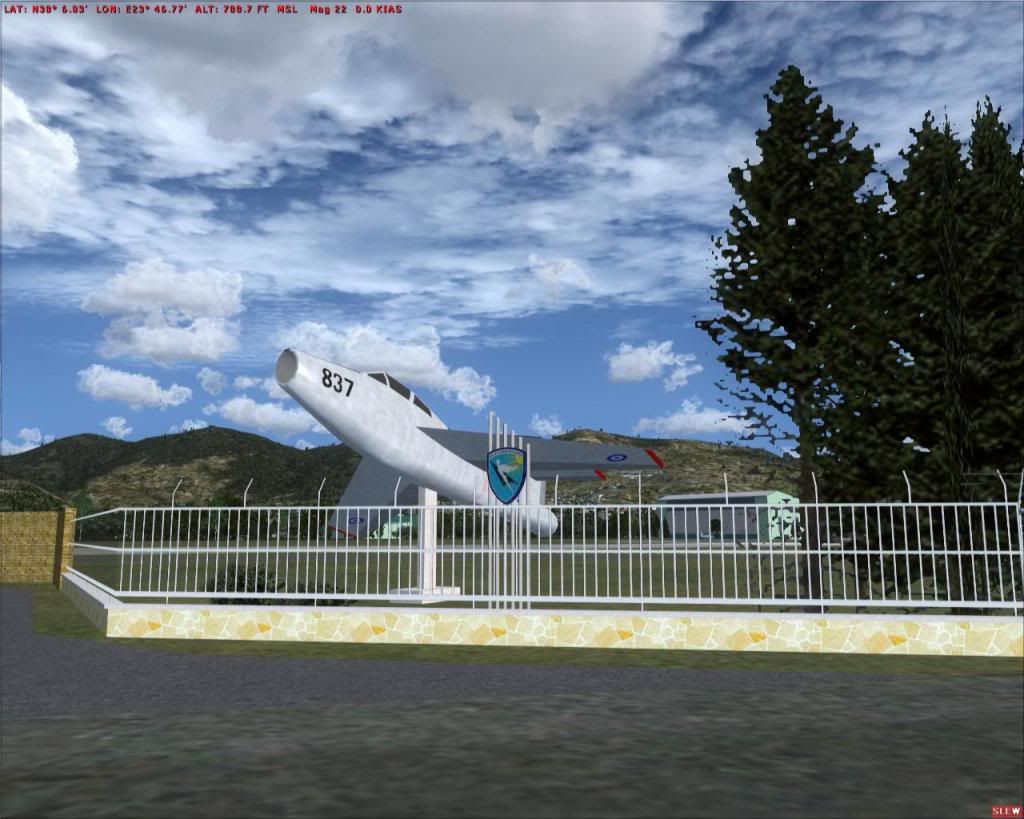
OleBoy, I've made many buildings with sketchup, even more complicated objects and imported them to FSX using Arno's ModelconverterX. Like this gate-guardian F-84:
And most of the stuff in this picture:
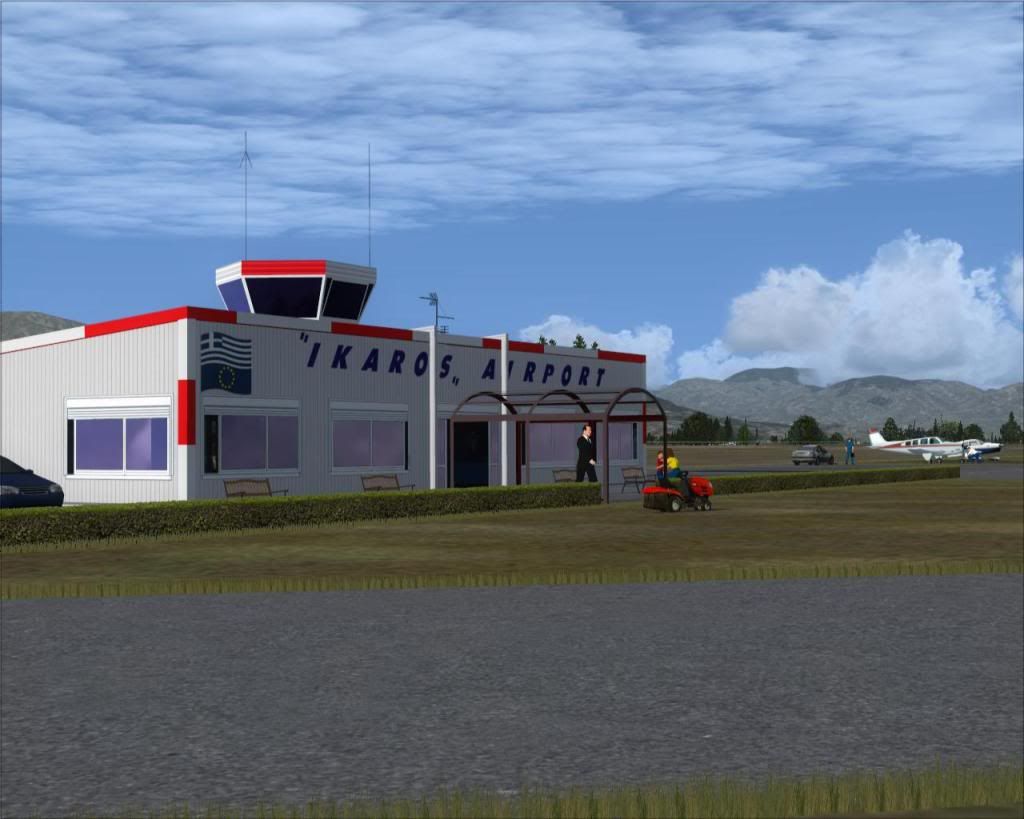
I find sketchup very intuitive and I think you can do lots of stuff with it for FSX.
Your hangar looks great!
If you have any trouble converting it and compiling it let me know, I'd be glad to help.
And most of the stuff in this picture:
I find sketchup very intuitive and I think you can do lots of stuff with it for FSX.
Your hangar looks great!
If you have any trouble converting it and compiling it let me know, I'd be glad to help.
This hanger works in FSX?
Yes. It works just fine!
OleBoy, I've made many buildings with sketchup, even more complicated objects and imported them to FSX using Arno's ModelconverterX. Like this gate-guardian F-84:
I find sketchup very intuitive and I think you can do lots of stuff with it for FSX.
Your hangar looks great!
If you have any trouble converting it and compiling it let me know, I'd be glad to help.
Hello Dimus,
I would be very appreciative if you would share you methods. I tried getting my hanger into the sim, but it would not show. I opened the file with model Converter X, then converted it to an FSX.BGL, and xxx.mdl. I loaded up the sim to get the coordinates and jotted them down. I'm not sure even if I did that right. Nonetheless I put in the coordinates and heading. MCX seemed to do the job I thought. Once I went where it was placed, it was no where to be seen for 10 square miles.
Another question are the textures. Not the sizes, but how they are used for the model. I don't understand the process of how they're called, or placed. Overall, this is very confusing for me.
Dimus
SOH-CM-2025
The process is not that simple and involves some tricky parts but once you've done it once it gets easier. I'll try to put a procedure down in simple steps and pm you.
Until then, the basic procedure is described by Arno here:
http://msmvps.com/blogs/arnogerretsen/archive/2010/01/19/modelling-for-fsx-using-sketchup.aspx
Until then, the basic procedure is described by Arno here:
http://msmvps.com/blogs/arnogerretsen/archive/2010/01/19/modelling-for-fsx-using-sketchup.aspx


Meshman
Charter Member
I loaded up the sim to get the coordinates and jotted them down. I'm not sure even if I did that right. Nonetheless I put in the coordinates and heading. MCX seemed to do the job I thought. Once I went where it was placed, it was no where to be seen for 10 square miles.
It helps to know where you are, especially placing stuff. One addition to the FSX.cfg file makes life a little easier. Under the [Main] section of FSX.cfg add this line;
FractionalLatLonDigits=6
This will give you Lat/Lon in 44.123456 -123.123456 formatting. Sure beats Degrees, Minutes and Seconds, though there simple math to that also.
If you want to find your work decompile the BGL file using BGL2XML by Jon Masterson, aka Scruffyduck. The XML code can be opened with a text editor like Notepad and will have lines for Lat and Lon.
I'm not a fan of using the \FSX\Addon Scenery\scenery and \texture folders. So I recommend making a new folder structure with a naming of your choice. The BGL file will go into the \scenery folder and the DDS file(s) that came out of MCX go into the \texture folder.
And if you want to get creative about doing 3D work, check out the free textures available here; http://www.cgtextures.com/


I managed to get it in sim, but there's an issue with the textures not showing. They are within parameters 128x128,256x256,512x512. Also converted to DDS. Though I'm not sure the format to save them in. These were saved DXT3. Do I need to be mapping the model? I figured that when the textures were applied, it was mapped.

I messed with textures. Not sure what the issue is. It's stiill not showing all the way

I messed with textures. Not sure what the issue is. It's stiill not showing all the way
Dimus
SOH-CM-2025
Hey Oleboy! You're very close. I did not have enough time to PM you. I promise I will tomorrow.
In the meantime, I can suspect that you are missing one step. Before saving to .mdl in MCX go to the "Material editor" and for every texture you use scroll down on the right scrollbox and in the "DiffuseTexture" field select the texture you have saved in dds. Once done the model will show in checkered surfaces in the MCX screen. Don't worry, export it in mdl and proceed as usual.
Your textures should reside in a "Textures" folder that belongs to an activated scenery in FSX.
In the meantime, I can suspect that you are missing one step. Before saving to .mdl in MCX go to the "Material editor" and for every texture you use scroll down on the right scrollbox and in the "DiffuseTexture" field select the texture you have saved in dds. Once done the model will show in checkered surfaces in the MCX screen. Don't worry, export it in mdl and proceed as usual.
Your textures should reside in a "Textures" folder that belongs to an activated scenery in FSX.
YEEEEEEE HAWWWWWW!!!!!!!!!!!!!
This is absolutely amazing. I can see my labor in flight sim. Finally, I see MY work displayed. Thanks for the tips Dimus. If it weren't for fellow flight simmers like you, (as there are so few) that help, visuals would not come from so many people who have talents.
Now I'm wondering what file formats the textures can be saved in for the best visuals. Any suggestions?
Your knowledge is greatly appreciated sir :salute:

This is absolutely amazing. I can see my labor in flight sim. Finally, I see MY work displayed. Thanks for the tips Dimus. If it weren't for fellow flight simmers like you, (as there are so few) that help, visuals would not come from so many people who have talents.
Now I'm wondering what file formats the textures can be saved in for the best visuals. Any suggestions?
Your knowledge is greatly appreciated sir :salute:

Dimus
SOH-CM-2025
Well, you figured most of it out yourself. I would have made a step by step procedure but I guess this is not needed any more. That's for the best as I happen to be extremely busy these days.
It's great isn't it! There is more to discover, as you can also make textures with alpha channel for transparency. I did that to create the steel bars on the fence in front of the gate guardian. Also the material editor lets you define a lot of stuff concerning reflectivity, transparency and shine of the surfaces. Check the windows of the "IKAROS" terminal that reflect the environment.
If you download my two airport sceneries here at SOH (Tatoi and Ikaros), all my objects are in single bgl files. You can open them with MCX and check the entries on the material editor to see examples of usage for shine and reflectivity.
The thing I don't do, mainly out of laziness is to combine many textures of an object in one sheet, to save on drawcalls. If I build something too big I will do so to save on FPS.
As for texture format, I usually save in dds format or DXT5 bmp. I don't see much difference in quality and the size is much smaller than normal bitmaps.
Another nice technique is to create pseudo shadows below roofs. You may draw a strip just below the roof on the wall that you can paint using a texture that is slightly darker than the wall texture. It adds a 3d feeling to the building and adds just a couple of more polygons. You can also paint the shadow on the texture if you wish.
It's great isn't it! There is more to discover, as you can also make textures with alpha channel for transparency. I did that to create the steel bars on the fence in front of the gate guardian. Also the material editor lets you define a lot of stuff concerning reflectivity, transparency and shine of the surfaces. Check the windows of the "IKAROS" terminal that reflect the environment.
If you download my two airport sceneries here at SOH (Tatoi and Ikaros), all my objects are in single bgl files. You can open them with MCX and check the entries on the material editor to see examples of usage for shine and reflectivity.
The thing I don't do, mainly out of laziness is to combine many textures of an object in one sheet, to save on drawcalls. If I build something too big I will do so to save on FPS.
As for texture format, I usually save in dds format or DXT5 bmp. I don't see much difference in quality and the size is much smaller than normal bitmaps.
Another nice technique is to create pseudo shadows below roofs. You may draw a strip just below the roof on the wall that you can paint using a texture that is slightly darker than the wall texture. It adds a 3d feeling to the building and adds just a couple of more polygons. You can also paint the shadow on the texture if you wish.