
I just noticed that the SR22 from the original Premium Deluxe package is available to buy in the Marketplace. Is it worth the $10 to buy it, or should I pass?

Please see the most recent updates in the "Where did the .com name go?" thread. Posts number 16 and 17.
Just when you think you have everything running some what better...
You get a message from the Hosting company. Short story they need to move us to a new server. I have been working with them to plan a good date for all concerned. Here is what we have come up with as a schedule.
If all goes well we should be back online on November 8th.
To keep you updated we will post updates on AVSIM forums.
Thank you for your support.
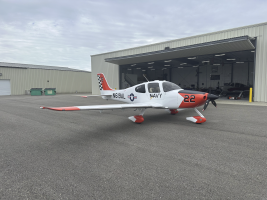
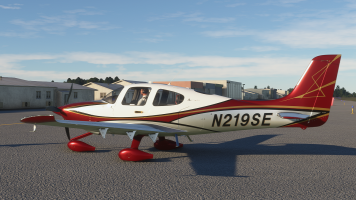
The purchase page for the SR22 advertises at least two liveries, one with stripes on the fuselage, and another with colors on the upper wingtips. After purchasing, there is only one livery available to select, and only one texture folder inside the SimObjects\Airplanes\Asobo_SR22 folder.
Surely this must be some sort of mistake, because I find it hard to believe that a reputable company such as Microsoft would ever engage in blatant "Bait and Switch" advertising such as this.

A couple of silly questions Tom:Well, I bought it, but there's an issue. The sale page for the plane shows two distinct liveries, but only one is included with the actual download. I posted on the MS forum, but no one in authority has responded. I'm also opening a support ticket with the following:

There is no mod but you can modify the "model" file. (make a backup before you start!)The liveries I've seen either have baked in reg's or none at all. I was able to open the default stripe livery and retune the stripes to blue shades instead of those dull browns. But what I really want is a mod that will allow the copilot to be visible in the cockpit.

It's an encrypted plane, so no xml files at all unfortunately.There is no mod but you can modify the "model" file. (make a backup before you start!)
1. Open your Asobo_SR22 file (most likely in MSFS/ official) and then the "mod" file.
2. You will find a "Cirrus_interior.xml. Open this with Notepad++ and
3. change
<LOD minSize="150" ModelFile="SR22_COCKPIT_LOD00.gltf"/> to
<LOD minSize="150" ModelFile="SR22_COCKPIT_LOD01.gltf"/>
4. Save and refresh - done
That's the simpliest way but do not work with all mods. Some reqiure more attention but in general, you can even add a crew to airplanes that do come without any visible avatars.
Hi Scotsman,There is no mod but you can modify the "model" file. (make a backup before you start!)
1. Open your Asobo_SR22 file (most likely in MSFS/ official) and then the "mod" file.
2. You will find a "Cirrus_interior.xml. Open this with Notepad++ and
3. change
<LOD minSize="150" ModelFile="SR22_COCKPIT_LOD00.gltf"/> to
<LOD minSize="150" ModelFile="SR22_COCKPIT_LOD01.gltf"/>
4. Save and refresh - done
That's the simpliest way but do not work with all mods. Some reqiure more attention but in general, you can even add a crew to airplanes that do come without any visible avatars.
One way ist to use mods from Condor7777 on FS.to "Pilot/Copilot always visible..." and/or "head removal for defailt Asobo...". On YouTube, you can find a detailed Tutorial on modifying the .XML and Lod.gltf files inside the model archive. Looks difficult first but ist at least no rocket science at all. That's the way I do it. Unfortunately, it does not work If those essential files are encrypted and also some airplanes (e.g. the Carenado Mooney and PA44) do react to that modifications with a complete freezing of all cockpit knobs and levers.Hi Scotsman,
This is something I've been interested in, and your method is very straight-forward. I have had success using it on the LHC Piper Pacer. However, in addition to the passenger, the mod also places the pilot in the cockpit (makes sense, I suppose), requiring moving my eyepoint forward to avoid having to look "through" the pilot model to see the panel and beyond. Do you know of a way to keep the pilot from appearing as well? I understand it may not be practical to respond with details since (as you say) "some [aircraft] require more attention".
Either way, thanks for posting this process. It provides me with a new place to start.
Regards,
Michael
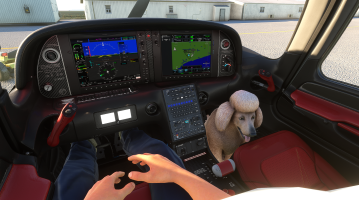
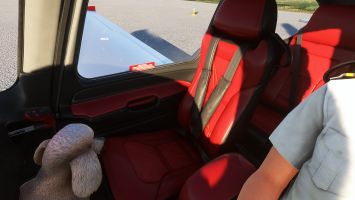
 . It's like buying a 4door sedan with the rear dors permanently locked.