
-
Please see the most recent updates in the "Where did the .com name go?" thread. Posts number 16 and 17.
-
Special Server Maintenance
Just when you think you have everything running some what better...
You get a message from the Hosting company. Short story they need to move us to a new server. I have been working with them to plan a good date for all concerned. Here is what we have come up with as a schedule.
- November 4th 17:00 -5UTC shut off the forums and start backup proceedures. During this time there will be no access to the forums or the Resource Section.
- November 5th Continue with Backups and download same until complete.
- November 6th 7:00 turn over server to hosting company to move system to new server
- November 7th - 8th restore backups and upgrade forum software.
If all goes well we should be back online on November 8th.
To keep you updated we will post updates on AVSIM forums.
Thank you for your support.
You are using an out of date browser. It may not display this or other websites correctly.
You should upgrade or use an alternative browser.
You should upgrade or use an alternative browser.
Stampe SV-4 Restauravia available !
- Thread starter flying v
- Start date


I'm having a problem: when I try tp start a flight with the Stampe, within half a second of loading at the airport, I get the
message that the aircraft is overstressed and asking whether I want to restart the flight or go back to the main menu. This
happens whether I choose to start cold and dark at a parking space or ready for takeoff on the runway. All other aircraft load
fine. I've downloaded twice, tried with different liveries and different airports.
For the half second I can see the vc before the error message comes up, it looks nice.
message that the aircraft is overstressed and asking whether I want to restart the flight or go back to the main menu. This
happens whether I choose to start cold and dark at a parking space or ready for takeoff on the runway. All other aircraft load
fine. I've downloaded twice, tried with different liveries and different airports.
For the half second I can see the vc before the error message comes up, it looks nice.

YoYo
SOH-CM-2023
Quite pity about this crash. Strange that it didnt noticed during tests. Developer know about this issue already?
This is MSFS problem in global. I have detection of crashes/overstressed ON also , so the same as it was in my FS9, FSX, P3D 1-5. In MSFS even if you open window you can recive it! It's fun how Asobo detects crashes .
.
This is MSFS problem in global. I have detection of crashes/overstressed ON also , so the same as it was in my FS9, FSX, P3D 1-5. In MSFS even if you open window you can recive it! It's fun how Asobo detects crashes
.hangarrat101
Members +
Just downloaded it and what an awesome aircraft! Flight modelling is among the best I've come across either freeware or payware. I'm lucky enough to have a couple of hours flying time in a Stampe and it feels very convincing. Even things like the way the tail comes up right at the start of the takeoff roll. I'm sold!

Dangerous Beans
SOH-CM-2022
I normally fly with damage turned off so didn't see this at first but I turned it on to see what everyone was talking about and sure enough I got the the crash popup.
I did a little digging and I think I found the problem.
In the flight_model.cfg under [AIRPLANE_GEOMETRY]
positive_g_limit_flaps_up =
positive_g_limit_flaps_down =
negative_g_limit_flaps_up =
negative_g_limit_flaps_down =
Are all set to 0. I don't know what the number should be but I tried the ones out of the P3D version which are all set to 8 and I don't get the popup any more.
I also have a theory on why it was missed. If you have Developer Mode enabled the crash detection options are ignored.
One other thing I would like to see fixed is IMO the windscreens are a bit too opaque and hard to see though.
I know that how the textures are handled in MSFS is totally different to how they where in FSX/P3D so I'm not sure how to fix it to my liking, anyone have ant ideas?
I did a little digging and I think I found the problem.
In the flight_model.cfg under [AIRPLANE_GEOMETRY]
positive_g_limit_flaps_up =
positive_g_limit_flaps_down =
negative_g_limit_flaps_up =
negative_g_limit_flaps_down =
Are all set to 0. I don't know what the number should be but I tried the ones out of the P3D version which are all set to 8 and I don't get the popup any more.
I also have a theory on why it was missed. If you have Developer Mode enabled the crash detection options are ignored.
One other thing I would like to see fixed is IMO the windscreens are a bit too opaque and hard to see though.
I know that how the textures are handled in MSFS is totally different to how they where in FSX/P3D so I'm not sure how to fix it to my liking, anyone have ant ideas?


K5083
SOH-CM-2024
I normally fly with damage turned off so didn't see this at first but I turned it on to see what everyone was talking about and sure enough I got the the crash popup.
I did a little digging and I think I found the problem.
In the flight_model.cfg under [AIRPLANE_GEOMETRY]
positive_g_limit_flaps_up =
positive_g_limit_flaps_down =
negative_g_limit_flaps_up =
negative_g_limit_flaps_down =
Are all set to 0. I don't know what the number should be but I tried the ones out of the P3D version which are all set to 8 and I don't get the popup any more.
I also have a theory on why it was missed. If you have Developer Mode enabled the crash detection options are ignored.
One other thing I would like to see fixed is IMO the windscreens are a bit too opaque and hard to see though.
I know that how the textures are handled in MSFS is totally different to how they where in FSX/P3D so I'm not sure how to fix it to my liking, anyone have ant ideas?
Excellent catch, Beans. The actual G limits for the Stampe are 6.0 for positive, -6.0 for negative (make sure to include the minus sign). I will download and try it out tonight!
http://stampe-busse.de/daten44.htm
August

grunau_baby
SOH-CM-2026
Great input Beans ´n´August. Thanks, works like a charm now.
Dearly missed since FSX days.
You gotta love it:
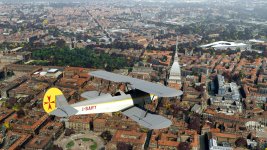
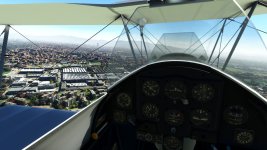
Another big plus: no "sporty" inside
Alex
Dearly missed since FSX days.
You gotta love it:
Another big plus: no "sporty" inside
Alex
hangarrat101
Members +
Question: does this also containt the model with the canopy like used in the Belgian AF?
Cheers,
Priller
This has the open cockpit only
Dangerous Beans
SOH-CM-2022
It doesn't include a definition for the VR view so here's mine for anyone that wants it.
Just add it to the bottom of the cameras.cfg
Restauravia are welcome to use it for an update if they want to.
[CAMERADEFINITION.2]
Title="PilotVR"
Guid="{B9AC873B-4051-4073-B2D6-231ECFC51EEC}"
UITitle="TT:GAME.PANEL_CAMERA_PILOT_VFR"
Description=""
Origin="Virtual Cockpit"
Track="None"
TargetCategory="None"
ClipMode="Normal"
SnapPbhAdjust="Swivel"
PanPbhAdjust="Swivel"
XyzAdjust=1
ShowAxis="NO"
AllowZoom=1
InitialZoom=0.35
SmoothZoomTime=2
BoundingBoxRadius=0.1
ShowWeather=1
CycleHidden=0
CycleHideRadius=0
ShowPanel=0
MomentumEffect=1
ShowLensFlare=0
PanPbhReturn=0
SnapPbhReturn=0
InstancedBased=0
NoSortTitle=0
NodesToHide=""
Transition=0
PitchPanRate=20
HeadingPanRate=60
PanAcceleratorTime=5
XYZRate=0.25
XYZAcceleratorTime=0
ZoomPanScalar=1
Category="Cockpit"
SubCategory="Pilot"
SubCategoryItem="PilotVR"
InitialXyz= 0.00, 0.15, 0.00 ; -l/+r -d/+u -b/+f
InitialPbh= 0, 0, 0
Just add it to the bottom of the cameras.cfg
Restauravia are welcome to use it for an update if they want to.
[CAMERADEFINITION.2]
Title="PilotVR"
Guid="{B9AC873B-4051-4073-B2D6-231ECFC51EEC}"
UITitle="TT:GAME.PANEL_CAMERA_PILOT_VFR"
Description=""
Origin="Virtual Cockpit"
Track="None"
TargetCategory="None"
ClipMode="Normal"
SnapPbhAdjust="Swivel"
PanPbhAdjust="Swivel"
XyzAdjust=1
ShowAxis="NO"
AllowZoom=1
InitialZoom=0.35
SmoothZoomTime=2
BoundingBoxRadius=0.1
ShowWeather=1
CycleHidden=0
CycleHideRadius=0
ShowPanel=0
MomentumEffect=1
ShowLensFlare=0
PanPbhReturn=0
SnapPbhReturn=0
InstancedBased=0
NoSortTitle=0
NodesToHide=""
Transition=0
PitchPanRate=20
HeadingPanRate=60
PanAcceleratorTime=5
XYZRate=0.25
XYZAcceleratorTime=0
ZoomPanScalar=1
Category="Cockpit"
SubCategory="Pilot"
SubCategoryItem="PilotVR"
InitialXyz= 0.00, 0.15, 0.00 ; -l/+r -d/+u -b/+f
InitialPbh= 0, 0, 0

collensr
SOH-CM-2025
I normally fly with damage turned off so didn't see this at first but I turned it on to see what everyone was talking about and sure enough I got the the crash popup.
I did a little digging and I think I found the problem.
In the flight_model.cfg under [AIRPLANE_GEOMETRY]
positive_g_limit_flaps_up =
positive_g_limit_flaps_down =
negative_g_limit_flaps_up =
negative_g_limit_flaps_down =
Are all set to 0. I don't know what the number should be but I tried the ones out of the P3D version which are all set to 8 and I don't get the popup any more.
I also have a theory on why it was missed. If you have Developer Mode enabled the crash detection options are ignored.
One other thing I would like to see fixed is IMO the windscreens are a bit too opaque and hard to see though.
I know that how the textures are handled in MSFS is totally different to how they where in FSX/P3D so I'm not sure how to fix it to my liking, anyone have ant ideas?
Thank you very much for this !