SU 5 officially released

Cazzie

SOH-CM-2024
I had prepared everything for it two weeks ago. Finally downloaded today. I haven't noticed anything I had in the Community folder affected. A few of my airport sceneries were missing an object (probably due to a change in the MSFS Library of an object I used from there) and MSFS 2024 needs to be restarted for the updated Chase Plane (if you have it) to work.

Cazzie
 
The first thing I tried was runway selection. STILL, for any airport with multiple runways, only one will be used no matter the method of selection.:mad:
The only one that MS2024 uses, when a departure airport is selected. is the default runway that is shown. This may only be my problem. Hopefully it is fixed for others.
 
Also, note that AAU4, which was announced to coincide with SU5, has been delayed until next week.

We are excited to announce that our Aircraft and Avionics 04 Update will release on May 5th, which includes the highly versatile Antonov An-2, our Expert Series 01 ATR 42-600/72-600, the classic Fokker F.VII, the beautiful French Latécoère 631, and the Savoia-Marchetti S.55/S.55X. Existing owners of these aircraft will receive this upgrade for free in Microsoft Flight Simulator 2024.
 
The first thing I tried was runway selection. STILL, for any airport with multiple runways, only one will be used no matter the method of selection.:mad:
The only one that MS2024 uses, when a departure airport is selected. is the default runway that is shown. This may only be my problem. Hopefully it is fixed for others.

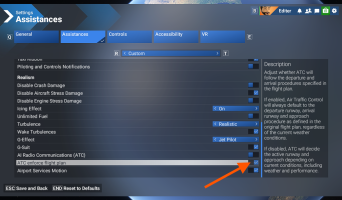
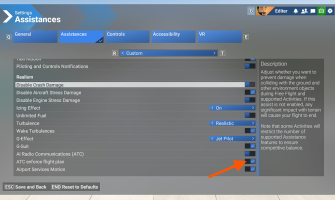
This is fixed. It's just a victim of unclear user interface design. You have to turn on "ATC enforce flight plan" and then MSFS will respect your runway choice. With it turned off, ATC will decide the current runway depending on weather. With it turned it, it respects your choice.

I just tried this at KSEA. With it off, no matter what runway I chose, it started me on 16L. I turned it on and was able to start at 16R and 16C.

1777587412610.png
 

Attachments

  • 1777587152388.png
    1777587152388.png
    603.9 KB · Views: 2
The first thing I tried was runway selection. STILL, for any airport with multiple runways, only one will be used no matter the method of selection.:mad:
The only one that MS2024 uses, when a departure airport is selected. is the default runway that is shown. This may only be my problem. Hopefully it is fixed for others.
You have to check the box "Enforce ATC flight plan" which seems backwards but it works.
 
This is fixed. It's just a victim of unclear user interface design. You have to turn on "ATC enforce flight plan" and then MSFS will respect your runway choice. With it turned off, ATC will decide the current runway depending on weather. With it turned it, it respects your choice.

I just tried this at KSEA. With it off, no matter what runway I chose, it started me on 16L. I turned it on and was able to start at 16R and 16C.

View attachment 187101
Used your tip and now works for me. :)
Many thanks DennyA.
Jim
 
Has anyone noticed that the sim is not saving your settings after you exit the sim and then start it up again? This has happened to me several times now after SU5. It is a known bug and there are a couple of work arounds. I fixed it by going to the usercfg file and right click it and go to properties. Make it a read only file and you are good to go.

Ed

 
The thing that bothers me the most is that Photogrammetry for the Phoenix area is still inoperative. I do 99% of my flying out of Phoenix/Scottsdale and am VERY tired of autogen buildings and trees. Asobo is aware of the problem, but it still hasn't been fixed.
 
Back
Top