
-
Please see the most recent updates in the "Where did the .com name go?" thread. Posts number 16 and 17.
-
Special Server Maintenance
Just when you think you have everything running some what better...
You get a message from the Hosting company. Short story they need to move us to a new server. I have been working with them to plan a good date for all concerned. Here is what we have come up with as a schedule.
- November 4th 17:00 -5UTC shut off the forums and start backup proceedures. During this time there will be no access to the forums or the Resource Section.
- November 5th Continue with Backups and download same until complete.
- November 6th 7:00 turn over server to hosting company to move system to new server
- November 7th - 8th restore backups and upgrade forum software.
If all goes well we should be back online on November 8th.
To keep you updated we will post updates on AVSIM forums.
Thank you for your support.
You are using an out of date browser. It may not display this or other websites correctly.
You should upgrade or use an alternative browser.
You should upgrade or use an alternative browser.
SU3 launched, but...
- Thread starter tiger1962
- Start date

Daube
SOH-CM-2026
Guys, don't forget to trigger also your Windows application updates via the MS Store. For example, I just pushed the "search for updates" button and it found an update for the Microsoft Games Services.
I always update all the MS Apps and launch the XBox app, prior to trying to launch the sim (I use the Steam version).
I always update all the MS Apps and launch the XBox app, prior to trying to launch the sim (I use the Steam version).

tiger1962
SOH-CM-2026
Here's the official announcement:

Release Notes here (but no mention of updates to the S340 and a few other Premium Deluxe planes):

 forums.flightsimulator.com
Release Notes here (but no mention of updates to the S340 and a few other Premium Deluxe planes):
Release Notes - Microsoft Flight Simulator 2024 Sim Update 3 [1.5.27.0] Available Now
RELEASE NOTES Sim Update 3 - Final - 1.5.27.0 If you are playing on PC, outdated packages in your community folder may have an unexpected impact on the title’s performance and behavior. If you suffer from stability issues or long loading times, move your community package(s) to another folder...
forums.flightsimulator.com


Dangerous Beans
SOH-CM-2022
I've updated OK and even downloaded a couple of the planes to my PC.
I know they said the planes are encrypted but I was kind of hoping it was in the same sort of way the 2020 ones are.
I wanted to be able to at least have access to the camera.cfg's so I could edit the default VR views to my liking the same way I have in 2020 but damn they've really locked the down solid and I cant even do that
I know they said the planes are encrypted but I was kind of hoping it was in the same sort of way the 2020 ones are.
I wanted to be able to at least have access to the camera.cfg's so I could edit the default VR views to my liking the same way I have in 2020 but damn they've really locked the down solid and I cant even do that
Installing through steam right now. Be sure to go back afterwards into your library, filter to "Disabled".
The install didn't take long but it pretty much disabled my entire library again, which re-enabling is a slow process. Good thing I keep a spreadsheet of the items I've already verified as working or not working in 2024.
Forest
The install didn't take long but it pretty much disabled my entire library again, which re-enabling is a slow process. Good thing I keep a spreadsheet of the items I've already verified as working or not working in 2024.
Forest


After clearing the Community folder Ms2024, SU2 was started. What followed seemed like a normal start sequence. When finished starting, the top banner showed the version as 1.5.27.0.
There had been no prompts to install or progress bars showing install activity. Hints that there was an update showed additional options in Graphics, the ability to download aircraft or scenery instead of streaming, and an additional aircraft, the Eurocopter EC-135 T1. Clicking the green FS icon displayed the Marketplace, but selecting My library displayed the message " To access My Library go back to the homepage". Returning to the sim and selecting the Marketplace, then My Library, all my scenery and aircraft was shown and seems OK. My first flight looked good but had excessive stuttering, which cleared up later. A visit to the Microsoft Store showed my Ms2024 program had been recently updated.
The question remains, did I get the full update? Seems so, but time and further use of the sim will tell.
There had been no prompts to install or progress bars showing install activity. Hints that there was an update showed additional options in Graphics, the ability to download aircraft or scenery instead of streaming, and an additional aircraft, the Eurocopter EC-135 T1. Clicking the green FS icon displayed the Marketplace, but selecting My library displayed the message " To access My Library go back to the homepage". Returning to the sim and selecting the Marketplace, then My Library, all my scenery and aircraft was shown and seems OK. My first flight looked good but had excessive stuttering, which cleared up later. A visit to the Microsoft Store showed my Ms2024 program had been recently updated.
The question remains, did I get the full update? Seems so, but time and further use of the sim will tell.

Can't you do both?What is the best options to download, scenery or aircraft?
tiger1962
SOH-CM-2026
What is the best options to download, scenery or aircraft?
While this option may be useful for developers, I think the benefits for players are debatable. The files are still encrypted and they'll still take up disk space when you're not playing the sim.
Daube
SOH-CM-2026
I haven't had the chance to test-flight the SU3 yet.
My MSFS2024 has no addons in the Community yet, and I have only activated a few of my MSFS2020 addons in Steamed mode (I believe) in the library.
I've just been a bit lazy to trigger the VR headset, so to say
I just launched a quick flight in 2D, staying on ground, with the Cowansim B-222 just to perform a quick walkaround and an engine startup. I was not really using MSFS2024 prior to this SU, so I still have to face a bit of a learning curve.... Also, I want to transfer some scenery addons from MSF2020 asap, but that's going to be a bit tedious... In fact I might even start using addon manager or something..
My MSFS2024 has no addons in the Community yet, and I have only activated a few of my MSFS2020 addons in Steamed mode (I believe) in the library.
I've just been a bit lazy to trigger the VR headset, so to say
I just launched a quick flight in 2D, staying on ground, with the Cowansim B-222 just to perform a quick walkaround and an engine startup. I was not really using MSFS2024 prior to this SU, so I still have to face a bit of a learning curve.... Also, I want to transfer some scenery addons from MSF2020 asap, but that's going to be a bit tedious... In fact I might even start using addon manager or something..
I was actually thinking about the benefits regarding bandwidth. You download them, so your connection is free for other stuff.While this option may be useful for developers, I think the benefits for players are debatable. The files are still encrypted and they'll still take up disk space when you're not playing the sim.

After the almost 4 Gig download it failed to get past 15% load and it was suggested to temporarily move the (large) community folder. That took a long time but it did load. One issue that was driving me crazy with SU2 was the long times (10 mins?) to make a simple bindings change. That works now. In the external view that appears when you hit ESC during a flight the PMDG 777's become somewhat disassembled with engines and other parts flying in formation. The 2000 PMDG 737's do not do this. However they originally disappeared and in the community tab area I found they had been "disabled".
The runways at Seattle shearing off airliner landing gear is worse.
The runways at Seattle shearing off airliner landing gear is worse.

Bomber_12th
SOH-CM-2025
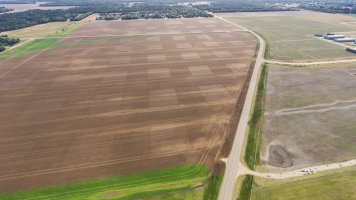
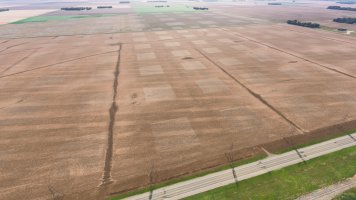
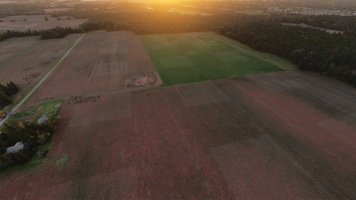
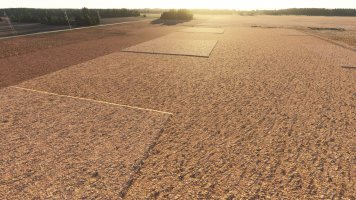
Since SU3 was released, all of my favorite photogrammetry has been ruined by these squares that appear everywhere. I have never seen this before, and it definitely did not have these squares prior to SU3. I'm curious if everyone else sees these too. These are screenshots from the fields around Fargo, North Dakota, as well as Oshkosh, Wisconsin and outside of Heathrow Airport near London. I suspect this is the case with all photogrammetry, everywhere, but it's easiest to see in the open fields. From above, the squares are most noticeable at low sun angles, and at ground level the squares are actually raised. I deleted by scenery cache file, but that had no effect. I have assumed others would be posting about this same issue on the official MSFS forums, but I have yet to see a thread about it, so I might have to start one there myself.
Attachments
-
 MSFS_2024_Photogrammetry_Squares_1.jpg3 MB · Views: 13
 -
 MSFS_2024_Photogrammetry_Squares_2.jpg3 MB · Views: 13
 -
 MSFS_2024_Photogrammetry_Squares_3.jpg2.7 MB · Views: 11
 -
 MSFS_2024_Photogrammetry_Squares_4.jpg2.6 MB · Views: 10
 -
 MSFS_2024_Photogrammetry_Squares_5.jpg4.2 MB · Views: 10
 -
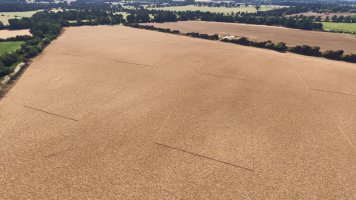 MSFS_2024_Photogrammetry_Squares_6.jpg3.4 MB · Views: 9
 -
 MSFS_2024_Photogrammetry_Squares_7.jpg3.6 MB · Views: 8
Last edited:
tiger1962
SOH-CM-2026
Since SU3 was released, all of my favorite photogrammetry has been ruined by these squares that appear everywhere. I have never seen this before, and it definitely did not have these squares prior to SU3. I'm curious if everyone else sees these too. These are screenshots from the fields around Fargo, North Dakota, as well as Oshkosh, Wisconsin and outside of Heathrow Airport near London. I suspect this is the case with all photogrammetry, everywhere, but it's easiest to see in the open fields. From above, the squares are most noticeable at low sung angles, and at ground level the squares are actually raised. I deleted by scenery cache file, but that had no effect. I have assumed others would be posting about this same issue on the official MSFS forums, but I have yet to see a thread about it, so I might have to start one there myself.
In case you haven't already tried this, I would suggest deleting your rolling cache (whether you use it or not) and your SceneryIndexes folder, then restart the sim.