
tiger1962
SOH-CM-2026
The Twotter Revived mod for MSFS2024 is based on the Captain Moustache mod for MSFS2020 which he withdrew due to objections from Aerosoft.
I've only been using this outstanding mod for a week or so, and there has already been an update in that short time!
I'm very impressed with the professional-standard installer (screenies below) which is very easy to use and fast with it.
You need to install the original Aerosoft Twin Otter for MSFS2020 v1.1.1 into your MSFS2024 Community folder. The mod then copies the files it needs from the original (for legal reasons) and creates a new MSFS2024 native install.
I bought mine from Aerosoft direct and to my surprise I didn't have v1.1.1 backed up, but I was able to download and install it via the Aerosoft One app without any issues.
I also re-downloaded three MSFS2020 Twin Otter liveries from flightsim.to and kept them in their .zip files in my Downloads folder.
In MSFS2020 I used the 'Better Cameras' mod for the Twin Otter by Archer374, it can now be installed automatically by clicking the 'Custom' button in the Camera Views section of the installer.
There is also an option to link the Twin Otter to the sounds package of the Black Square Turbine Duke, if you also own that model.
The liveries can be selected and automatically installed in working order by clicking the Liveries button and then clicking the 'Add Archives' button - you can then navigate to the livery .zip files in your Downloads folder.
The Twotter Revived mod is available at Hangar Addons (a breath of fresh air after all the tedious pop-ups at fs.to):

 hangaraddons.com
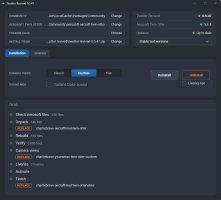
You need to specify a few file/folder paths before installation can begin, here's a screenshot taken after installation:
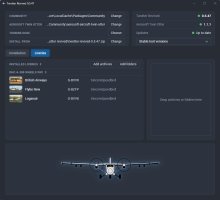
Here are the three livery .zip files I selected and installed:
The Twotter Revived mod includes the Canadian Captain Moustache realism mod for the GNS530/GNS430, which can also be installed for other aircraft in the sim:
 hangaraddons.com
Once installed and up and running in the sim, you can select the default EFB from the toolbar menu:
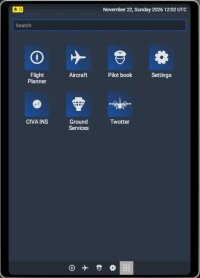
Click on the Twotter icon and you'll find more settings and options than you can handle at one go:
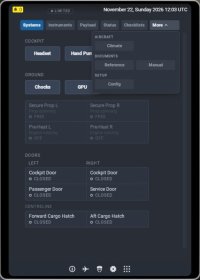
Just about EVERYTHING is customizable to your own preference, it's amazing - AND it all works, first time, no problems.
This mod (or is it actually a rebuild?) is now on my 'must-have' list for sure.
I've only been using this outstanding mod for a week or so, and there has already been an update in that short time!
I'm very impressed with the professional-standard installer (screenies below) which is very easy to use and fast with it.
You need to install the original Aerosoft Twin Otter for MSFS2020 v1.1.1 into your MSFS2024 Community folder. The mod then copies the files it needs from the original (for legal reasons) and creates a new MSFS2024 native install.
I bought mine from Aerosoft direct and to my surprise I didn't have v1.1.1 backed up, but I was able to download and install it via the Aerosoft One app without any issues.
I also re-downloaded three MSFS2020 Twin Otter liveries from flightsim.to and kept them in their .zip files in my Downloads folder.
In MSFS2020 I used the 'Better Cameras' mod for the Twin Otter by Archer374, it can now be installed automatically by clicking the 'Custom' button in the Camera Views section of the installer.
There is also an option to link the Twin Otter to the sounds package of the Black Square Turbine Duke, if you also own that model.
The liveries can be selected and automatically installed in working order by clicking the Liveries button and then clicking the 'Add Archives' button - you can then navigate to the livery .zip files in your Downloads folder.
The Twotter Revived mod is available at Hangar Addons (a breath of fresh air after all the tedious pop-ups at fs.to):
Twotter Revived - Realism Mods for MSFS 2024 | Hangar Addons
Download Twotter Revived by aurel42 & Canadian Captain Moustache free for MSFS 2024. A complete realism overhaul of the Aerosoft Twin Otter with dozens of cust…
hangaraddons.com
You need to specify a few file/folder paths before installation can begin, here's a screenshot taken after installation:
Here are the three livery .zip files I selected and installed:
The Twotter Revived mod includes the Canadian Captain Moustache realism mod for the GNS530/GNS430, which can also be installed for other aircraft in the sim:
CCM's GNS530/430 Crazy Completionist Mod V3.00.00 - Panels & Instruments for MSFS 2024 | Hangar Addons
Download CCM's GNS530/430 Crazy Completionist Mod V3.00.00 by Canadian Captain Moustache free for MSFS 2024. Working towards a 100% accurate GNS530/430 experie…
hangaraddons.com
Once installed and up and running in the sim, you can select the default EFB from the toolbar menu:
Click on the Twotter icon and you'll find more settings and options than you can handle at one go:
Just about EVERYTHING is customizable to your own preference, it's amazing - AND it all works, first time, no problems.
This mod (or is it actually a rebuild?) is now on my 'must-have' list for sure.


