• Please see the most recent updates in the "Where did the .com name go?" thread. Posts number 16 and 17.

    Post 16 Update

    Post 17 Warning old domain name stealing credentials

  • IMPORTANT INFORMATION - ALL MEMBERS PLEASE READ

    Due to an increase in the number of new members who are trying to systematically download our entire Resource Library (one new member yesterday tried to download 3,000+ files AT ONCE!) we are being forced to implement some changes regarding who can download what, how many files at a time and at what speed. As the forums and Resource Library share the same bandwidth when the Library gets overloaded with demand like that the forums fall over, as we have all seen recently. It's sad that greed has forced our hand in this way but we must do something for the benefit of all our legitimate members (many of whom paid money for the upkeep of the site) and to prevent the files stored here being used for nefarious purposes. Many of our uploads have specific conditions tied to them that forbid uploading to any other site or deny uploading to any site that has a 'paywall' (i.e. a pay to download policy). Due to the number of mass download attempts recently we can only assume that somebody, somewhere, is attempting to stock up a new file library with our files and we owe it to our up-loaders to protect their files and intellectual property especially as many (like my own LDR Development projects) are made available at SOH only and are specified as such in the 'read me' files.

    The forums and Resource Library will be taken offline as of 13:00 EDT with the forums coming back online shortly after without the resources library while we work on setting up permissions on the new Library module.

    We hope our members understand why we need to do this and will bear with us while we implement the changes.

    Thanks in anticipation, SOH ADMINISTRATION

    Downloads are now active. You may proceed with downloading as desired

    The download limits are a work in progress. Some settings are likely to need tweaking in the coming days.

win 10 .bat compatibility for ETO 1.50

undood

Members +
Following hairyspin's instructions and sixstring's download links I've got ETO 1.40 hotfix running fine, spent an hour mucking about with an alfa romeo at some RAF pasture to great delight. But I can't seem to follow the instructions for 1.50... In the "Installation guides for ETO and Rising Sun" thread someone mentioned back in 2018 that
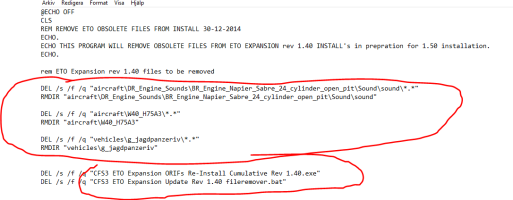
When installing 1.50, after putting the file remover bat into the main ETO Expantion folder, it says "If using Windows 7 and Windows 8/8.1, you will then need to right-click on the CFS3 ETO Expansion Update Rev 1.50 File Remover.bat and set Compatibility under Properties to XP (Service Pack 3)." However, cant find that in properties. The tabs only have "General, Security, Details, and Previous versions."

Is this necessary for Win 10? Because when I run the .bat, (running as admin) in the dos box that pops up, a few lines says "The system cannot find the path specified" then it shuts down real quick.
and I have the exact same issue. then they posted that they had got past the issue but not how. I figure it's a windows issue rather than strictly speaking cfs3 but parhaps some generous soul can point me in the right direction?

ps aiee! it CTDs in campaign missions :'''''( ds
 
Last edited:
I posted this just now elsewhere


AFAIK one doesn't do the compatibility settings on the batch file, but on it's target; for instance, the masterstartup batch file refers to the cfs3.exe file, and that's the one to change the compatibility. Look in the batch file by using the edit mode to fine the target. Now I don't see CFS3 ETO Expansion Update Rev 1.50 File Remover.bat in my set up, now win 11, but the same idea applies that it's not the actual batch file's compatibility that's the issue.


But with win 10 as with win 11, change all the exe files compatibilities to XP (Service Pack 3), inc. the cfg and other exe files. Works for me!
 
I just checked and I've been running in Win 11 for years without any of my installs being in compatibility mode. Go figure...
 
I posted this just now elsewhere


AFAIK one doesn't do the compatibility settings on the batch file, but on it's target; for instance, the masterstartup batch file refers to the cfs3.exe file, and that's the one to change the compatibility. Look in the batch file by using the edit mode to fine the target. Now I don't see CFS3 ETO Expansion Update Rev 1.50 File Remover.bat in my set up, now win 11, but the same idea applies that it's not the actual batch file's compatibility that's the issue.


But with win 10 as with win 11, change all the exe files compatibilities to XP (Service Pack 3), inc. the cfg and other exe files. Works for me!
I just checked and I've been running in Win 11 for years without any of my installs being in compatibility mode. Go figure...
aw man :(
 
the file removers for the other updates were all .exe and they were straightforward but this one seems not to work..
 

Attachments

  • CFS3 ETO Expansion Update Rev 1.50 File Remover.zip
    9.5 KB · Views: 8
welp, so I removed (with backups of course) the directories indicated in the .bat. funny thing with the engine sound one, it didn't match the name in the file. there was a .cfg which specified some kind of alias and nothing else but I wasn't sure if that was enough for the command to find what it needed, bc in the .bat it says "\BR_Engine_Napier_Sabre_24_cylinder_open_pit\Sound\sound\" while in my 1.4 install it was called "\BR_Engine_Napier_Sabre_24_cylinder_open_pit\BR_Engine_Napier_Sabre_24_cylinder_open_pit\sound\". In the others it's just "\Sound\" and then the sound files immediately and a .cfg with a bunch of stuff that's not the the alias. I removed everything inside the BR_Engine_Napier_Sabre_24_cylinder_open_pit folder but not the folder itself, including the aliasmaking .cfg. now in it's place there is a BR_Engine_Napier_Sabre_24_cylinder_open_pit folder with the expected Sound subfolder so that seems to have worked out.
BDP zapper didn't work (as expected) so removed all .bdp and .zx manually

But the ETO Start shortcut says the game isn't there??? but it is?? and it runs when I run it from the .exe directly. so far quick combat seems to work allright. normal amount of exploding!
 
celebrations!! I have succesfully crashed back at base after a bombing misson against a lighthouse in the 1943 campaign!
 
Back
Top