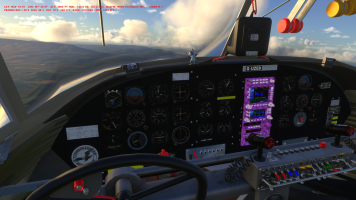
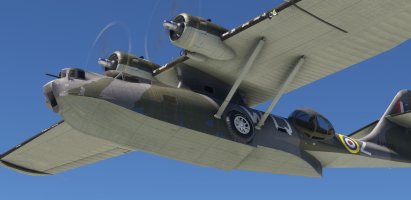
• There seems to be an uptick in Political comments in recent months. Those of us who are long time members of the site know that Political and Religious content has been banned for years. Nothing has changed. Please leave all political and religious comments out of the forums.

    If you recently joined the forums you were not presented with this restriction in the terms of service. This was due to a conversion error when we went from vBulletin to Xenforo. We have updated our terms of service to reflect these corrections.

    Please note any post refering to a politician will be considered political even if it is intended to be humor. Our experience is these topics have a way of dividing the forums and causing deep resentment among members. It is a poison to the community. We appreciate compliance with the rules.

    The Staff of SOH

  • Please see the most recent updates in the "Where did the .com name go?" thread. Posts number 16 and 17.

    Post 16 Update

    Post 17 Warning

An old project brought up to date: Canso PBY-5 of SAGQ

Hello,

Some good news about AP bug, following a few tests of this morning.

- First point: The "heading bug" isn't parented to the "heading cylinder" so the the direction of the aircraft change, the "heading bug" remains in the axis where it had been placed which is incorrect. By changing this, it completely changes the behavior of the aircraft when AP is ON.
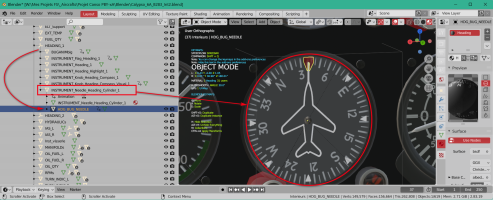
1768832751113.png

- Second point: The magnetic compass which has been created in April 2021 (with very little experience on MSFS) give "bad informations" around the 360° / 0° value. The animation duration isn't precise enough and jumps occur when the indicated value exceeds 355° or falls below 5°. I need to destroy this and re-create a valid animation.
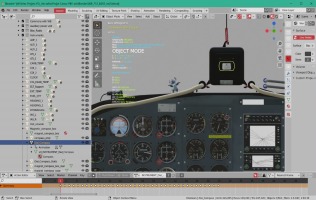
1768832347712.png

- Third point: The annoying problem with reflections on the interior windshield which occurs under FS24 only seems a MSFS bug find last year and that Asobo hasn't fixed with SU4 (it was in their todo list).
This point was pointed out to me by a user who provided me with some explanations and especially the link on the official Q&A forum where I could read the entire problem.
=> https://devsupport.flightsimulator.com/t/msfs-2020-airplanes-windshield-reflections-anomaly/10531

If I resume, in MSFS 2024, Asobo "seems" to have changed the way the renderer works for reflections: the "exterior windshield" should now be included in the "exterior modele so that the environment (lanscape, buildings, etc) can be reflected on this windshield, while the "interior windshield" should be in the "interior model".
If you are reading the post above, an error ticket was indeed opened in July 2025 by SimBolFSReborn and some were waiting for it to be resolved with SU4: it has not been!
A certain Flak99 has worked on this error since July 2025 and found this workaround : https://forums.flightsimulator.com/t/excessive-reflections-glare-tint-opacity-canopy/682224?u=flak99 ...
 
Last edited:
Hello,

After several modifications of the animations involved in the management of the aircraft’s heading and numerous tests, I arrived at a result that seems satisfactory to me. I hope you will enjoy it.

Changelog for v0.9.6e test version (January 23th 2026) :
  • Magnetic compass animation redone on 360 keyframes to obtain a smooth rotation (for each PBY variation)
  • Heading compass animation completely redone on 360 keyframes (i.e.)
  • Heading bug and Heading compas are now parented in order for the heading bug to follow the aircraft heading changes (i.e)
  • Empty weight roll moment increase to decrease oscillations that occurs during aircraft heading changes (i.e.)
  • [AUTOPILOT] section completely reviewed (flight_model.cfg of each aircraft)
The download link:
https://www.dropbox.com/scl/fi/830h...096e.zip?rlkey=2i7ze8pd9ejhxiuv3fvw1ysdc&dl=0
 
Last edited:
Thanks Tim,
To arrive at this it took me several days to analyze the only two planes that have this instrument (at least on my installation) that is to say the C172 and the DHC-2.
Unfortunately these two planes, once imported into Blender, do not allow to see how the different parts are organized because they are in a "armature" that manages the whole.
So through trial and error and multiple attempts I finally managed to find a solution that worked. Afterwards, it simply needed to be reflected in all the variations, which is not the most fun.

If this result is satisfactory for you, I will be able to move on to another step :cool:
 
If this result is satisfactory for you, I will be able to move on to another step

I've taken a closer look at the AP issues reported by Brian, and discovered that I had my own systems.cfg mod installed all this time, D'OH!
By comparing my own systems.cfg [AUTOPILOT] section with the one in the latest v0.9.6e I've found a few significant differences and a couple of important omissions.

Lines in blue are the differences, lines in red are missing from v0.9.6e:

max_bank = 10, 0, 0, 0, 0, 0
max_bank_acceleration =8
max_bank_velocity =16

max_throttle_rate =0.1
yaw_damper_gain =0
altimeter_indicator =1

direction_indicator =1
pitch_use_trim =1
default_pitch_mode =0
default_bank_mode =1

autothrottle_arming_required =0
autothrottle_takeoff_ga =0
autothrottle_max_rpm =0
use_no_default_bank =0
use_no_default_pitch =0

alt_mode_slot_index =2

With these settings I can confirm that there is no 'swaying' from side to side when engaging the autopilot heading or nav modes.

I also noticed an avionics stack texture issue with the pby5a_blisters GPBYA model, but I can find no missing textures or any texture.CFG file errors, very strange:

1769345391503.png
 
Thanks for your tests, Tim.

The content of [AUTOPILOT] section in this version is exactly the one of the B-24: that is OK for one aircraft can or can not be OK for an other one, even if they are similar in terms of dimensions. I will upgrade the download link with your datas afeter a test on my PC.

For the Avionic stack texture of the blister variation, I have one idea. Sometimes Blender "forget" some textures or when adding an object, the material used is incremented as well as the textures included in this material.
For example a material "Engines" becomes "Engines.01" and the included texture engine_albd.png becomes engine_albd.png.01.
During the export if we do not pay attention to it, the generated glTF/bin will look for the texture engine_albd.png.01 which of course does not exist and therefore cause this kind of incident.

In this kind of situation, when one realizes it, one must change the name of the material generated by the old one and pay attention to the names of the textures called and correct if necessary.
I have made some verification on the "Standard" and "Liner" models but it is OK in the bleder files and in the Sources folder which serve for the Packages generation. Also the contents of Packages generated is OK.

The only thing what I noted that can explain this it's the avionics_emis.png.dds that I have forget to copy in the Packages folder.
Verifying the blender model I have also noted an error in the name of a texture: Decal_avionics_norm.png in the blender file and Decal_avionics_nrm.png in the Sources files (the letter o has been disappear).

I will take in account theses points in each Interior models and regenerate the Packages folder.

PS:
- After verification, I have the same behavior than you in the Hanger when the Standard model is loaded.
- Theses 3 lines are also different in my system.cfg:

yaw_damper_gain =0
d
efault_pitch_mode =0
default_bank_mode =1
 
Last edited:
Back
Top