• Please see the most recent updates in the "Where did the .com name go?" thread. Posts number 16 and 17.

    Post 16 Update

    Post 17 Warning

  • Bandwidth Drive 2026 is over

    Thanks to everyone who donated.

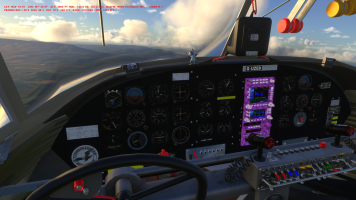
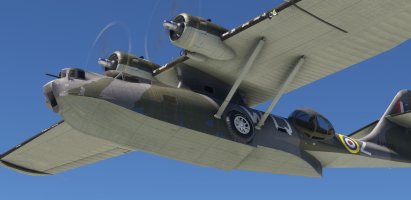
An old project brought up to date: Canso PBY-5 of SAGQ

Hello,

Some good news about AP bug, following a few tests of this morning.

- First point: The "heading bug" isn't parented to the "heading cylinder" so the the direction of the aircraft change, the "heading bug" remains in the axis where it had been placed which is incorrect. By changing this, it completely changes the behavior of the aircraft when AP is ON.
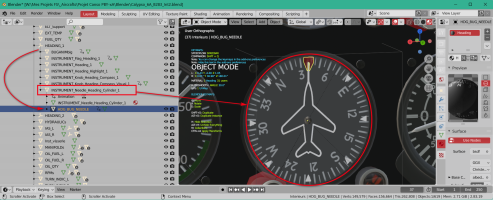
1768832751113.png

- Second point: The magnetic compass which has been created in April 2021 (with very little experience on MSFS) give "bad informations" around the 360° / 0° value. The animation duration isn't precise enough and jumps occur when the indicated value exceeds 355° or falls below 5°. I need to destroy this and re-create a valid animation.
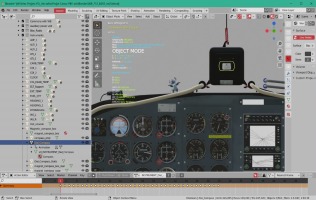
1768832347712.png

- Third point: The annoying problem with reflections on the interior windshield which occurs under FS24 only seems a MSFS bug find last year and that Asobo hasn't fixed with SU4 (it was in their todo list).
This point was pointed out to me by a user who provided me with some explanations and especially the link on the official Q&A forum where I could read the entire problem.
=> https://devsupport.flightsimulator.com/t/msfs-2020-airplanes-windshield-reflections-anomaly/10531

If I resume, in MSFS 2024, Asobo "seems" to have changed the way the renderer works for reflections: the "exterior windshield" should now be included in the "exterior modele so that the environment (lanscape, buildings, etc) can be reflected on this windshield, while the "interior windshield" should be in the "interior model".
If you are reading the post above, an error ticket was indeed opened in July 2025 by SimBolFSReborn and some were waiting for it to be resolved with SU4: it has not been!
A certain Flak99 has worked on this error since July 2025 and found this workaround : https://forums.flightsimulator.com/t/excessive-reflections-glare-tint-opacity-canopy/682224?u=flak99 ...
 
Last edited:
Hello,

After several modifications of the animations involved in the management of the aircraft’s heading and numerous tests, I arrived at a result that seems satisfactory to me. I hope you will enjoy it.

Changelog for v0.9.6e test version (January 23th 2026) :
  • Magnetic compass animation redone on 360 keyframes to obtain a smooth rotation (for each PBY variation)
  • Heading compass animation completely redone on 360 keyframes (i.e.)
  • Heading bug and Heading compas are now parented in order for the heading bug to follow the aircraft heading changes (i.e)
  • Empty weight roll moment increase to decrease oscillations that occurs during aircraft heading changes (i.e.)
  • [AUTOPILOT] section completely reviewed (flight_model.cfg of each aircraft)
The download link:
https://www.dropbox.com/scl/fi/830h...096e.zip?rlkey=2i7ze8pd9ejhxiuv3fvw1ysdc&dl=0
 
Last edited:
Thanks Tim,
To arrive at this it took me several days to analyze the only two planes that have this instrument (at least on my installation) that is to say the C172 and the DHC-2.
Unfortunately these two planes, once imported into Blender, do not allow to see how the different parts are organized because they are in a "armature" that manages the whole.
So through trial and error and multiple attempts I finally managed to find a solution that worked. Afterwards, it simply needed to be reflected in all the variations, which is not the most fun.

If this result is satisfactory for you, I will be able to move on to another step :cool:
 
If this result is satisfactory for you, I will be able to move on to another step

I've taken a closer look at the AP issues reported by Brian, and discovered that I had my own systems.cfg mod installed all this time, D'OH!
By comparing my own systems.cfg [AUTOPILOT] section with the one in the latest v0.9.6e I've found a few significant differences and a couple of important omissions.

Lines in blue are the differences, lines in red are missing from v0.9.6e:

max_bank = 10, 0, 0, 0, 0, 0
max_bank_acceleration =8
max_bank_velocity =16

max_throttle_rate =0.1
yaw_damper_gain =0
altimeter_indicator =1

direction_indicator =1
pitch_use_trim =1
default_pitch_mode =0
default_bank_mode =1

autothrottle_arming_required =0
autothrottle_takeoff_ga =0
autothrottle_max_rpm =0
use_no_default_bank =0
use_no_default_pitch =0

alt_mode_slot_index =2

With these settings I can confirm that there is no 'swaying' from side to side when engaging the autopilot heading or nav modes.

I also noticed an avionics stack texture issue with the pby5a_blisters GPBYA model, but I can find no missing textures or any texture.CFG file errors, very strange:

1769345391503.png
 
Thanks for your tests, Tim.

The content of [AUTOPILOT] section in this version is exactly the one of the B-24: that is OK for one aircraft can or can not be OK for an other one, even if they are similar in terms of dimensions. I will upgrade the download link with your datas afeter a test on my PC.

For the Avionic stack texture of the blister variation, I have one idea. Sometimes Blender "forget" some textures or when adding an object, the material used is incremented as well as the textures included in this material.
For example a material "Engines" becomes "Engines.01" and the included texture engine_albd.png becomes engine_albd.png.01.
During the export if we do not pay attention to it, the generated glTF/bin will look for the texture engine_albd.png.01 which of course does not exist and therefore cause this kind of incident.

In this kind of situation, when one realizes it, one must change the name of the material generated by the old one and pay attention to the names of the textures called and correct if necessary.
I have made some verification on the "Standard" and "Liner" models but it is OK in the bleder files and in the Sources folder which serve for the Packages generation. Also the contents of Packages generated is OK.

The only thing what I noted that can explain this it's the avionics_emis.png.dds that I have forget to copy in the Packages folder.
Verifying the blender model I have also noted an error in the name of a texture: Decal_avionics_norm.png in the blender file and Decal_avionics_nrm.png in the Sources files (the letter o has been disappear).

I will take in account theses points in each Interior models and regenerate the Packages folder.

PS:
- After verification, I have the same behavior than you in the Hanger when the Standard model is loaded.
- Theses 3 lines are also different in my system.cfg:

yaw_damper_gain =0
d
efault_pitch_mode =0
default_bank_mode =1
 
Last edited:
Hello,
Taking into account Tim’s remarks and my notes, the offending textures were redone then checked. I took the opportunity to take back a bit of the Empty_CG position in order to improve the weight & balance.
Here is this latest version of tests that should be officially published if everything goes well, which will allow me to focus on the DC-4 and the A-26.

Link v0.9.6f
 
Here is this latest version of tests that should be officially published if everything goes well

Unfortunately the updated Autopilot settings didn't cure the swaying issue, so I checked all the other autopilot settings and made a few more changes which made no difference.
Finally I realised that I am using the panel.wt folder with the Working Title Garmins instead of the standard panel folder - and THAT is the cure, along with the existing autopilot updates of course.
I would recommend setting the panel.wt option as the default for each model and variant just in case.
With that issue fixed, I think all that remains is the glass reflections - and maybe the spinning wheels when landing on water?
 
Hello Didier, I just noticed that the Blisters model
has a texture problem with the CFRR and the TAA repaint.
The FUSE_NRM.PNG.DDS texture in the texture folders has artifacts.

Screen Shot 01-27-26 at 10.46 PM.PNG

Screen Shot 01-27-26 at 11.14 PM.PNG
 
Thanks for your remark,

Indeed, it is a concern that comes from the source file because it has the same problem, no doubt that I clicked too quickly when I exported the texture without leaving enough time for it to be completely saved.

I just checked the FUSE_NRM.PNG.DDS texture of the GPBYA is similar (just extra streaks on the rudder - right upper side) and it’s exactly the same size 21846 oct so we can temporarily overwrite that of the CFCRR and the TAA with that of the GPBYA.

In case of use under MSFS 2024, it is better to recreate the layout.

PS: For CFCRR and TAA you can use this file that I regenerate this morning:
 

Attachments

  • FUSE_NRM.PNG.DDS.zip
    3.2 MB · Views: 6
Last edited:
Wanting to test what Tim had written above about the AutoPilot of Working Title, I tried to learn a little more about this product that I don't know precisely and I realized that:
- on MSFS 2020 it could be installed via the MarketPlace for free and
- that it was native in two versions on MSFS 2024 : v1 or v2.

First of all, when installing this product on MSFS 2020 it seems that the product overwrites the old implementation of Asobo AS430/AS530 and replaces it. Therefore, once installed from the MarketPlace, using the "panel" directory (provided by default) in MSFS 2020, we actually use the Working Title product.
before WT installation: asobo-vcockpits-instruments-navsystems\html_ui\Pages\VCockpit\Instruments\NavSystems\GPS\AS430\AS430.html
after WT instalation: workingtitle-instruments-gns\html_ui\Pages\VCockpit\Instruments\NavSystems\GPS\AS430\AS430.html
The two components have the "same path" and the "same name": how Asobo make the differences ? Here, I don't know :(

On MSFS 2024, there are actually two directories (use VFSProjector in the DEV Mod to search for this): wtgns and wtgns2.
The first corresponds to version V1 and the second to version V2.

Microsoft reference:

A Note on Versions :
MSFS 2024 includes both v1 and v2 versions of the GNS.
v1 is a copy of what is available in MSFS 2020 and is only meant to be used by airplanes developed for MSFS 2020 that are carried forward into 2024 without any updates.
v2 is an updated version that will take advantage of new functionality available in MSFS 2024.

Therefore, as Canso PBY is an aircraft developed for MSFS 2020, if you wish use it under MSFS 2024 it would be appropriate to use panel.WT but taking care to replace the wtgns2 label with wtgns in this file (and regenerate the layout.json of course) to be compliant with Microsoft requirements. That said, apparently the wtgns2 version seems to work .... :p

To conclude, I think the best is that I advise the user in an appropriate Readme.txt AND in my comments on my site (just before the link) that it is strongly advised:

- on MSFS 2020 to use the Canso PBY addon with the provided panel (that I will rename panel.20 for clarity purposes) but after downloading and installing via MarketPlace the product Working Title

- on MSFS 2024 to use the addon after changing in the aircraft.cfg file from panel.20 to panel.24 (renamed also for clarity purposes) so as to have the version recommended by Microsoft/Asobo.

In the MarketPlace, this is the product page for this FREE product:

WTGNS_Download.png

2026-01-28_115722.png

After that I cann't do more thing to upgrade/improve the AutoPilot behavior :cool:
Fortunately, all this time spent searching for why it wasn’t working will be useful for the DC-4 and the A-26, at least I hope :p
 
Last edited:
Hello,

The v0.9.6G is delivered this morning:


I cannot seem to download it lagaffe. I get a vicious circle of going to the download and it says my site is not secure (I use a VPN). When I 5 seconds is passed and I click the link, I get another window, asking for my sign in. When I sihn in, it goes back to the same sign in window blank. I use to love technology, now at age 80 I am beginning to loathe the security involved.

Cazzie

download_1.jpg

When I click the download link, I get this.

download_2.jpg

So I fill it out.

download_3.jpg

When I click Sign in om the above, it carries me back to the original blank Sign In?

download_4.jpg

I'm an 80 year old lost child!
 
I cannot seem to download it lagaffe. I get a vicious circle of going to the download and it says my site is not secure (I use a VPN). When I 5 seconds is passed and I click the link, I get another window, asking for my sign in. When I sihn in, it goes back to the same sign in window blank. I use to love technology, now at age 80 I am beginning to loathe the security involved.

Cazzie

View attachment 181728

When I click the download link, I get this.

View attachment 181729

So I fill it out.

View attachment 181730

When I click Sign in om the above, it carries me back to the original blank Sign In?

View attachment 181731

I'm an 80 year old lost child!
@Cazzie the username is pilote and the password is virtuel

Cheers,

Priller
 
Sorry Cazzie,
I was far from my PC this afternoon. If you are still in trouble, send me an MP I will give you a direct link.
 
Back
Top