DC-4 Skymaster

I use all of them still from 2000 up along with any other flight, combat flight, car, train, farm, space or what ever sim you can think of.

I was really wanting to stick with 2020 but there are a few things that bothered me about it, so of course when 24 went on sale for the second time I caved, extreme curiosity got the better of me, then again I'm a sim nutcase lol.

Needless to say the things that bothered me in 20 are not present in 24, so for my own personal reasons it was a good step up for me. I will of course keep the basic install of 20.
 
I'm an "out with the old, in with the new" kind of simmer, which of course means putting up with "teething troubles" in the short term, but the long term benefits are well worth it.
From the developer's point of view however, it's a long term royal pain and I have the utmost respect and admiration for Didier who codes for both sims at once.
Monsieur, vous êtes formidable!
 
I’ve got them both installed. I love the visuals in 2024 (although they aren’t too shabby in 2020, either!!!). I fly both, although in my opinion, the flight models seem much smoother to me in 2020. To each his/her own…YMMV.
 
View attachment 191819

Starting engines in SFO. This livery is from Gary Harp over at flightsim.to brought into FS2024. Didier is doing a great job with this project and looking forward to spending many hours in the cockpit of the C-54!
Question:
Is it much work to bring over the liveries from the old Skymaster version to this new one in 24? What all do I need to do? Rename files, edit texture.cfg and/or use the MSFSLayoutGenerator tool?
 
Currently, I have not modified the UV mapping or if you prefer the paintkit so currently it's yet possible.
Nevertheless, in the future, I may change some maps, especially the fuselage, because the upper and lower parts, when projected onto a 2D plane, are too distorted; ideally, the fuselage should be divided into four parts: upper, lower, and both sides, thus, each area of the fuselage will have the same precision.
Why hasn’t this been done yet: because I always process the textures at the end of the process, since a 3D model can still evolve, change during development, and so if that’s the case, the textures will have to be redone, so it’s as much as processing them at the end

For personnal purpose I have rename textures files according to my following principles (to respect my usual workflow):
- spec files are not longer used but they can help to create metallic/roughtness textures for the comp textures creation
- glow files are not longer used

For the cockpit, ns_*_l.* (l for light) are rename in dc4_*_emis.*. In fact, almost all the needles of the gauges were in duplicate: one had the diffuse texture and another used the ns_*_l texture. * and the latter was displayed only at night or when cockpit lighting was requested.
Under MSFS, we handle things differently, since each material can have 4 subtextures: albd, comp, nrm, emis. Emissivity can be managed by the value of a potentiometer or by appropriate XML code lines.

The main files used for exterior repaints are :
- ns_fuselage.* (i.e. the diffuse file) in dc4_fuselage_albd.*
- ns_fuselage_bump.* in dc4_fuselage_nrm.*
- ns_wing_l.* (i.e. the diffuse file) in dc4_wingl_albd.*
- ns_wing_l_bump.* in dc4_wingl_nrm.*
- ns_wing_r.* (i.e. the diffuse file) in dc4_wingr_albd.*
- ns_wing_r_bump.* in dc4_wingr_nrm.*

In the basic repaints provided in the addon, a texture.cfg file is yet created to make reference to the others textures needed. You only need to copy/paste in your files.

For your repaint, you can make a Projects file structure inspired by the SDK examples, populate your png files and compile with fspackagetools to have the necessary json files and dds.

The Paintkit files provided byt Flight Replicas homesite are always valuable and you can download them for new repaints.

Currently, the only repaint which is correct according to my point of view, it is that of Air France.
The others were quickly transferred from P3D to MSFS and the COMP files will need to be improved as well as the NRM files (this is a beta version).
For the next version, I will try to improve the NL repaint that is close to my heart for Javis who had sent me a lot of photos and images of the DC-4, which is near his home in Holland.
 
Last edited:
I absolutely LOVED the DC-4/C-54 when it was initially released. I really like seeing the upgrades being worked. Love this airframe!
 
Hydraulic and Brakes systems :

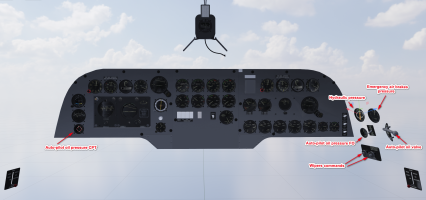
By studying the 3 gauges (on some aircrafts it seems taht there are only 2, but no simplification: DC-4 and C-54 will be provided with 3 gauges) that remained to be completed on the side console to the pilot’s right, I was able to clarify the situation:

1783243057445.png

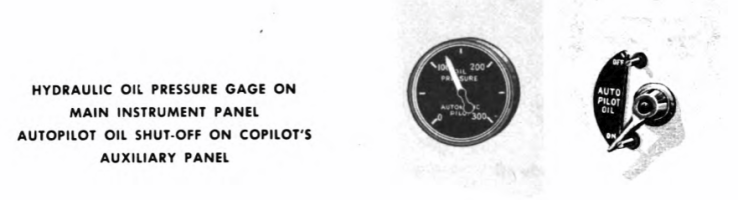
- the bottom gauge is the oil pressure in the circuit managing the autopilot; this circuit is powered according to the ON-OFF switch located slightly back: now the switch controlling the oil circuit is modeled and programmed, and the gauge also (the oil pressure gauge for the autopilot is also duplicated on the left side of the main panel for the pilot). For the auto-pilot circuit, the working pressure is 125 psi, + or - 5 psi
1783236086037.png
- above this gauge is the one showing the fluid pressure in the hydraulic circuit : this hydraulic system manage brakes, wing flaps, landing gear, cowl flaps, carburetor air filter (not modelized) and windshield wipers.
Reading carefully the Flight Manual for the C-54G and the C-54E, some details "could/should" be modified .
  • C-54E: a hydraulic reservoir gauge added on the upper instrument panel (overhead ?)
  • according the C-54G manual : the main hydraulic system is supplied by two engine-driven pumps (engine n°2 and n°3), the auto-pilot is operated by a separate hydraulic system, and an other engine driven pump on engine n°2
  • reading the the C-54E manual : 3 engine-driven pumps (n°2, n°3, n°4) supply hydraulic fluid at 2700 to 3050 psi pressure, the hydraulic reservoir capacity is 5.4 gallons (with a reserve of 2.5 gallons whicth is available only for hand pump operation)
  • brakes operate under a reduced pressure of 390 to 410 psi whih brakes fully applied.
Modifications in the system.cfg in brakes and hydraulic sections
[BRAKES]
parking_brake = 1
auto_brakes = 0
toe_brakes_scale = 0.5
differential_braking_scale = 0
hydraulic_system_scalar = 1
gear_warning_available = 1

[HYDRAULIC_SYSTEM]
normal_pressure = 3000
electric_pumps = 3
engine_map = 0,1,1,1,0,0,0,0,0,0,0,0,0,0,0,0
min_pct_rpm_for_max_pressure = 0.2
ailerons_require_hydraulics = 0
rudder_require_hydraulics = 0
elevator_require_hydraulics = 0
spoilers_require_hydraulics = 0

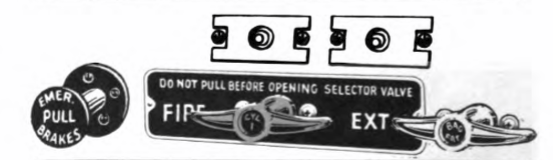
- finally, the last gauge is the emergency air brake pressure : emergency air brake control handle is managed at each end of the main instrument panel, just under the glare-shield by red handles.
1783238643573.png

PS: For the hydraulic hand pump operation, perhaps I will study how this has been mode in the DC-3 and if it is possible to add to this add-on ... but later in the development.
 
Last edited:
Version v0.52

Yesterday, I have push a new version with minors improvments, this version cancels and replaces the previous one on the link #187 / page 10 :
- Fix the duplicate object on the navigator desktop behind the copilot
- Revision of the right side console of the copilot: hydraulic pressure gauge, hydraulics for the auto-pilot command and de-icing controls
- Oil dilution switch are animated and XML coded
- Deicer commands are now functional on the overhead
- Contrails are implemented (work in progress)

{EDIT] I have find a better solution to activate the contrails in MSFS. Reading the xML code provided in a PMP A330 addon, I have discover a new AVar which can bring a quick solution:
<FX_CODE>(A:CONTRAILS CONDITIONS MET:1, Keyframe) 0 &gt;</FX_CODE>
In the engines.cfg, verify that you have:
max_contrail_temperature = -39.724
 
Last edited:
Hello,

With temperatures too high in Europe, the last two months have not been very productive, air conditioning in private homes is not very common in Europe, so working at 40°C is impossible for me (heart problems). I can only work properly between 8 and 12 o'clock, so it hinders me a lot.

Nevertheless, I was able to add and test the following functions on my v0.53 version (dev. version):
- safety lights for gears are modelized and coded (unsafe warning and green lights) on the central panel
- safety gear lever for gears is implemented and coded (red light) on the pedestral
- caution light for oil quantity is implemented on the DC-4
- caution for oil and fuel pressures are implemented on the C-54
- the "deicing" switches on the overhead for each aircraft
- the oil dilution switches on the overhead for each aircraft
- the switches for controlling the lights and spotlights on the overhead for each aircraft
- the orientation of landing lights for each aircraft.

All has been tested on FS20 but also with FS24.

1784972326579.png

Now in the v0.53 version, the wheel lever is provided as indicated in the manual with a small lever (such as a "spring") that locks the gears lever when the wheels are lowered but also when they are raised.
The 3 green lights indicate that the gears are down and locked, the red light (on the left of these warnings light) is on and the siren sounds (to be encoded in the sound files) when the lever is not locked by the security system.

1784972401568.png

The work on sounds (WWISE and Legacy sound mixes) has started and I am rereading my notes that I took when creating the Aéronca, which was my first test on this point.

With the previous XML code the exhaust flams were "static" when the throttle were at 100%. To modify this I have changed the code in order to use "THROTTLE - 10%" as parameter to manage the effect and adding a light fluctuation in the animation with each engine vibration, so now each flam has its proper animation even when the throttle is at 100%.

 
Last edited:
Hi,

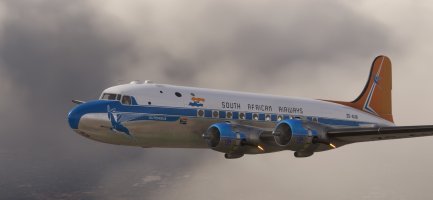
At the beginning of this project I found a lot of information and videos about the South African DC-4s still in flight conditions. From what I understood and could read, there are two aircrafts: ZS-AUB "Outeniqua" c/n 42984 and ZS-BMH "Lebombo" c/n 43157 which are in the colors of South African Airways: Reference https://saamuseum.co.za/history/His...ways_Museum_Society_webpage.htm#_Toc172456408.

zo45ktpt.png
ZS-BMH and sistership ZS-AUB

Over the years, several liveries have been used and on FS.to Gary Harp has published one of the first liveries from the ZS-AUB Outeniqua.
ml0heh4k.png
For a short period ZS-AUB wore the “Blue and Silver Fleet” livery - Photograph: Sonja Grünbauer.

Marty beat me slightly by creating his repaint ZS-AUB, but I had also already recovered a lot of photos on the ZS-BMH.
As the South African models are slightly different from the DC-4 1009 (no radio astronomer, two wire antennas along the underside of the fuselage, a long nose, etc.) I wanted to adapt another Mike model for this purpose. So yesterday I added another model "model.saaf" that uses this adapted fuselage and the interior model of the current DC-4.

6ys31g4m.png

For the cockpit, this is the vintage model that will be slightly adapted. The particularity of the cockpit is in the central console, which does not include the old means of communication (see the videos on the ZS-AUB and ZS-BMH available on YouTube)

u86xlwt3.png

I noted a few details about these two planes:
- The Douglas roundel appears on the outer part of the engine nacelles and not on the inner part, which is visible from the cockpit (I will provide decals for this, in the next version)
- The inscriptions concerning the airline on the fuselage are different: SUID AFRIKAANSE LUGDIENS (Afrikan language) on the left side and SOUTH AFRICAN AIRWAYS (in English) on the right side
- On the bottm of the wings, the "emergency paths" are indicated painted (I will provide decals for this, in the next version).

Emergency stripes.jpg


This morning I have tested my first version of the ZS-BMH :

1785146068349.png
 
Last edited:
Doors are closed and engines run-up from JOHANNESBURG to DURBAN (South Africa) at 17h ... (real professionnal flight made in 2003 but on an other aircraft :confused: )

1785161553938.png

As asked by Martial, here the v053 version (Work in Progress) including a new model: DC-4 1009 SAAF with a new livrery ZS-BMH.
I was slightly inspired by Martial’s work, which I adapted and added a few additional details that could be used on his repaint ZS-AUB ;) .

The DropBox link for v053 version:

This new model isn't finish, I have some errors to solve:
- interior model used is the interior from the DC-4 and the aerodome has not yet been removed and the center console is not the final one. I will upgrade this interior model to adapt it for this new model.
- Hamilton stickers will be added on each propeller and on each model ...
- Emergency stickers will be added as decalc on each exterior window.
- White strobe on the wings are not displayed (the tail one: yes) ... under investigation

For the others models, crew people will be added in the cockpit and the cabin.
For the C-54 Cargo, a jeep is finished and will be included as "fret" with some others boxes.
I started working with the sounds to create a WWISE and legacy mix... maybe for the next beta.

---------------------------------------------------------------------------------------------------------------------------------------------​
As I mentioned, I prefer that these Beta versions are currently reserved for SOH members only, given the help some of them have given me and still give me, so this is just a modest return on their investment.
As soon as the version is a bit more advanced (see the changelog for work still planned), I will make it available more widely, but it will be in the SOH library and on my website (there are absolutely no plans to put it on FS.to, so I won’t respond to this kind of request).

---------------------------------------------------------------------------------------------------------------------------------------------
 
Last edited:
Didier, I tried it for the first time today and I must say that this is a real beauty! Also flies well. I even managed to land it softly without really knowing the V's.
Top work, my friend!

1250410_20260729135334_1.png
 
Back
Top