
-
Please see the most recent updates in the "Where did the .com name go?" thread. Posts number 16 and 17.
-
Special Server Maintenance
Just when you think you have everything running some what better...
You get a message from the Hosting company. Short story they need to move us to a new server. I have been working with them to plan a good date for all concerned. Here is what we have come up with as a schedule.
- November 4th 17:00 -5UTC shut off the forums and start backup proceedures. During this time there will be no access to the forums or the Resource Section.
- November 5th Continue with Backups and download same until complete.
- November 6th 7:00 turn over server to hosting company to move system to new server
- November 7th - 8th restore backups and upgrade forum software.
If all goes well we should be back online on November 8th.
To keep you updated we will post updates on AVSIM forums.
Thank you for your support.
You are using an out of date browser. It may not display this or other websites correctly.
You should upgrade or use an alternative browser.
You should upgrade or use an alternative browser.
Attention all DC-3 fans !
- Thread starter Javis
- Start date

Ian Warren
Charter Member
Super Smooth !  nice jalopy
nice jalopy
cavaricooper
SOH-CM-2023
Ted:
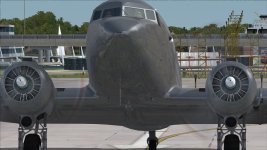
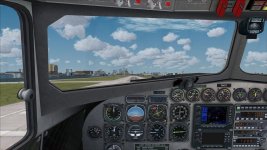
Got the repaint from here- thank-you! I'm having a bit of an issue and need a point in the right direction..... The exterior has NO shine unlike your previews, and the cockpit seems to be missing bits....
Piccies to make it clearer..... any thoughts?
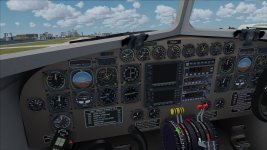
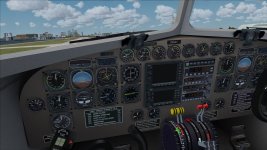
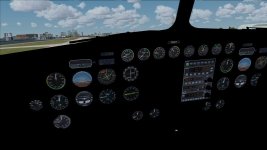
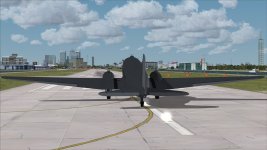
...not sure why there are 2 pics each.....Ta!
Carl
Got the repaint from here- thank-you! I'm having a bit of an issue and need a point in the right direction..... The exterior has NO shine unlike your previews, and the cockpit seems to be missing bits....
Piccies to make it clearer..... any thoughts?
...not sure why there are 2 pics each.....Ta!
Carl

TuFun
Riveter
Ted:
Got the repaint from here- thank-you! I'm having a bit of an issue and need a point in the right direction..... The exterior has NO shine unlike your previews, and the cockpit seems to be missing bits....
Piccies to make it clearer..... any thoughts?
View attachment 5167View attachment 5168View attachment 5169View attachment 5169View attachment 5170View attachment 5170
...not sure why there are 2 pics each.....Ta!
Carl
I have MJ C-47 Texture Basepak done by Gman and the texture.cfg file is set to texture.clean.
If you don't have MJ C-47 Texture Basepak, excellent pak by the way, you will need to use the default (texture.EATS_315221) texture.cfg file.
Copy this file into the texture.Silver Cloud folder.
should look like this, open with Notepad...
[fltsim]
fallback.1=..\texture
fallback.2=..\..\..\..\Scenery\Global\texture
fallback.3=..\..\..\..\..\..\Scenery\Global\texture
I believe there are two different texture.cfg files in the MJ texture pak... this is the one in the Silver Cloud, which has different enhancements used...
[fltsim]
fallback.1=..\texture.clean
fallback.2=..\..\..\..\Scenery\Global\texture
fallback.3=..\..\..\..\..\..\Scenery\Global\texture
Last edited:

gray eagle
SOH-CM-2026
I have MJ C-47 Texture Basepak done by Gman and the texture.cfg file is set to texture.clean.
If you don't have MJ C-47 Texture Basepak, excellent pak by the way, you will need to use the default (texture.EATS_315221) texture.cfg file.
Copy this file into the texture.Silver Cloud folder.
should look like this, open with Notepad...
[fltsim]
fallback.1=..\texture
fallback.2=..\..\..\..\Scenery\Global\texture
fallback.3=..\..\..\..\..\..\Scenery\Global\texture
I believe there are two different texture.cfg files in the MJ texture pak... this is the one in the Silver Cloud, which has different enhancements used...
[fltsim]
fallback.1=..\texture.clean
fallback.2=..\..\..\..\Scenery\Global\texture
fallback.3=..\..\..\..\..\..\Scenery\Global\texture
Is this the MJ C-47 Texture Basepak, you mentioned :
http://www.sim-outhouse.com/sohforums/local_links.php?catid=3&linkid=17613
Also, will those redone radial engines (above ^) redo's be included in next release that also includes the new interior?

TuFun
Riveter
Yes, that is the MJ C-47 Texture Basepak. Concerning radial textures use in Jan's update. That will be up to Jan to included them.
Important to read Gman's notes as stated...
IMPORTANT !!!
Copy and paste the texture.clean and texture.weather files into the same Douglas_C-47_V2 folder. These files containe the specific spec, bump, reflective and detail files for the clean or weathered looks. These fines can be interchanged for a customization of your individual skins.
Important to read Gman's notes as stated...
IMPORTANT !!!
Copy and paste the texture.clean and texture.weather files into the same Douglas_C-47_V2 folder. These files containe the specific spec, bump, reflective and detail files for the clean or weathered looks. These fines can be interchanged for a customization of your individual skins.
gray eagle
SOH-CM-2026
Yes, that is the MJ C-47 Texture Basepak. Concerning radial textures use in Jan's update. That will be up to Jan to included them.
Important to read Gman's notes as stated...
IMPORTANT !!!
Copy and paste the texture.clean and texture.weather files into the same Douglas_C-47_V2 folder. These files containe the specific spec, bump, reflective and detail files for the clean or weathered looks. These fines can be interchanged for a customization of your individual skins.
So one part of the equation is solved ( gmans Base Pak) just to make sure I understand, we will have to modify via our paint program and modify each radial engine texture that we want changed. Yes?

Alky
Charter Member
So one part of the equation is solved ( gmans Base Pak) just to make sure I understand, we will have to modify via our paint program and modify each radial engine texture that we want changed. Yes?
You'll need to copy & paste the engine section as shown in the above post. If you don't have the tools or ability to work with dds/bmp files, maybe someone can do it for you. I copied & pasted the engine to a C-117D repaint I have, looks great.

TuFun
Riveter
Yes, all of them will have to be resubmitted again by authors to use the radial textures. The paintkit will need to be updated with these textures. If you can use photoshop, this can be done to those repaints as shown in my previous post. All this maybe mute when Jan releases his version.
Example...

Example...
cavaricooper
SOH-CM-2023
Thanks for all the help received! Mission Accomplished! Beautiful Ted, a simply lovely repaint!
GMan Gordon.... Do the clean and weathered textures only effect the VC or do they result in external visual changes as well? BTW I'm using the PATCH version (seems to have all necessary files).
Has there been any thought about removing the clear astrodome as a future project?
Carl
GMan Gordon.... Do the clean and weathered textures only effect the VC or do they result in external visual changes as well? BTW I'm using the PATCH version (seems to have all necessary files).
Has there been any thought about removing the clear astrodome as a future project?
Carl
gray eagle
SOH-CM-2026
Grab the Nvidia Plug-in for Adobe Photoshop. It handles the dds files very well.
All that is required to use the engine textures are in the red box. Create a layer and copy that to any C47_1_T.bmp or dds using photoshop.
Example:
Silver Cloud texture...

Eastern Airlines... released over at flightsim.com a few days ago. As you can see I copied the shadowed version to this texture sheet.

Well, First off DXTBMP opens this file upside down so do I flip the eastern one and then copy the highlighted file over an after that does it have to be flipped back?
I tried this once for the eastern and it was a disaster. see for yourself: I use paint.net with photo shop tools. One the original texture sheet, I isolated and copied
the engine jugs and other stuff that was shown in red box and then copy and pasted as a layer to the eastern and then after file flattening, I had DXTbmp refresh
the eastern file with the changes and it replaced the old file with the new one and well..... it got a little messy.
View attachment 5185

I noticed TuFun that your new "Silver Cloud" repaint with new engines is saved as extended bmp 32 888. Where as the other skins are DXT5 dds files. In turn, with pun intended, they are upside down from a dds DXT5 vs an extended bmp 32. I hope that clears some user issues or confuses them more. LOL!
TuFun
Riveter
I noticed TuFun that your new "Silver Cloud" repaint with new engines is saved as extended bmp 32 888. Where as the other skins are DXT5 dds files. In turn, with pun intended, they are upside down from a dds DXT5 vs an extended bmp 32. I hope that clears some user issues or confuses them more. LOL!
Yes, Silver Cloud are bmp files so no flip of the textures, where as the dds files on other repaints are required to be upside down.
If one wants to learn repaint should seek professional help!

This concludes my time here. Many more model to do!
gray eagle
SOH-CM-2026
Yes, Silver Cloud are bmp files so no flip of the textures, where as the dds files on other repaints are required to be upside down.
If one wants to learn repaint should seek professional help!
This concludes my time here. Many more model to do!
Then one could just flip the target texture, add the radial texture, then reflip to original display and forgo the nvidia plugin achieving same desired results ergo, not seek "(sic) professional help"
 Six of one and half dozen of another.......either way...... View attachment 5210 This concludes my time here as well; I too have other repaints to finish.
 I did it my way! (Frank Sinatra 14 June 1969)

Last edited:
gray eagle
SOH-CM-2026
Nats R4d radial image change


Cirrus N210MS
Charter Member
looking amazing cant wait to use it with the dc-3 i really have been wanting a Old style vc for my dc-3s i like the Updated vc though its just to clean for me feels like i am flying a Jet not a DC-3