
-
Please see the most recent updates in the "Where did the .com name go?" thread. Posts number 16 and 17.
-
IMPORTANT DOWNLOADING INFORMATION - ALL MEMBERS PLEASE READ
Please see this thread for updates. Update Thread
SOH ADMINISTRATION
You are using an out of date browser. It may not display this or other websites correctly.
You should upgrade or use an alternative browser.
You should upgrade or use an alternative browser.
Attention all skinners!
- Thread starter gecko
- Start date

MajorMagee
SOH-CM-2022
Yes, pushing the z direction away from the eye point (less negative, more positive) solves the disappearing sprite problem.
That pretty much confirms my suspicion - the bug causing graphical issues is inside reticle removal code.Yes, that did the trick. However, when I did, I began experiencing the unstable graphical issues associated with Bf 109 reflector sight.
MajorMagee
SOH-CM-2022
I took another look at the Sun Glare and it is pretty much dependent on how the suneffect.xml is set up. The one I needed to tone down came with the ETO 1.5 update. Other versions are fine with the original 1.2 multiplier.
MajorMagee
SOH-CM-2022
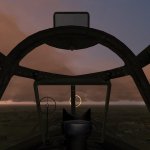
I was flying at sunrise, and noticed a white line being rendered on the terrain. It always stayed about the same distance away as I moved toward it, but seemed to progress in discrete steps (jumped to the next position when it was ready). I could see it from high up so I dove down for a better look to see if it was just rendering a road or a stream incorrectly. It didn't appear to be tied to anything in particular, and looked the same at the lower angle. Perhaps it's tied to some LOD boundary calculation?

Attachments

gecko
Charter Member
I have done some more experiments with the reflector sight. As suggested the cockpit always being drawn in front can be dealt with by moving the location of the reticle forward, so it is no longer within the bounds of the cockpit. This also helps with the disappearing bug (I found it will also be clipped if you turn your head while leaning in, even if it is still visible when looking directly at it). There are two issues though, 1. as Andy found, structure which should be behind the reticle is still in front, and 2. sizing the reticle correctly to fit the glass becomes difficult to impossible. The farther back the reticle is placed from the glass it is being projected on, the sooner you will see it projected off of the glass as you lean side to side or up and down if you made the reticle the right size when looking at it dead on. This is especially an issue for offset sights. If you make the reticle smaller to compensate, it now only fills a small portion of the glass.
I found my issue with the thin reticle not working. It was a mouse actuator malfunction. I set up the new texture incorrectly and had the alpha channel applied directly to the main texture, so it showed the reticle instead of the circle defining where the reticle can be seen. I have it working correctly now.
Also, there seems to be some sort of conflict between moving reticles and other nearby DXT5 textures. I'm not sure exactly what, I'm trying to look into it.
Lastly, I'm really liking the fresnel effect at certain angles. It really adds a lot of depth. But I am convinced it would look better with its own texture, one with maybe only two colors that gently faded into each other, or something similar.
I found my issue with the thin reticle not working. It was a mouse actuator malfunction. I set up the new texture incorrectly and had the alpha channel applied directly to the main texture, so it showed the reticle instead of the circle defining where the reticle can be seen. I have it working correctly now.
Also, there seems to be some sort of conflict between moving reticles and other nearby DXT5 textures. I'm not sure exactly what, I'm trying to look into it.
Lastly, I'm really liking the fresnel effect at certain angles. It really adds a lot of depth. But I am convinced it would look better with its own texture, one with maybe only two colors that gently faded into each other, or something similar.
MajorMagee
SOH-CM-2022
The line on the ETO 1.5 terrain is there during the day as well, but it appears dark. It looks a bit like an anisotropic filtering artifact, but it forms a square around the viewer that changes position in discreet jumps rather than staying a fixed distance away from your airplane and moving as you do.
HouseHobbit
Charter Member
I don't claim to understand any of this, But.. I am completely taken by this work you all are doing..
THANKS Very Much.

THANKS Very Much.
MajorMagee, that white line is most likely an edge of certain terrain LOD. I will check what might cause it.
I'm sure I can find a workaround for cockpit details obscuring the reticle, and regarding proximity to the camera gecko is right - placing it further away makes it impossible to align properly for all viewing angles - this is something that didn't occur to me at first.
The simplest solution I can think of is to keep the reticle sprite far to let the CFS3 engine process it correctly but then my shaders will move it closer and place at correct distance to match the glass. So basically you define the Z value in XDP to be say 1 meter farther than needed and then my shaders move the sprite 1 m back. The offset will be configurable in TextureMagic.ini (should I keep calling it texturemagic, or maybe a more serious name is needed? ).
).
Another option is to use low detail mip level of environment map, but I noticed that it doesn't work properly on all GPUs.
To understand what I'm speaking about, try editing Models.fx, line 787:
float4 cubeVec = float4(reflDir, 5 * saturate(1-log10(Material.fPower)*0.5));
Change it to be like this:
float4 cubeVec = float4(reflDir, 5);
or any other integer number instead if 5. Here 0 is the most detailed mip level and something like 10 will be just 1x1 texture.
---
Ok, I see there are quite a few bugs to fix already, but I'm too busy with non-gaming stuff these days so it may take some time before I can fix these issues.
I'm still reading and answering in this thread of course
I'm sure I can find a workaround for cockpit details obscuring the reticle, and regarding proximity to the camera gecko is right - placing it further away makes it impossible to align properly for all viewing angles - this is something that didn't occur to me at first.
The simplest solution I can think of is to keep the reticle sprite far to let the CFS3 engine process it correctly but then my shaders will move it closer and place at correct distance to match the glass. So basically you define the Z value in XDP to be say 1 meter farther than needed and then my shaders move the sprite 1 m back. The offset will be configurable in TextureMagic.ini (should I keep calling it texturemagic, or maybe a more serious name is needed?
).Yes, I already have partially working code which uses a gradient of sky color, average ground color and fog color in between for reflection instead of environment map (except for _r textures of course). This should help with surfaces looking "wet".But I am convinced it would look better with its own texture, one with maybe only two colors that gently faded into each other, or something similar.
Another option is to use low detail mip level of environment map, but I noticed that it doesn't work properly on all GPUs.
To understand what I'm speaking about, try editing Models.fx, line 787:
float4 cubeVec = float4(reflDir, 5 * saturate(1-log10(Material.fPower)*0.5));
Change it to be like this:
float4 cubeVec = float4(reflDir, 5);
or any other integer number instead if 5. Here 0 is the most detailed mip level and something like 10 will be just 1x1 texture.
I probably need a more specific example how to reproduce it. It doesn't sound like something I've seen before.Textures in certain formats (DXT5 and possibly others) show as black unless the underlying material color in the model is full white as seen in the hex editor.
---
Ok, I see there are quite a few bugs to fix already, but I'm too busy with non-gaming stuff these days so it may take some time before I can fix these issues.
I'm still reading and answering in this thread of course
Daiwilletti
Charter Member
MajorMagee, that white line is most likely an edge of certain terrain LOD. I will check what might cause it.
Thanks to all involved in this noble endeavour, especially the magician, Ankor

I won't pretend to understand this but just a wild guess involving the white line in the terrain - could it be addressed with a change to the scenerybudgets xml file? Usually, the scenerybudgets file has an interface between scenery rings which use mips, and those that don't. My wild guess is maybe the white line shows at the interface between the use of mips and where mips are turned off?
MajorMagee
SOH-CM-2022
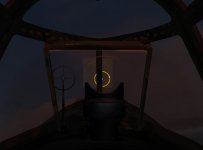
I took another look at the conflict we're having with blanking out the static reticle, and in just the right lighting I saw this.

There is some odd bit logic happening in that part of the dynamic reticle is being brightened by the mostly hidden static reticle where they both cross. I had seen these bright spots on the dynamic reticle the other day, but didn't correlate them to the hidden static reticle because I couldn't see it in the daytime lighting conditions.
Now that I look really closely I can see that the ghost is in fact the new dynamic reticle just held in a static position at it's original size and not the static one. (I have a 0.75 scale factor set so the visible sizes are different.)
There is some odd bit logic happening in that part of the dynamic reticle is being brightened by the mostly hidden static reticle where they both cross. I had seen these bright spots on the dynamic reticle the other day, but didn't correlate them to the hidden static reticle because I couldn't see it in the daytime lighting conditions.
Now that I look really closely I can see that the ghost is in fact the new dynamic reticle just held in a static position at it's original size and not the static one. (I have a 0.75 scale factor set so the visible sizes are different.)
Attachments
MajorMagee
SOH-CM-2022
I spent the evening creating 8 high resolution reticles, and have references for 5 more. With the new method of applying these without needing to hex edit the m3d files it should be easy to to publish a gunsight reticle pack for people to apply as they wish with little more needed than a text editor.
I eventually realized that the reason I was seeing the ghost version of the dynamic reticle was that I had accidentally set the Alpha mask at 4% rather than 0%. It turns out that it really helps to see where it is for setting the x y position in the xpd file correctly, and can easily be corrected back to fully transparent once everything is finished.
I eventually realized that the reason I was seeing the ghost version of the dynamic reticle was that I had accidentally set the Alpha mask at 4% rather than 0%. It turns out that it really helps to see where it is for setting the x y position in the xpd file correctly, and can easily be corrected back to fully transparent once everything is finished.
gecko
Charter Member
Sounds great! Most of the reticles in our aircraft are not the correct ones. Now that they actually work correctly and are all being replaced anyways, it's a great opportunity to correct the errors.
For placing them, I have created a test reticle, which is actually a 1 meter wide bright red square to precisely locate the z coordinant and get the y and x roughly in place, then switch to a smaller test reticle .05 meters wide with a black cross in the middle, which I then fine tune to y and x values with to line it up exactly with the existing reticle.
For placing them, I have created a test reticle, which is actually a 1 meter wide bright red square to precisely locate the z coordinant and get the y and x roughly in place, then switch to a smaller test reticle .05 meters wide with a black cross in the middle, which I then fine tune to y and x values with to line it up exactly with the existing reticle.
MajorMagee, good you are figured that out. I was scratching my head what could go wrong there.
A couple of notes about reticle textures:
- I think you already noticed it, but dynamic reticles are drawn with additive blending, which I believe looks more realistic but changes the way color looks if compared the original static reticles.
- If you leave any "lit" pixels in the alpha channel at the edge of the texture these pixels will be repeated infinitely even when the reticle has moved away from the glass.
This means you can get similar look, by drawing a big circle and just making sure vertical and horizontal lines coming out of it touch the texture border:
http://www.youtube.com/watch?v=Blem3FlkaMc
If this effect is undesired or has to be adjusted (for example, it should not repeat infinitely, but only certain distance) - I can adjust my shaders.
A couple of notes about reticle textures:
- I think you already noticed it, but dynamic reticles are drawn with additive blending, which I believe looks more realistic but changes the way color looks if compared the original static reticles.
- If you leave any "lit" pixels in the alpha channel at the edge of the texture these pixels will be repeated infinitely even when the reticle has moved away from the glass.
This means you can get similar look, by drawing a big circle and just making sure vertical and horizontal lines coming out of it touch the texture border:
http://www.youtube.com/watch?v=Blem3FlkaMc
If this effect is undesired or has to be adjusted (for example, it should not repeat infinitely, but only certain distance) - I can adjust my shaders.
MajorMagee
SOH-CM-2022
Yes, I accidentally found out about the infinite edge effect last night as I was putting together the reticle for the K-14 sight, as two of the diamond points were touching the edge of the texture.
The only issue I see with the additive blending is that as the moving version of the reticle passes over any part of the unmoving (invisible) reticle where the alpha mask is not totally black it creates an unnatural bright spot in the pattern.
I've also verified that the high res reticles can be used as static ones as well, so anyone can upgrade even if they don't want to fuss with the edits needed for the dynamic functionality.
The only issue I see with the additive blending is that as the moving version of the reticle passes over any part of the unmoving (invisible) reticle where the alpha mask is not totally black it creates an unnatural bright spot in the pattern.
I've also verified that the high res reticles can be used as static ones as well, so anyone can upgrade even if they don't want to fuss with the edits needed for the dynamic functionality.
Ok. This effect was unintentional, but I kept it in case it was useful, and as I said I can modify it if needed.Yes, I accidentally found out about the infinite edge effect last night as I was putting together the reticle for the K-14 sight, as two of the diamond points were touching the edge of the texture.
That's odd. The static reticle should be hidden completely, maybe it is some sort of bug then.The only issue I see with the additive blending is that as the moving version of the reticle passes over any part of the unmoving (invisible) reticle where the alpha mask is not totally black it creates an unnatural bright spot in the pattern.
MajorMagee
SOH-CM-2022
I finished three more reticles last evening, and I used the infinite edge function on the last one (Navy Mk8 Mod 6). It's not historically accurate, but it works well, and looks cool. I'll also include a version with normal functionality in the reticle library for the purists out there.
MajorMagee
SOH-CM-2022
It might be a nice function for the newer sights like the K-14 to have 3 different magnifications listed in the ini file, and then provide a key command that cycles throught the different sizes to simulate making an adjustment for different size target aircraft.