

lagaffe
SOH-CM-2026
OK, I have see the exact modification to bring on the DC-4 (SAAF variation).
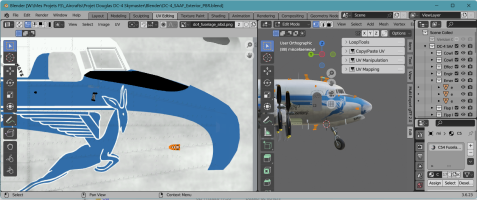
For pilots animations, I had planned some improvments:
- extract all animations and displays conditions from the current XML files and include them in a new specific XML file
- for animations and visibility from an external camera, nothing should be changed.
- It will mainly be the interior camera that will be reviewed.
As soon as the first engine starts or when the CTRL+SHIFT+E sequence is engaged, we will scan the position of the interior camera (existing variable in the SDK):
- If she is on the pilot’s station, then we will display the co-pilot and the radio on their seat.
- If it is on the co-pilot’s seat, the pilot and the radio will be displayed
- If it is located on the flight engineer station (jump seat in the middle), then we will display the pilot and copilot.
When discussing a few months ago with the designer of the Tiger Moth (Ants), Anthony explained to me how he handles the display between his own avatars or those of Asobo.
=> https://www.fsdeveloper.com/forum/threads/north-american-t-28-trojan.458851/page-2#post-940279
He sent me these lines of code that I need to apply to the DC-4.
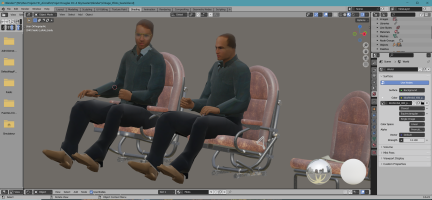
As for the avatars from the Flight Replicas addon, I have already isolated them and they are operational (animations); all I need to do now is review their textures to have:
- that is, two airline pilots
- that is, two pilots in flight uniform for the C-54s (green flight suits)
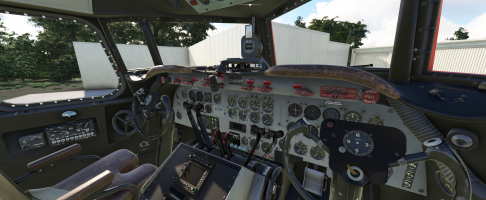
For the Fire Fighter, the new yokes are almost finished (I just need to add the clock needles),
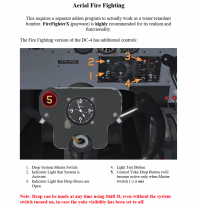
Regarding the management of buttons and hatches to carry out retardant drops, I want to reuse the same functions as those described in the Flight Replicas manual (theses manuals can be download on Flight Replicas homesite):
- a button ( 1 - Drop System Master Switch) on the panel to arm the devices,
- two other buttons ( 5 - Control Yoke Drop Button) on each shelf to trigger this drop operation,
- retardant tanks filling will be done via the MSFS UI by moving the cursor relative to an additional tank.
For pilots animations, I had planned some improvments:
- extract all animations and displays conditions from the current XML files and include them in a new specific XML file
- for animations and visibility from an external camera, nothing should be changed.
- It will mainly be the interior camera that will be reviewed.
As soon as the first engine starts or when the CTRL+SHIFT+E sequence is engaged, we will scan the position of the interior camera (existing variable in the SDK):
- If she is on the pilot’s station, then we will display the co-pilot and the radio on their seat.
- If it is on the co-pilot’s seat, the pilot and the radio will be displayed
- If it is located on the flight engineer station (jump seat in the middle), then we will display the pilot and copilot.
When discussing a few months ago with the designer of the Tiger Moth (Ants), Anthony explained to me how he handles the display between his own avatars or those of Asobo.
=> https://www.fsdeveloper.com/forum/threads/north-american-t-28-trojan.458851/page-2#post-940279
He sent me these lines of code that I need to apply to the DC-4.
As for the avatars from the Flight Replicas addon, I have already isolated them and they are operational (animations); all I need to do now is review their textures to have:
- that is, two airline pilots
- that is, two pilots in flight uniform for the C-54s (green flight suits)
For the Fire Fighter, the new yokes are almost finished (I just need to add the clock needles),
Regarding the management of buttons and hatches to carry out retardant drops, I want to reuse the same functions as those described in the Flight Replicas manual (theses manuals can be download on Flight Replicas homesite):
- a button ( 1 - Drop System Master Switch) on the panel to arm the devices,
- two other buttons ( 5 - Control Yoke Drop Button) on each shelf to trigger this drop operation,
- retardant tanks filling will be done via the MSFS UI by moving the cursor relative to an additional tank.
Last edited: