• Please see the most recent updates in the "Where did the .com name go?" thread. Posts number 16 and 17.

    Post 16 Update

    Post 17 Warning

  • Bandwidth Drive 2026 is over

    Thanks to everyone who donated.

DC-4 Skymaster

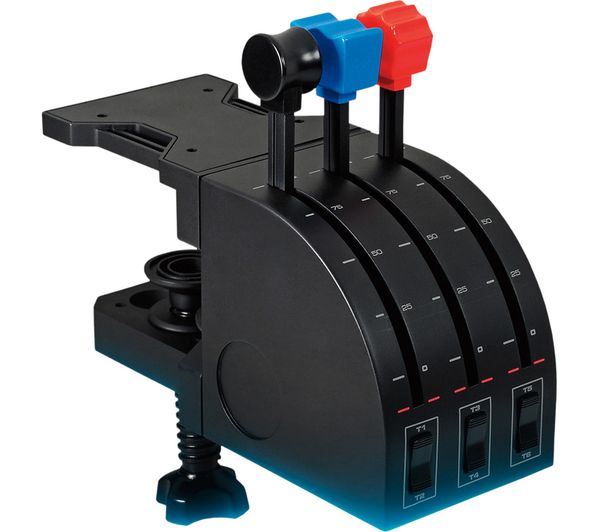
And what about the working turbo levers we added? đŸ¤£ Need. More. Axes!
l_06874878.jpg
 
Hello,

My first development version (v0.030) really usable has been compiled and works under both simulators: 2020 & 2024 :p

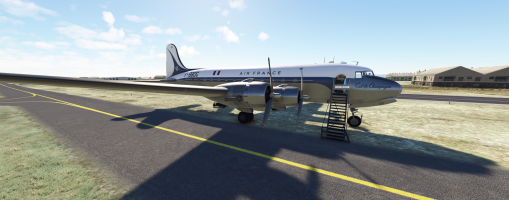
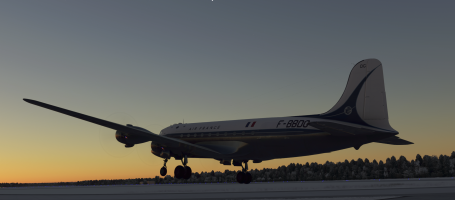
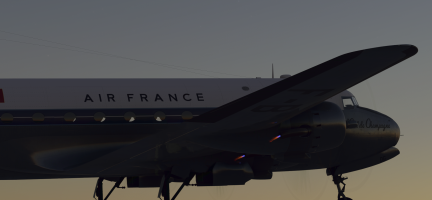
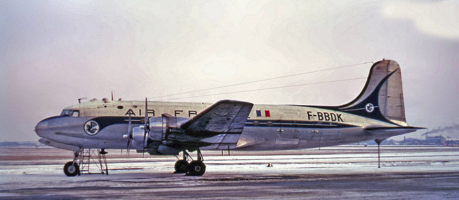
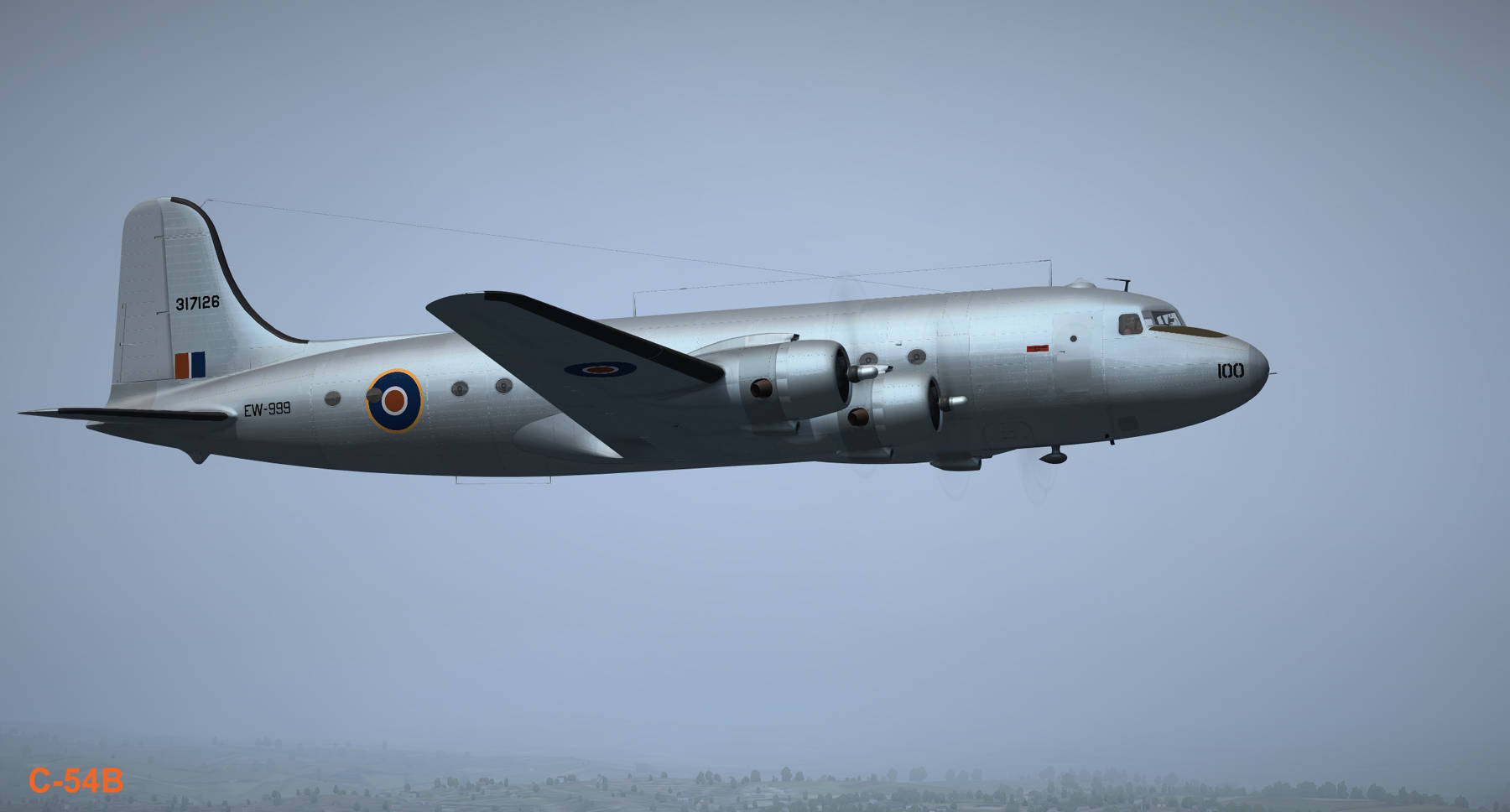
I chose for this first aircraft the DC-4 Air France version that I myself took in 1965 to go from Marseille (LFML) to Ajaccio (LFKJ), this trip has remained etched in my memory because my father who worked at Air France had taken GP tickets (partially free) and the captain had been kind enough to take us into the cockpit: I was able to see the arrival in Ajaccio sitting next to the radio operator.

Currently, I have already:
- a functional exterior model: retracting trains, flaps if engines started, operational flight surfaces, very slow starting propellers (to be improved), front and rear doors whose opening can be controlled with the mouse
- stairs for the crew and passengers moving when opening the front or rear doors without forgetting the chocks (these elements disappear as soon as the second engine starts)
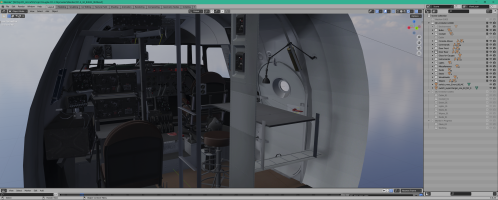
- an interior model with two LOD, a LOD00 for the VC and a LOD01 for the exterior views
- The interior model LOD00 is almost completely finished in terms of fixed elements: the instrument hands and controls are not yet integrated and animated.

The textures used are those of origin in the same resolution and have not yet been worked on: it’s a job for my eminent colleague who is currently training at PBR Painter.

There is still a lot of work but after the first two weeks, which were quite difficult to learn this plane and its cockpit very full of instruments and various objects (it’s my first liner), it’s much better and I am almost as comfortable as in my PBY.

There are plenty of ideas to improve it and make it interesting, or maybe even make it a study plane ...

1770402130643.png

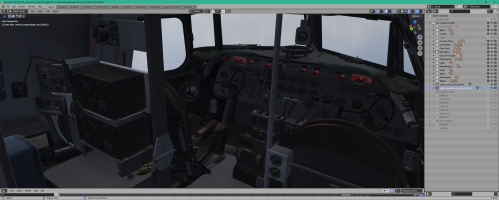
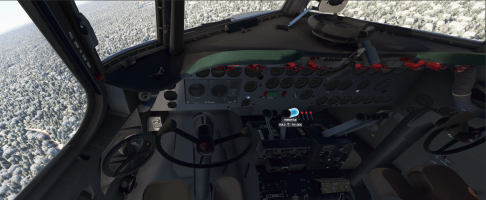
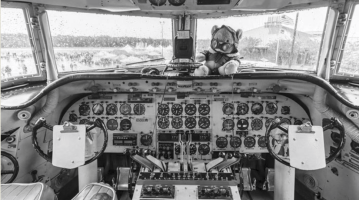
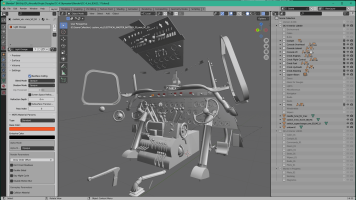
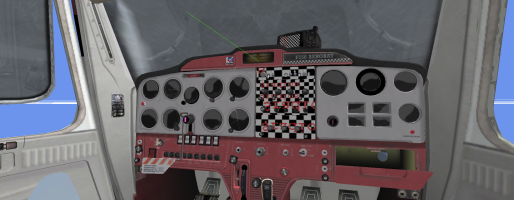
Two screens of the Interior model ...
1770404996454.png


1770405120056.png

Sorry for the second image a bit dark but it’s about the lighting that I have under Blender to work with. In fact, the textures are like that and I think we will probably need to clarify them a bit.
 
Last edited:
Excellent work! really looking forward to this. The DC-4 was one of my first aviation experiences way back when and has always been a favorite.

Mike
 
Work of the day:
- adding the support bar at the back of the plane when it is stopped and its animation,
- work on the yokes and throttle levers with their animations (they are subject to engine vibrations)
- adding smoke and flame effects on the exhausts, these latter effects are adjustable depending on the values of mixture used on each engine independently of each other.

1770572929586.png


1770573154618.png


1770574596695.png
 
Last edited:
Lagaffe, how much different would the exhaust flames on the DC-4 be compared to that of the Connie? We have a flying example of the Connie here in OZ & there are a heap of youtube videos showing the exhaust flames on that bird. They are very prominent, especially in low light even in cruise speeds.
 
Jcweston351,
The flame effect consists of 3 cones, each with its own texture (oil, lean, rich) and several animations.
The set is related to an empty by a function available in a plugin included in Blender that allows creating a "group" (function Parent to Empty) in the same sense as what was feasible under Gmax or 3DS.
The advantage of this "group" is that it allows to move the set in 3D space and apply a scale factor without the effect being deteriorated.
In yesterday’s version, I limited myself to simply copy/paste the effect I had created for the CANSO PBY onto the DC-4 without changing the size of this effect.
Now, if in your opinion the size of the effect is incorrect, which is quite possible, can you give me approximately a value for the scale factor to be applied to this set?
At the moment compared to the second last image, the length of the effect is one third of the exhaust pipe. Should it be doubled or tripled?

Another question for those who know the DC-4 better than I do, the current animation of the throttle is 0% forward and 100% backward. That intrigues me but it may be correct.
Here on this screen, you have a DC-4 used by Air France (1969) which is "On the Ground" and the throttle are "backward" ....
So I wonder if the animations of the commands are not to be reversed to comply with reality (that’s what I had to do on the Stearman which were originally developed for FS2004).

1770634380640.png

1770634092907.png
Are there people who could tell me what is reality?
 
Last edited:
The pic of the cockpit is correct for it sitting on the ground; throttles at zero(ish), props full forward. The levers move in the way you would expect.
 
Hi Lagaffe, Here are a couple of videos of the Connie, the 2nd shows the exhaust flame effect the best...
or
Not sure if it'd be similar on the DC-4, I know you are just testing effects etc. just thought this might help you visually, I know a few people that'd be interested in some great MSFS exhaust effects...
 
Hello,

For the Connie, here is the most accurate image I found but the Connie’s engines (4 x Wright R-3350 Duplex Cyclone - 18 cyl - 2200 cv) are much more powerful than those of the DC-4 (4 x Pratt & Whitney R2000 Twin Wasp - 14 cyl - 1450 cv) so this must be taken into account to define the exact scale of these effects!
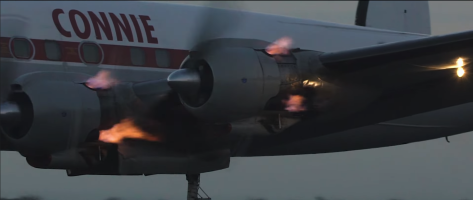
1770715451265.png

Well, with a 1.8 factor on each empty which manage flames effects (screen under MSFS 2024 - Gibraltar at night)
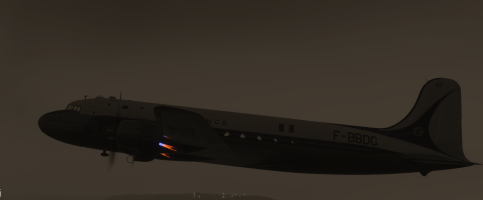
1770735071119.png

========================================================================

Following a remark made on the official FS forum, I would like to return to the subject: improved mode ... that one user used.

When one wants to carry an existing aircraft on FS9 or FSX/P3D with the agreement of its initial creator, a method consists in using MCX (Model Converter X by Arnon Gerretssen) to load the MDL file and export it in glTF/bin which also generates an XML file which is a translation of the modeldef.xml used to create the initial aircraft.
This process works rather well but has a number of disadvantages if we stop the work at this stage:
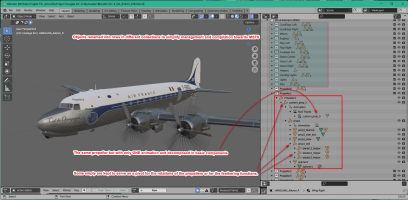
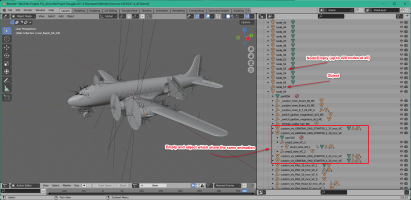
- all the objects are transcribed in a tree structure based on nodes/empty related to each other and which contains the elements/objects of the aircraft and the animations, the names of these nodes, objects and animations are generated automatically and it is very very difficult to recognize an object or an animation just by reading the name assigned to it
- the generated XML file includes these complicated names and is essentially based on <Partinfo> and some very simplified ModelBehavior
- all the animated objects are broken down and if an object contains several elements, each element is assigned the same animation; for example a throttle that consists of a lever, a knob and bolds will be broken down into three elements: the lever then the knob and the bolds and each of them will be assigned the same animation which amounts to duplicating at least this one.

If we take the entire plane, we arrive at a result that works but is not optimal:
- it is very difficult to navigate in this tree structure
- there is a multitude of node/empty that are useless (420 nodes or empties in the initial blender file), some of them have a function of pivot or attachment for an object but most are generated only for the needs of the tree structure and because of the generation process which is recursive,
- this multiplication at the level of animations can be a brake on the rendering engine because it will be required for each animation to perform additional work, which degrades the performance of the aircraft,
- the 3D objects are triangulated and vertex merging is not optimal which produces too complex objects compared to what is strictly necessary from a 3D point of view; indeed the rule commonly applied in 3D is to use as many quadrilateral polygons (4 sides) as possible and to avoid n-gones or triangles if possible.

If I refer to the numerous posts I have read for 20 years, the graphics engines of FS9 and FSX/P3D imposed limits on the number of nodes/empty that the creator used in an airplane because it overloaded the processes.
That’s why in my addons, I try to limit these empty as much as possible except when it is absolutely necessary.
Having 2 or more animations attributed to a complex object is counterproductive you will easily understand, in this case it is preferable to keep the animation on the main element (in my example the throttle lever) and to link to this main element the subaltern elements (knobs and bolts for example). In the end, the graphics engine runs faster and the workload is reduced, which allows for more FPS or adding more animations and details: the render engine compute ONE animations and the others components are attach to the animated one.

Breaking down the different complex objects seems to be a waste of time but it allows for isolating the basic elements from reworking them to eliminate excess vertices and make the object’s topology look like quadrilateral polygons when possible.
The gain in terms of saved vertex sometimes reaches more than 30% and so I prefer to use these 30% to add details or animations rather than unnecessarily overloading the graphics engine.
Some will tell me that the graphics engines of MSFS have evolved (multi-threading, parallelism) and that they allow more polygons and vertices, nevertheless a simple object is rendered faster and more efficiently regardless of the graphics engine that will use it.

On a plane like the DC-4, the cleaning task:
- breaking unnecessary composed objects,
- removing unnecessary empty,
- renaming objects and animations,
- re-associating basic objects into a coherent whole,
- etc ...
takes me between 15 days to count 5 hours of daily work but in the end, I obtain a source file that is very close to the one that the initial author may have created with another software (FSDS for the DC-4 of Mike), which is readable and optimized.

Initially after MCX step :
1770721201800.png

After cleaning operations :
1770720168010.png

As for the XML code automatically generated by MCX, it is in <PartInfo> format for 80%, the rest can be very simplistic ModelBehaviors that are automatically generated. Indeed, this code is usable by MSFS 2020 and 2024 but for how long?
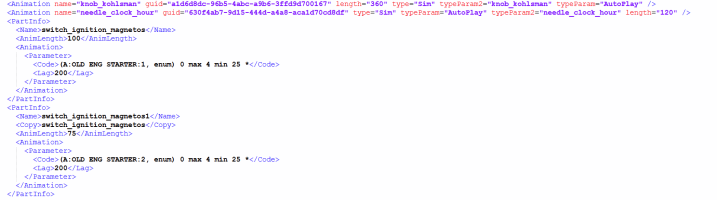
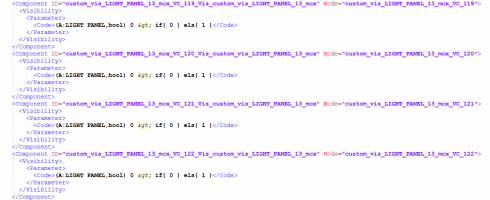
1770720679849.png
1770720585983.png

The MSFS engine is built to comply with an SDK and it gives its maximum if it is allowed to load an aircraft that complies with this SDK and especially the most recent functions and not those that date back 20 years ...
Finally, an aircraft whose 3D is optimal, well broken down into coherent objects and with an XML code based on the latest principles of the SDK allows very easily to be subsequently used under another SDK to be compiled into a native FS24 aircraft !

It is for all this work and all these technical details that I consider that it is not an "improved mod" but a native creation based on a 3D model created by another person, whose consistent work I commend he has done with FSDS. (software that I have never been able to master by the way ;) )
 

Attachments

  • 1770719566910.png
    1770719566910.png
    802.8 KB · Views: 5
Last edited:
Hello,

An other day ... an other problem!

Yesterday, I faced another problem that I did not know about single-engine or twin-engine engines: the proximity of the controls can cause difficulties in selecting one or the other control when they are too close.
When we look at the central console, we realize that the levers are very close to each other. On the other hand, all orders are managed as follows:
- an empty to define the axis of rotation and that carries the animation,
- a first object constituted by the lever which is parented to the empty,
- a second object constituted by the knob which is parented to the first object.

1770889112069.png

This way of doing things allows one material A to be assigned to the lever and another different to the knob (DC4 Panels & DC4 Metal).

In ModelBehavior, we often define an object/node that will graphically represent the selection, it is the <NODE_ID>. This object will turn blue (if you have activated the function) when moving the mouse over the object.
In our case, we can define the knob as being the <NODE_ID> or the lever. In the case of the lever, the advantage is that not only does the lever turn blue but also the knob which is interesting because the area selected is bigger.

Except that in doing so, we isolate well each time the complete command that we want to activate, but given the proximity of the different commands, it is very difficult to then deselect the first one to select the other: switching from the mixture1 command to mixture2 for example, unless we move the angle of view in the cockpit which quickly becomes tiring :( .

On the other hand, I noticed that if only the knob was set to <NODE_ID>, it worked much better with less discomfort for selections, with in turn a slightly more difficult selection because the mouse click area is more restricted (see last screenshot in post #44)

Taking into account the advantages and disadvantages, I decided to opt for the second solution.
 
Hello,

Some news of the DC-4 Skymaster native:
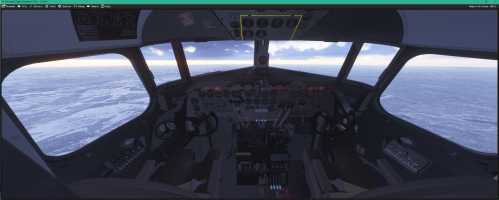
- tested under MSFS 2024 (you can see the cockpit screen below)
- 90% of flight controls are operational: animation + XML code so they can be animated via the mouse or connected devices,
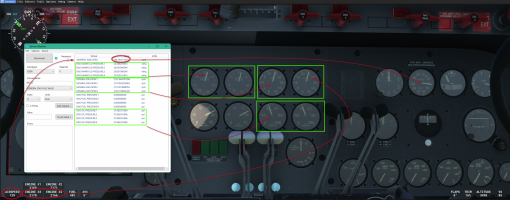
- 95% of the needles and gauges on the main VC were processed, that is to say the isolated objects/empty, taken out of the tree structure created by MCX and dispatched to appropriate collections, significant names were given so that they could be used by my ModelBehavior bank
- 100% of the overhead has been processed: all switches, rotators, and needles are present, they still need to associate the names with ModelBehavior.

The commands that work or are animated:
- the pilot’s throttles (those of the co-pilot are linked to that of the pilot)
- the pedals and the brakes
- the trims (rudder, pitch, ailerons) it will remain to animate the exterior surfaces that had not been done by Mike
- the mixing levers (I am thinking of modifying the ModelBehavior to have 4 pre-determined positions and simplify their use)
- the levers of the cowl flaps or cowl gill
- the lever of the flaps (same reflection as for the mixtures)
- the levers to manage the angle of the propellers
- the parking brake (the lag is too high currently)
- the lever to raise the landing gear
I wanted to add an OK on the image for all these elements and then I was afraid to overload the screen.
I have yet to do the 4 fuel valves and the cross-feed levers, without forgetting the controller of the auto-pilot which seems to be an indispensable for some of you ;)
Ah, I almost forgot: the Asobo pilots are automatically visible in exterior view: 2 empty to add PILOT_0 and PILOT_1 and some parameters added in the aircraft.cfg.

On a project of this nature there is 50% work to convert the plane, pass it in MCX and then "clean" the Blender files to have a usable file quickly and efficiently, the remaining 50% are dedicated to improve the plane, the textures, the available functions. Let me tell you, the first 50% are the most daunting to perform, it’s repetitive work, not very complicated to perform but to do very meticulously under penalty of having to go back to an archived version in case of false manipulation and wasting time.
At the moment I must have completed 80% of this first step.

Whenever possible, the objects have been cleaned of superfluous vertexes and polygons to gain fluidity or at least allow more room for maneuver for later functions or details: the gain is estimated between 20 and 30% at present.

Regarding the tablet, due to some technical issues, I would not use my old tablet. On the other hand, I plan to create another one (HTML/JS) based on a github development of SAL1800. This is a talented developer to whom we owe a C170 and a C206T of great beauty and who also offers some open-source developments.
This model will not suffer from the disadvantages of the previous one and if it works according to my assumptions, that of the CANSO will be replaced by this one and I could also solve the parasitic reflections inside the cockpit of the PBRs.

1771244093731.png

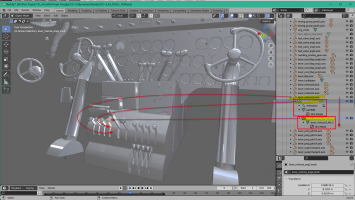
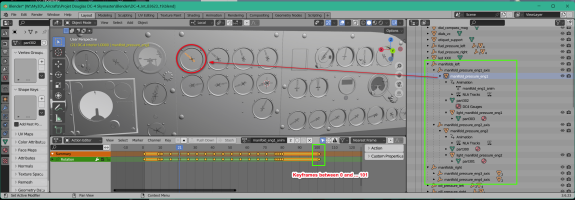
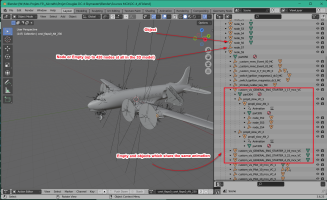
On the right side you have the "Outliner" in which the various collections (groups) are managed. Theses groups are very useful to dispatch the objects in order to have the minimum displayed and to works more easily but also to create the LODs contents before exporting to MSFS.
Here I have two main collections : DC-4 Interior LOD00 and DC-4 Interior LOD01, each one is populated with secondary collections.

The last export plugin v1.3.3 offers in an advanced interface the various collections that you just need to select in order to create a LOD and these choices are memorized afterwards.
1771246254628.png
 
Last edited:
I third that, and to the others working with Didier on this project. This is going to be a wonderful addition to the Propliner fleet.

Thank you one and all.
 
For the GPS, I think that I have see a 295 in one variation on P3D version and I know a little this peripherical.

1771257718784.png
I use it yet in my C150 TiBush: one of my addon made in 2013 which was a portover on FSX of the Cessna 152/FS2004 from Fravin.
If I remember well, I had the 3D model of the outer frame and the few buttons were animated, all under Gmax. I need to transform that in a Blender file.
 
Back
Top