
-
Please see the most recent updates in the "Where did the .com name go?" thread. Posts number 16 and 17.
-
IMPORTANT DOWNLOADING INFORMATION - ALL MEMBERS PLEASE READ
Please see this thread for updates. Update Thread
SOH ADMINISTRATION
You are using an out of date browser. It may not display this or other websites correctly.
You should upgrade or use an alternative browser.
You should upgrade or use an alternative browser.
DC-4 Skymaster
- Thread starter lagaffe
- Start date


lagaffe
SOH-CM-2026
Just a few words to complete a question that I had asked myself a few posts above: the unit of speed displayed in the "MSFS Hud" interface: this debugging interface that can be selected by over-printing on the screen.
After checking with SimVars in which I asked for the display of the airspeed in several units, it turns out that this interface displays the airspeed in KNOTS which, if we have instruments with other units, can be a bit surprising.
This display surprised me because while developing the Aéronca, the person who had asked me several times claimed that I was mistaken since the values between this display and the instrument were different... and for good reason, the gauge display was also in MPH.
Fortunately the engines are always expressed in RPM
After checking with SimVars in which I asked for the display of the airspeed in several units, it turns out that this interface displays the airspeed in KNOTS which, if we have instruments with other units, can be a bit surprising.
This display surprised me because while developing the Aéronca, the person who had asked me several times claimed that I was mistaken since the values between this display and the instrument were different... and for good reason, the gauge display was also in MPH.
Fortunately the engines are always expressed in RPM


Hollister56
Members +
I think Lagaffe had to take a couple of weeks off due to his wife having knee surgery. Hopefully she has a speedy recovery and Lagaffe can get back to working his magic with Blender and the other programs he uses.
But in the mean time I found this cool video on the development of the DC-4.
And maybe Javis can take note of that beautiful livery.
Ed
But in the mean time I found this cool video on the development of the DC-4.
And maybe Javis can take note of that beautiful livery.
Ed
lagaffe
SOH-CM-2026
Thanks for your posts: yes, all went well and she is at home; now it’s the recovery stage with the physiotherapist that has started for a few days.
For the DC-4, I left a bit of the VC which causes me problems to be interested in the engine starting environment.
These large radial engines like the Stearman’s Pratt & Withney or those of the PBY need a "pull-throught step" before starting the engine. I had started to add and test a specific code on the PBY in 2023 but which is not activated in the last release. I had copy and past theses codes from the PBY to the DC-4 ant test it currently.
In fact, the propeller is related to an pivot axis that performs the normal animation: prop0 and the whole thing is still related to another a dummy axis: custom_prop_0.
The principle to give the illusion of a pull-through is to animate this dummy axis with a few lines of code in order to control the rotation speed, and since the propellers are associated with this dummy, they are driven at low speed.
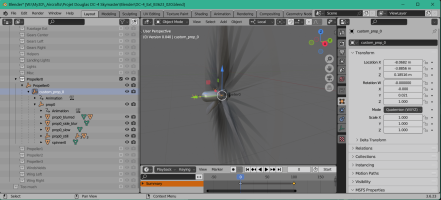
Then, we switch to the start phase and when the engine has started, we can stop the dummy animation, It’s like a centrifugal clutch.
Here is what I want to get:
Currently, the whole thing works perfectly on one engine but I have some difficulties running the second engine. This comes from a calculation loop that blocks.
Of course, in simulan this realistic start-up it increases the start-up time in the simulation so I plan to add a variable that will allow for either a realistic start-up or a quick start-up for busy people.
For the VC, I realized that after the transformation via MCX of the original P3D MDL binary, the blender file contains a lot of elements (mainly pivot or animation dummys for rotations) that have scale issues, which has big implications on the animations.
It is sometimes possible to correct these scale issues but in some cases, it is almost impossible so the best thing is to start the animation again by saving the object as an OBJ (Wavefront object) then resubmitting it and doing the complete animation again: this takes a lot of time.
It’s mainly the levers and needles of the VC that have these troubles.
Here you can see the mixture lever on keyframe 1: the lever knob is orthogonal to the direction of the lever.
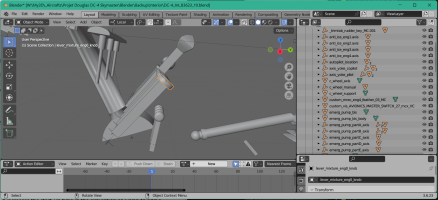
The same object at keyframe 50: the lever knob is deformed due to the pivot dummy scale being incorrect, it should be at (X:1.0; Y:1.0; Z:1.0).
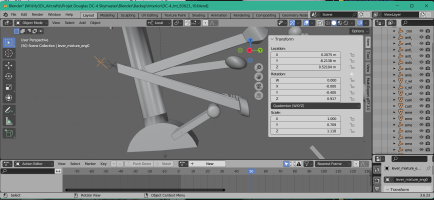
For the DC-4, I left a bit of the VC which causes me problems to be interested in the engine starting environment.
These large radial engines like the Stearman’s Pratt & Withney or those of the PBY need a "pull-throught step" before starting the engine. I had started to add and test a specific code on the PBY in 2023 but which is not activated in the last release. I had copy and past theses codes from the PBY to the DC-4 ant test it currently.
In fact, the propeller is related to an pivot axis that performs the normal animation: prop0 and the whole thing is still related to another a dummy axis: custom_prop_0.
The principle to give the illusion of a pull-through is to animate this dummy axis with a few lines of code in order to control the rotation speed, and since the propellers are associated with this dummy, they are driven at low speed.
Then, we switch to the start phase and when the engine has started, we can stop the dummy animation, It’s like a centrifugal clutch.
Here is what I want to get:
Currently, the whole thing works perfectly on one engine but I have some difficulties running the second engine. This comes from a calculation loop that blocks.
Of course, in simulan this realistic start-up it increases the start-up time in the simulation so I plan to add a variable that will allow for either a realistic start-up or a quick start-up for busy people.
For the VC, I realized that after the transformation via MCX of the original P3D MDL binary, the blender file contains a lot of elements (mainly pivot or animation dummys for rotations) that have scale issues, which has big implications on the animations.
It is sometimes possible to correct these scale issues but in some cases, it is almost impossible so the best thing is to start the animation again by saving the object as an OBJ (Wavefront object) then resubmitting it and doing the complete animation again: this takes a lot of time.
It’s mainly the levers and needles of the VC that have these troubles.
Here you can see the mixture lever on keyframe 1: the lever knob is orthogonal to the direction of the lever.
The same object at keyframe 50: the lever knob is deformed due to the pivot dummy scale being incorrect, it should be at (X:1.0; Y:1.0; Z:1.0).
Last edited:
lagaffe
SOH-CM-2026
Last night I finally resolved the error that had been disturbing my tests for more than 10 days.
PS a poorly worded comment: in fact it is advisable to move the usual comments <!-... --> out of a ModelBehaviors section or to use other symbols such as (* ... *)
I started to review the coding of my old CTRL+E procedure to get the result displayed on my previous video (C-54 Start up and Take Off ...).
My first tests this morning focused on the sole start of the 3rd engine (the others will be a copy/paste of the instructions used by changing only the engine number) and the results were very encouraging because similar to the video. On the other hand, it will always be possible to start the engines one by one and in another order (3, 4, 2, & 1) if the user so desires.
In order not to go back over these codes, I will also transfer the fuel management to the new system [FUELSYSTEM] so that I no longer have to modify this part of the code.
On this part, I would like to be able to reuse what I had already implemented on the Stearman, that is to say "4 very special additional fuel tanks" that will actually serve to store engine oil. Thus it will be possible by code to simulate the oil consumption and to have a lightening of the aircraft as the flight progresses
PS a poorly worded comment: in fact it is advisable to move the usual comments <!-... --> out of a ModelBehaviors section or to use other symbols such as (* ... *)
I started to review the coding of my old CTRL+E procedure to get the result displayed on my previous video (C-54 Start up and Take Off ...).
My first tests this morning focused on the sole start of the 3rd engine (the others will be a copy/paste of the instructions used by changing only the engine number) and the results were very encouraging because similar to the video. On the other hand, it will always be possible to start the engines one by one and in another order (3, 4, 2, & 1) if the user so desires.
In order not to go back over these codes, I will also transfer the fuel management to the new system [FUELSYSTEM] so that I no longer have to modify this part of the code.
On this part, I would like to be able to reuse what I had already implemented on the Stearman, that is to say "4 very special additional fuel tanks" that will actually serve to store engine oil. Thus it will be possible by code to simulate the oil consumption and to have a lightening of the aircraft as the flight progresses
Hollister56
Members +
That is great news Didier and hope your progress continues without too much trouble. Thank you for the update.Last night I finally resolved the error that had been disturbing my tests for more than 10 days.
lagaffe
SOH-CM-2026
Hello,
Some news of the project ALPHA v0.4.0:
PS: Sorry for the "cramped video" (I tried to prioritize the size of it ) but I think I will improve for the next one
Mains features coded currently:
- The start-up for this DC-4 Skymaster presentation on CYMX (Mirabel - QUEBEC) is maded via CTRL+E,
- You need 7~10 s to start one engine (pull-through included) in realist mode,
- The exhaust flames have been modified to be displayed during the day and night,
- Currently, only the main controls in the VC have been animated and coded : yoke (show/hide), pedals, trims, doors, etc., some gauges work nevertheless: manifold, rpms, airspeed, flaps.
Some news of the project ALPHA v0.4.0:
PS: Sorry for the "cramped video" (I tried to prioritize the size of it ) but I think I will improve for the next one
Mains features coded currently:
- The start-up for this DC-4 Skymaster presentation on CYMX (Mirabel - QUEBEC) is maded via CTRL+E,
- You need 7~10 s to start one engine (pull-through included) in realist mode,
- The exhaust flames have been modified to be displayed during the day and night,
- Currently, only the main controls in the VC have been animated and coded : yoke (show/hide), pedals, trims, doors, etc., some gauges work nevertheless: manifold, rpms, airspeed, flaps.
Last edited:
lagaffe
SOH-CM-2026
Hello,
I finally managed to add an effect that I have "coveted" for quite some time: "vortex tips" at the end of propeller blades in poor conditions, that is to say low temperatures (less than 5°Celsius) and humid atmospheres (rain or ice).
Here is what this effect appears in reality :
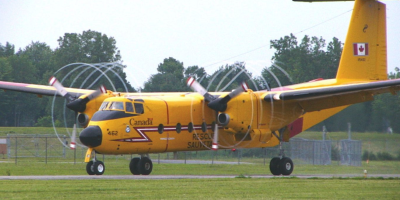
It’s an effect that I had seen implemented on the MetroLiner III from Razbam for FSX and I wanted to introduce it in the simulation of my addons as complements of frost on the wings and the windshield: there it is done, now
The result is quite satisfactory regarding this afternoon’s test :
- A:STANDARD ATM TEMPERATURE -11°C
- A:SURFACE CONDITION: 1 (rain)
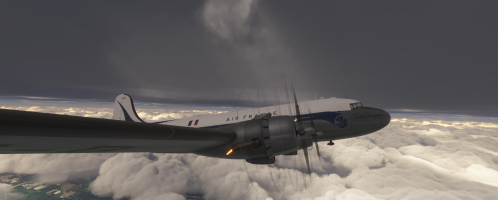
I finally managed to add an effect that I have "coveted" for quite some time: "vortex tips" at the end of propeller blades in poor conditions, that is to say low temperatures (less than 5°Celsius) and humid atmospheres (rain or ice).
Here is what this effect appears in reality :
It’s an effect that I had seen implemented on the MetroLiner III from Razbam for FSX and I wanted to introduce it in the simulation of my addons as complements of frost on the wings and the windshield: there it is done, now
The result is quite satisfactory regarding this afternoon’s test :
- A:STANDARD ATM TEMPERATURE -11°C
- A:SURFACE CONDITION: 1 (rain)
lagaffe
SOH-CM-2026
To address some concerns about effects that might be too present such as flames or vortices, I would say that I am simply trying to make my addons as realistic as possible.
For the flames, I think that the video proposed by jcwinston351 on page 3 is quite realistic and shows well this effect using a plane with slightly more powerful engines but in the same category (radial pistion engines of high power with two stages of compression)
Regarding the flame effects, they require more than 150 lines of XML code and their display is subject to several tests:
- level of throttle,
- percentage of mixture (in order to change the main color of the combustion: red, blue or yellow),
- moment during the startup step (15 s during the starter impulse)
so for my tests (we are still in an Alpha version) I am used to using configuration parameters that are very non-binding so as to focus on the graphic quality of the effect and the exact moment of its appearance. This saves me a lot of time during my tests.
Then in a next step, I could review these parameters to make them more restrictive and thus limit the frequency/duration of appearance of these effects.
I am also thinking of incorporating advanced engine management to possibly cause engines breakdowns or fires, but this function will be conditioned on a variable that the user can or cannot select.
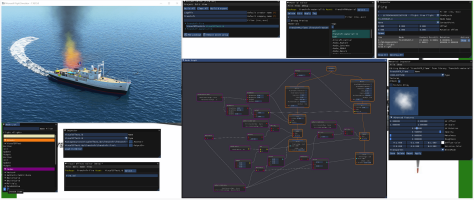
The creation of effects under MSFS is greatly facilitated by the VFX Editor but it is a rather difficult tool to master. In 2020 I started working with to add effects on my boats, that’s what it gave (these effects and some boats were transmitted to Henrirk for the well-known GAIST product).
Here on MSFS 2020 v1.18.15.0 my fire and wake effects for the Calypso.
In the largest window you can see the pattern of creation of particles, their temporal management and the modifications (degradations, clarifications, etc.) made over time
WANTED !
I am looking for images or photos regarding the opening and closing of baggage holds, currently I don't find many of them.
- after unlocking do they swing down or up with a hydraulic cylinder?
- after unlocking, do they move forward slightly and then slide towards the back or front of the plane?
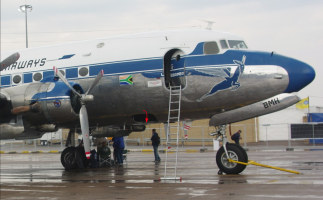
The only image of a DC-4 (ZS-BMH "LEBOMBO" Delivered to South-Africa the 9th August 1947 This was the last DC-4 Skymaster off the Douglas factory production line) that I have found seem that the luggage door pivots towards the inside (here it is open).
The axis of the pivoting being on the upper part of the opening in the fuselage. We see a hydraulic cylinder/metal rod on the left upper part to keep this door open.
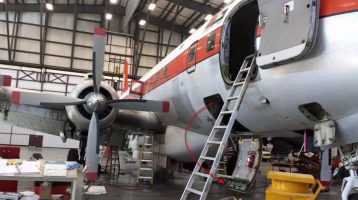
Here is a DC-6 (four blades) where the luggage door is different :
PS: During my youth, I worked during studies as a baggage handler on LFPO - ORLY and I even unloaded the front hold of the Concorde (4 m stairs to access it) but in 1978 there were no longer operational DC-4s in France
If someone has theses informations, I could modelized theses parts. Thanks.
For the flames, I think that the video proposed by jcwinston351 on page 3 is quite realistic and shows well this effect using a plane with slightly more powerful engines but in the same category (radial pistion engines of high power with two stages of compression)
Regarding the flame effects, they require more than 150 lines of XML code and their display is subject to several tests:
- level of throttle,
- percentage of mixture (in order to change the main color of the combustion: red, blue or yellow),
- moment during the startup step (15 s during the starter impulse)
so for my tests (we are still in an Alpha version) I am used to using configuration parameters that are very non-binding so as to focus on the graphic quality of the effect and the exact moment of its appearance. This saves me a lot of time during my tests.
Then in a next step, I could review these parameters to make them more restrictive and thus limit the frequency/duration of appearance of these effects.
I am also thinking of incorporating advanced engine management to possibly cause engines breakdowns or fires, but this function will be conditioned on a variable that the user can or cannot select.
The creation of effects under MSFS is greatly facilitated by the VFX Editor but it is a rather difficult tool to master. In 2020 I started working with to add effects on my boats, that’s what it gave (these effects and some boats were transmitted to Henrirk for the well-known GAIST product).
Here on MSFS 2020 v1.18.15.0 my fire and wake effects for the Calypso.
In the largest window you can see the pattern of creation of particles, their temporal management and the modifications (degradations, clarifications, etc.) made over time
WANTED !
I am looking for images or photos regarding the opening and closing of baggage holds, currently I don't find many of them.
- after unlocking do they swing down or up with a hydraulic cylinder?
- after unlocking, do they move forward slightly and then slide towards the back or front of the plane?
The only image of a DC-4 (ZS-BMH "LEBOMBO" Delivered to South-Africa the 9th August 1947 This was the last DC-4 Skymaster off the Douglas factory production line) that I have found seem that the luggage door pivots towards the inside (here it is open).
The axis of the pivoting being on the upper part of the opening in the fuselage. We see a hydraulic cylinder/metal rod on the left upper part to keep this door open.
Here is a DC-6 (four blades) where the luggage door is different :
PS: During my youth, I worked during studies as a baggage handler on LFPO - ORLY and I even unloaded the front hold of the Concorde (4 m stairs to access it) but in 1978 there were no longer operational DC-4s in France
If someone has theses informations, I could modelized theses parts. Thanks.
Last edited:

Hollister56
Members +
Hollister56
Members +
Here is a nice video of the C-54 taking off and doing fly-bys.
I was looking at the exhaust.
lagaffe
SOH-CM-2026
Ed, thank you for this manual that I had not managed to find.
At the beginning of the project, I had recovered the one from the DC-4 but it doesn’t address the aspect of the bunkers: it’s a shame.
I will see if by finding the repair manuals for the DC-4 or the C-54 I have a better chance of obtaining diagrams of the luggage compartments... otherwise I would do according to my intuition.
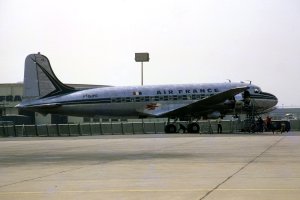
According to the image of Meridien (thanks for this picture) and the one I found, it seems that on the DC-4 the door after unlocking retracts slightly towards the inside and then slides onto rails to facilitate its use.
At the beginning of the project, I had recovered the one from the DC-4 but it doesn’t address the aspect of the bunkers: it’s a shame.
I will see if by finding the repair manuals for the DC-4 or the C-54 I have a better chance of obtaining diagrams of the luggage compartments... otherwise I would do according to my intuition.
According to the image of Meridien (thanks for this picture) and the one I found, it seems that on the DC-4 the door after unlocking retracts slightly towards the inside and then slides onto rails to facilitate its use.
Hollister56
Members +
Hollister56
Members +
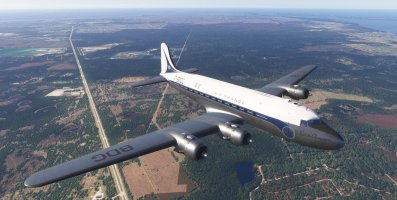
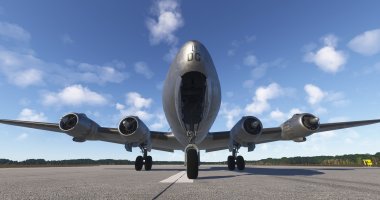
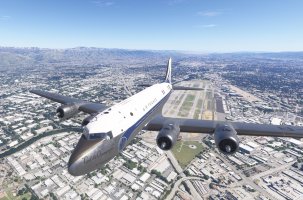
I have spent a few hours flying the DC-4 and trying to get a feel for this really significant airplane. It played a significant roll in the history of both military and civilian aviation.
Certainly, a big thank you to Didier and anyone else assisting him on this project.
Certainly, a big thank you to Didier and anyone else assisting him on this project.